9
Function Overview
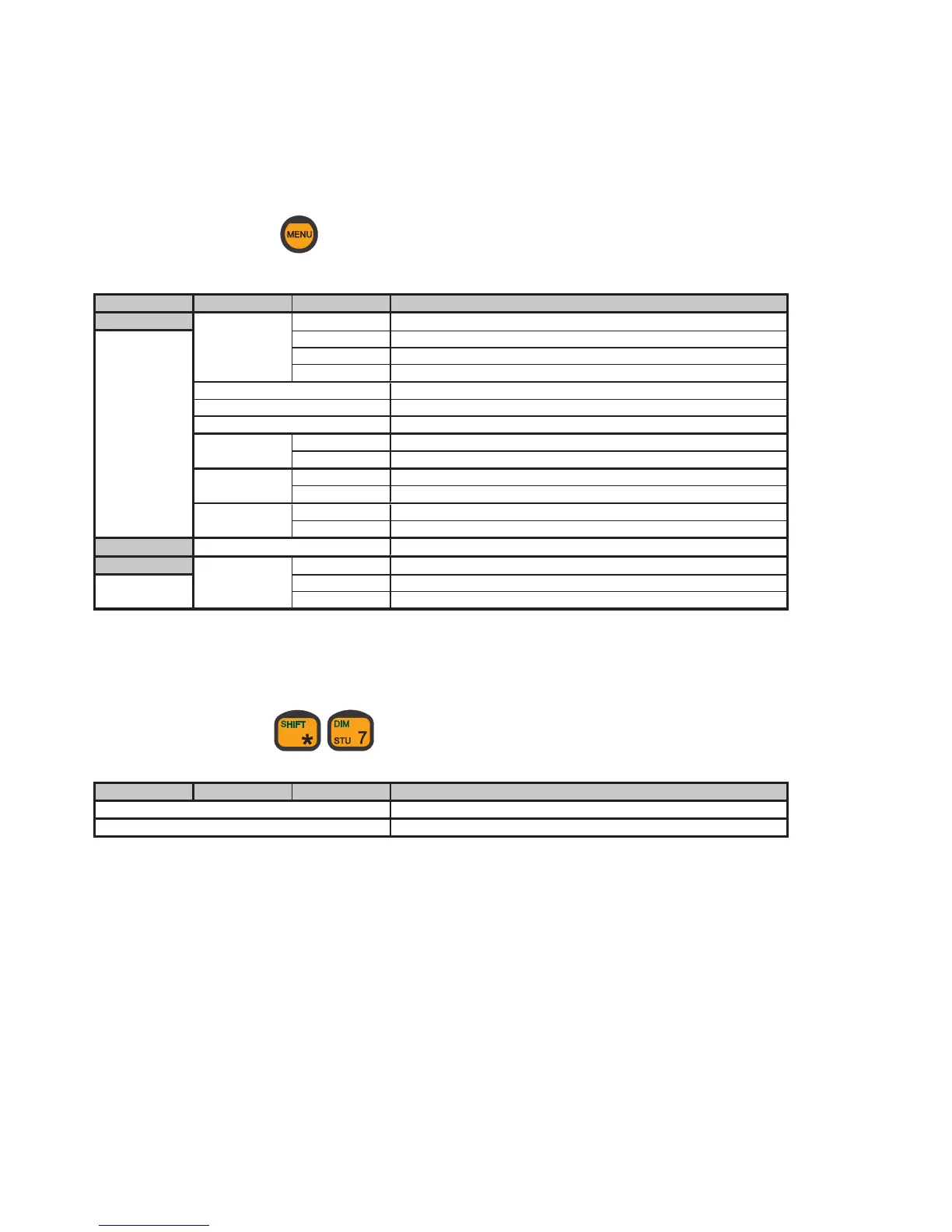
To access this menu, press:
Menu 1st submenu 2nd submenu Action
Setup Ringing tone Deep Sets ringing tone to deep
High Sets ringing tone to high
Slow alt. Sets ringing tone to slow alternating
Fast alt. Sets ringing tone to fast alternating
Ring vol. Sets ringing volume
Speaker vol. Sets speaker volume
Key beep Sets key beep volume
Language English Sets language to English
Danish Sets language to Danish
Extension Number Selects the extension number of the current CU
Name Selects the extension name of the current CU
Display Time/date Displays time and date when the CU is idle
Status only Displays only the terminal states when the CU is idle
Call log Views the log of all outgoing calls
System SW versions Transceiver Displays the RTU’s software version number
LBT Displays the LBT’s software version number
Ctrl. unit Displays the control unit’s software version number
Dimmer Menu
To access this menu, press:
Menu 1st submenu 2nd submenu Action
Dimmer Adjusts the level of display back light
Contrast Adjusts the display’s contrast


 To Next Page