Check the Rotational Timing
of the Shuttle Gib Hook
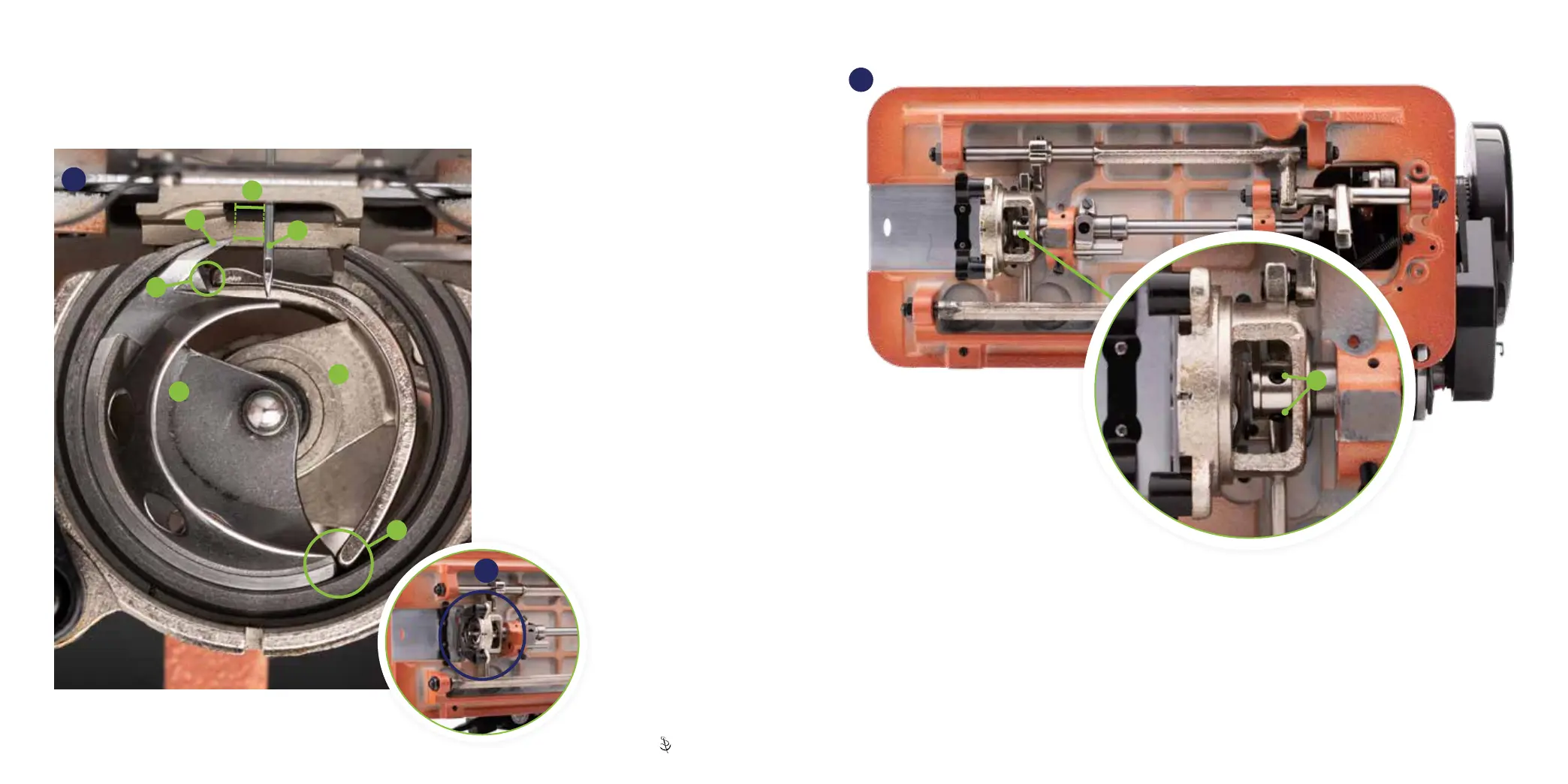
The shuttle gib hook (B) is driven by the
shuttle driver (C)� To change the rotation of
the hook, the driver must be repositioned�
1� Turn the balance wheel so the gib
hook point (D) is at its farthest position
counterclockwise as shown (67)�
2� Use your nger to push the gib hook
counterclockwise to remove any gap at E�
3� Measure the distance between the gib
hook point (D) and the needle (F)� The
driver is correctly positioned when the
point is between 1/8 inch and 3/16 inch
left of the needle (G)�
If spaced properly, the driver is set
correctly� If not, continue to adjust the
driver (p� 48)�
Hook/Driver Gap
Oscillating hook sewing machines have loose tolerances between the shuttle gib hook and the shuttle driver� This play
between the parts is intentional and allows the Ultrafeed to sew a wide variety of thread sizes� The typical play between
parts is 0�04 inch (A)�
67
C
B
G
D
A
F
E
68
Adjust the Driver
The driver (C) is secured to the lower shaft with two set screws (H)� Loosen the screws and gently twist the shuttle driver
to match (G). If the t to the shaft is tight, carefully use a screwdriver as leverage. Do not allow the driver to move to
the left, which would be evident by the driver not being fully seated in the shuttle race guide shaft� Be sure the driver is
pushed all the way to the right� Once proper position is found, retighten the two set screws (H)�
After adjusting the driver, check the left-right positioning of the shuttle gib hook (p� 49)�
67
H
47 | Sailrite�com Ultrafeed
®
LS Guidebook | 48


 To Next Page