EasyManua.ls Logo

Saitek ZMF II - User Manual

Saitek ZMF II
2 pages
Print Icon
To Next Page IconTo Next Page
Loading...
V. Krishnamurthy Page 1 of 2 2023-06-15
ZMF II / ZMF Pro
1. Start/Stop. ON/OFF slider is at the top of the clock
2. Enter edit mode. Hold center button down for 5 seconds till
display flashes
3. Set time
a. Press the right button till you see INC 00 (increment).
Both will blink
b. Press center button to SELECT and make just 00 blink
c. Press right button to set INC to 5. Then press select to
fix.
d. Press left button till you get to HH:MM HH:MM.
e. Press center button to edit
f. Change each value by using the right/left button to
increase/decrease to 1:30 (or alternate time control)
and press select to fix and move forward
g. Press select when all times are set
4. Exit edit mode: Edit mode will be automatically exited when
the time is set.
5. Play by pressing one of the player buttons
In edit mode
a) The digit to be modified will blink on the display.
b) The Right play button will increase the blinking value.
The Left play button will decrease the blinking value.
c) Use the center button to set and advance
d) Press the check to move to the next setting
Question and Answer IconNeed help?

Do you have a question about the Saitek ZMF II and is the answer not in the manual?

Summary

Chess Clock Operation

Enter and Navigate Edit Mode

Hold the center button for 5 seconds to enter edit mode, then use buttons to modify and advance settings.

Set Time and Time Controls

Set the clock time (HH:MM) and time controls, such as increments, using the provided buttons.

Start and Exit Modes

Start play by pressing a player button; edit mode exits automatically when time is set.

Future Use and Additional Time

Automatic Settings and Starting

Settings are saved automatically; press the center button to start the game.

Additional Time Feature

Placeholder for future functionality related to additional time.

Overview

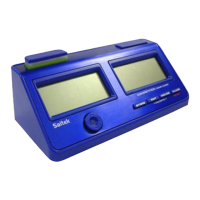
The ZMF II / ZMF Pro is a digital chess clock designed for setting and managing game times. It features two distinct digital displays, each showing "05:00" in the provided image, indicating a five-minute time setting. The clock has a sleek, modern design with a dark casing and light-colored buttons.

Function Description:

The primary function of the ZMF II / ZMF Pro is to track time for two players in a chess or other two-player game. It includes an ON/OFF slider, located at the top of the clock, to power the device. The clock offers an "edit mode" for setting various time controls and increments, allowing for flexible game configurations. Once settings are established, players can initiate and manage the game using the player buttons.

Usage Features:

Powering On/Off:

  • The clock is turned on or off using the ON/OFF slider located at the top.

Entering Edit Mode:

  • To enter edit mode, the user must hold the center button down for 5 seconds until the display flashes. This indicates that the clock is ready for time adjustments.
  • Digit Modification: When in edit mode, the digit currently being modified will blink on the display.
  • Value Adjustment: The Right play button is used to increase the blinking value, while the Left play button decreases it.
  • Setting and Advancing: The center button is used to set the current value and advance to the next digit or setting.
  • Moving to Next Setting: The "check" button (likely the center button pressed briefly after setting a value) is used to move to the next setting option.

Setting Time:

  • Setting Increment (INC):
    • Press the right button until "INC 00" appears and both digits blink.
    • Press the center button to SELECT, making only "00" blink.
    • Press the right button to set the increment (e.g., to 5).
    • Press the center button (select) to fix this setting.
  • Setting Hours and Minutes (HH:MM HH:MM):
    • Press the left button until "HH:MM HH:MM" is displayed.
    • Press the center button to enter edit mode for the time.
    • Use the right/left buttons to increase/decrease each value (e.g., to 1:30 or an alternate time control).
    • Press the center button (select) after adjusting each value to fix it and move to the next.
    • Once all times are set, press the center button (select) to confirm.

Exiting Edit Mode:

  • The clock automatically exits edit mode once all time settings are completed and confirmed.

Starting Play:

  • To begin a game, press one of the player buttons.

Future Use (Planned Features):

  • Automatic Saving: Settings are automatically saved unless changed, eliminating the need for manual saving.
  • Quick Start: Users can simply press the center button to start a game with previously saved settings.
  • Additional Time: This feature is currently "To Be Determined" (TBD), suggesting potential future updates for adding time during a game.

Important Technical Specifications (Inferred):

  • Display Type: Digital, likely LED or LCD, capable of displaying time in HH:MM format.
  • Input: Multiple buttons (Left play, Right play, Center, ON/OFF slider) for control and navigation.
  • Power Source: Not explicitly stated, but typically chess clocks are battery-powered.
  • Time Control Range: Capable of setting various time controls, including increments and main game times (e.g., 1:30).

Maintenance Features:

  • The manual does not explicitly detail maintenance features such as cleaning instructions or battery replacement. However, the "Future Use" section implies a user-friendly experience with automatic saving of settings, reducing the need for frequent re-configuration.

In summary, the ZMF II / ZMF Pro is a robust digital chess clock designed for ease of use and flexibility in setting game times. Its intuitive button layout and clear display make it suitable for both casual and competitive play.

Saitek ZMF II Specifications

General IconGeneral
BrandSaitek
ModelZMF II
CategoryClock
LanguageEnglish

Related product manuals