V2.1 3 4 © Sanjing, 2024-2025. All rights reserved.
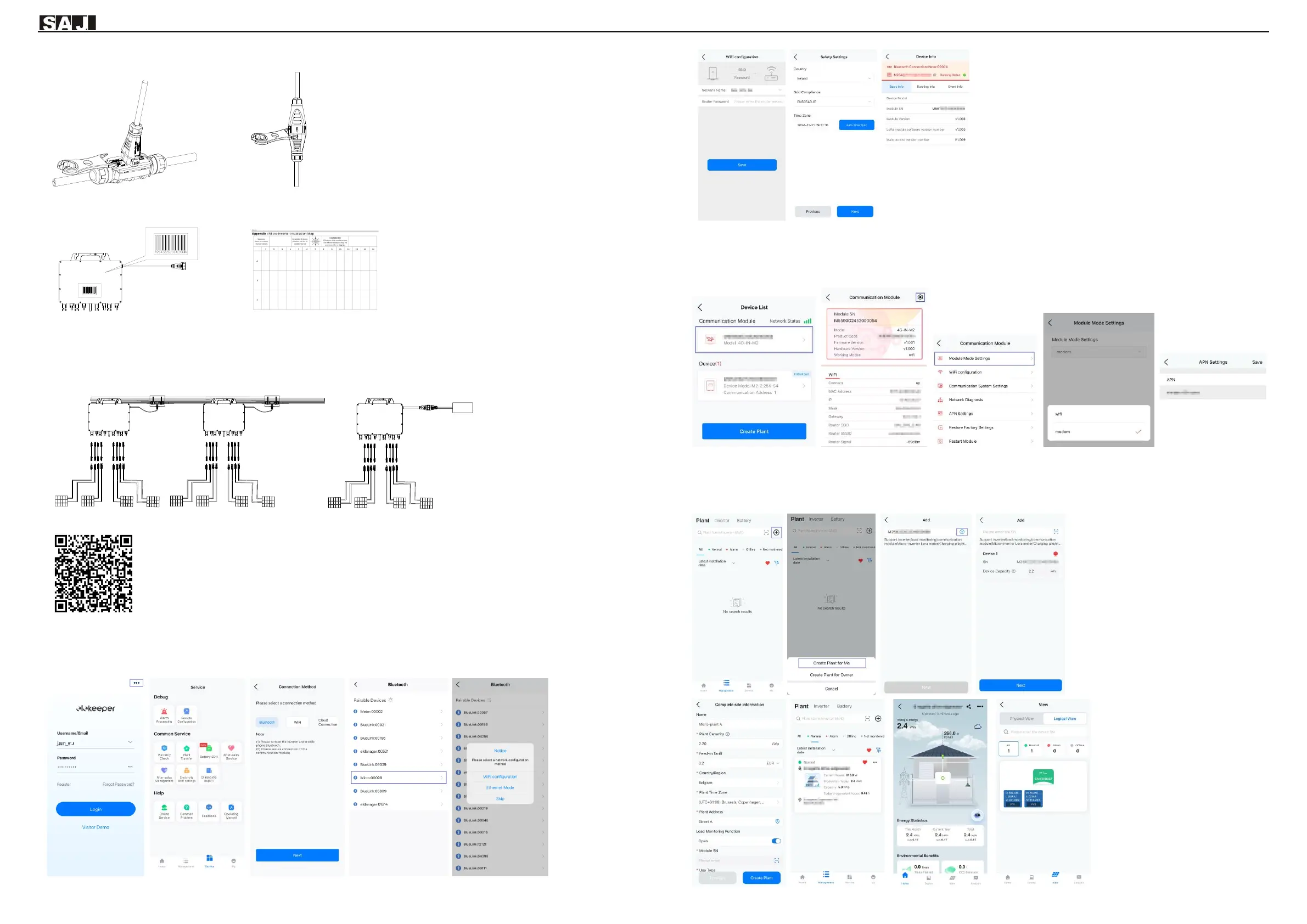
Note: If you need to remove the output-side AC connector of the microinverter from the AC trunk cable, insert the branch connector
unlock tool into the AC branch cable connector.
Step 4: Make an installation map.
Peel off the SN label on each microinverter and attach the SN label to the installation map as follows:
Step 5: Connect the PV modules.
Install the microinverters under the PV arrays. Connect the DC output cable of PV arrays to the DC input side of the microinverters.
ATTENTION: The DC cable length from the PV array to the inverter must be no larger than 3 meters to meet relevant regulatory
requirements. Ensure that the DC cables are correctly connected. For details, consult your local electric power operator and refer
to local regulatory requirements.
Step 6: Install the App. Scan the QR code to download the elekeeper App and check the M2 product documentation.
Step 7: Perform initialization on the App.
Log in to the App → Select Service and then Remote Configuration → Select Bluetooth → Select the M2 inverter and tap
WiFi configuration → Set the Network Name and Router Password → On the Safety Settings page, select the Country and
Grid Compliance → Save the settings to complete the initialization.
Step 8: Set 4G connection on the App. (Only applicable to M2 inverters equipped with 4G communication.)
Connect to the device through Bluetooth connection → On the Device List page, select Communication Module → Tap the
settings icon on the upper right corner > On the Communication Module page, select Module Mode Settings → On the
Module Mode Settings page, select modem → On the APN Settings page, set the APN of the customer’s 4G operator.
Step 9: Create a plant.
On the Management page, tap the + button in the upper right corner → Tap Create Plant for Me → enter the inverter SN, tap
the + button to add the inverter, and tap Next → On the Complete site information page, enter the plant information and tap
Create Plant → On the Plant page, select the new plant and check the detailed information on the Micro plant page.


 To Previous Page
 Loading...