3-003
INSPECTION AND MAINTENANCE
1-4. Vibrator
1) Stop the engine and keep the compactor level.
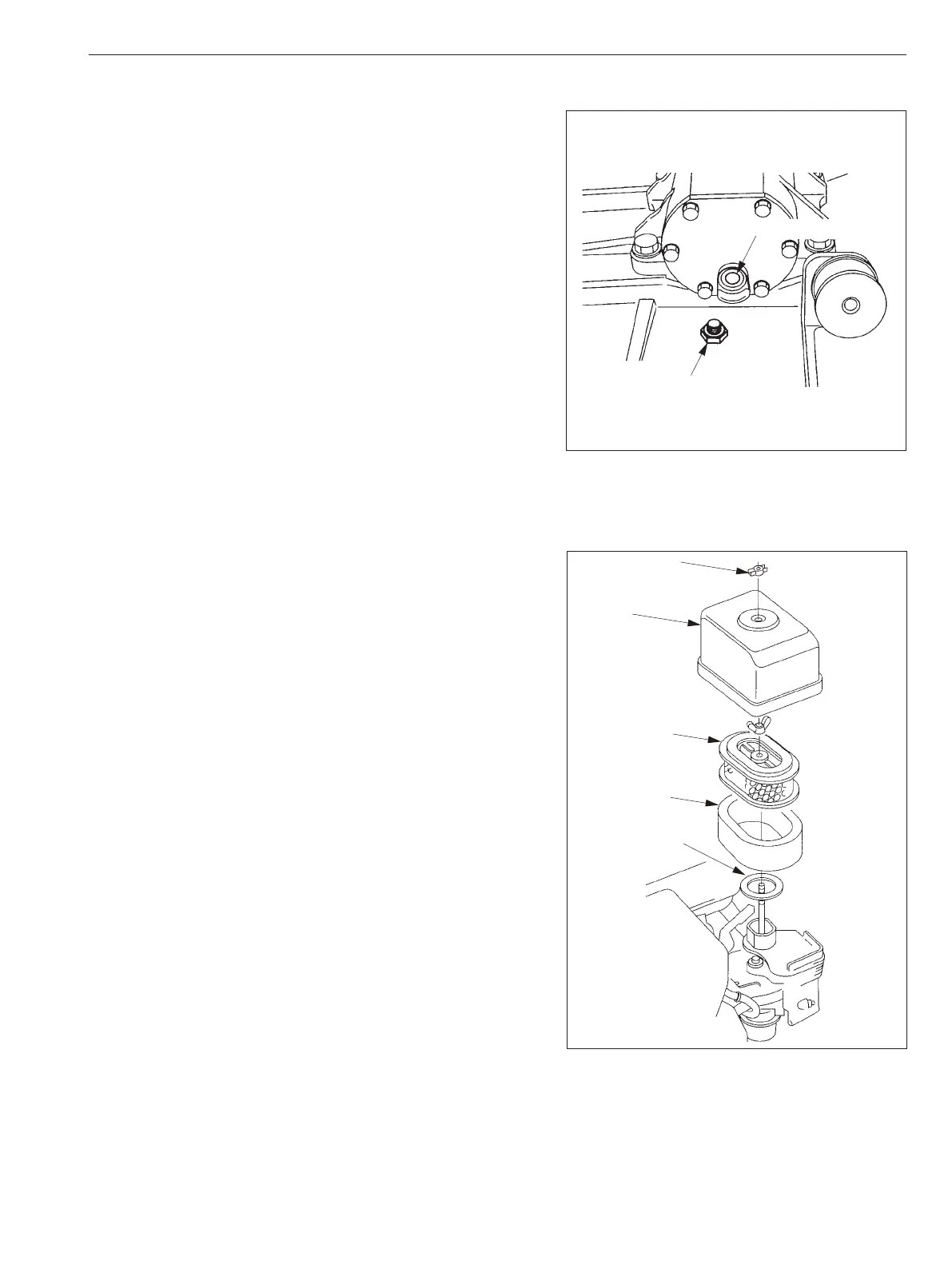
2) Remove the ll-drain plug to check that the oil spills out of the
plug.
3) Supply oil if it has been found insufcient.
How to change oil:
• Remove the belt cover, V-belts, and 4 bolts which secure the
base. Remove the upper parts which installed a engine, cage
from the body. Then remove the drain plug, Fill-Drain plug,
or the oil level gauge and tilt the compactor body to drain the
oil, then ll the new oil. Wipe off oil stuck on the outside of
compactor after oil change.
• Change oil at an interval of either one month or 200 operating
hours which comes rst.
Specied oil quantity (when in replacement):
0.35 L (0.09 gal.)
1-5. Air Cleaner
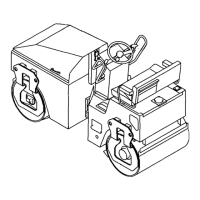
1) Remove the wing nut from the air cleaner cover, and remove
the cover.
2) Remove the wing nut from the air lter, and remove the lter.
3) Remove the foam lter from the paper lter.
4) Inspect both air lter elements, and replace them if they are
damaged. Always replace the paper air lter element at the
scheduled interval.
5) Clean the air lter elements if they are to be reused.
• Paper air lter element :
• Tap the lter element several times on a hard surface to
remove dirt.
• Blow compressed air [207 kPa (30 psi)]
through the lter element from the inside.
• Never try to brush off dirt; brushing will force dirt into the
bers.
• Foam air lter element :
• Clean in warm soapy water, rinse, and allow to dry
thoroughly.
• Clean in nonammable solvent and allow to dry. Dip the
lter element in clean engine oil, then squeeze out all
excess oil.
PC800-03004
Fill-drain plug
Fill-drain port
PC800-03004
Fill-drain plug
Fill-drain port
AC-03001
Wing nut
Air cleaner
cover
Paper filter
element
Foam filter
element
Gasket
AC-03001
Wing nut
Air cleaner
cover
Paper filter
element
Foam filter
element
Gasket


 To Next Page