EN
20
www.salda.lt
FLEX
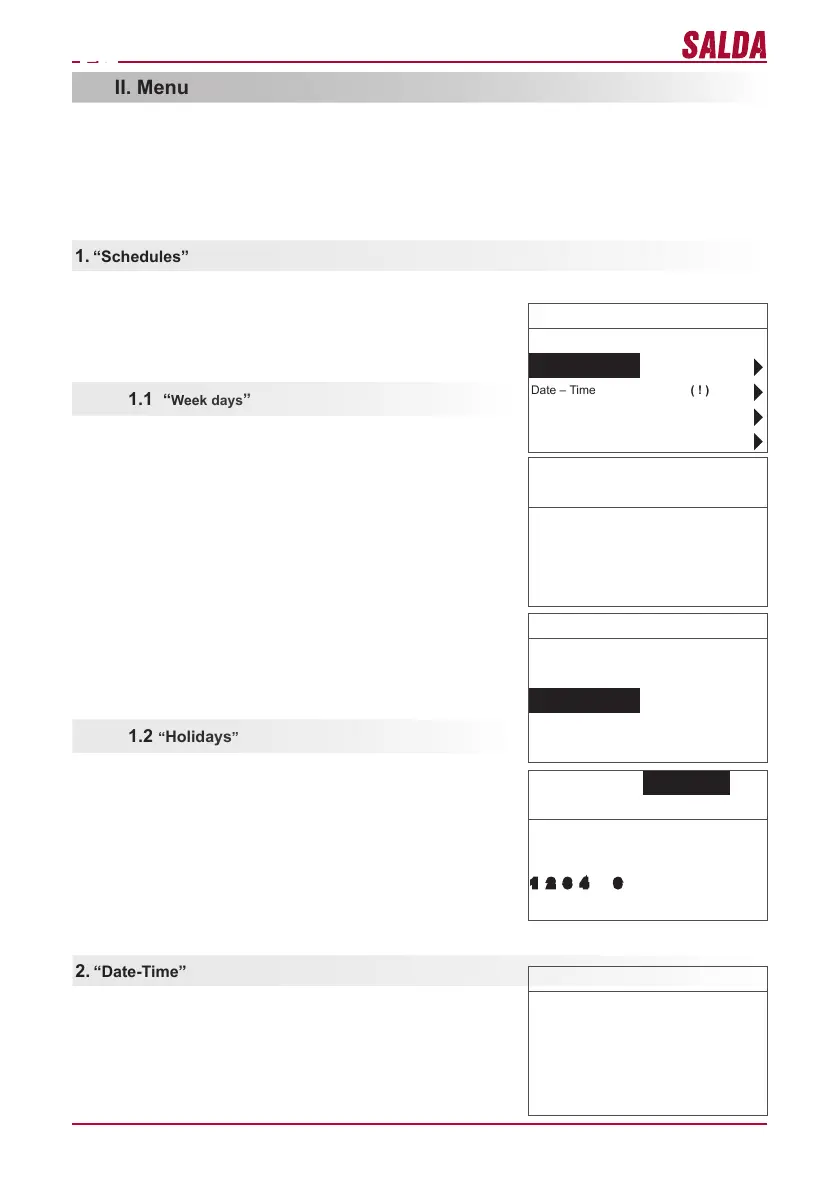
Is used for setting the current time and date. If no time is set, “( ! )” is
displayed at the menu screen.
The rst line is for information:
Version of the unit is shown or “NC” if there is no connection with the
unit;
Numbers at the right side:
Right – total number of the items for selection
Left – your current position
“( ! )” – no parameters set – attention.
System V2.2 2/7
Exit
Schedules ( ! )
Date – Time ( ! )
View Alarms
Languages
No events
Week days
1-7 1-5 6-7
↓
1 2 3 4 5 6 7 Exit
Events
Exit
Save?
Copy?
1 7:30 middle 18 °C
2 hh:mm Stop 18 °C
Events Copy?
Week days
1-7 1-5 6-7
↓
1 2 3 4 5 6 7 OK 18 °C
Date – Time
Exit
↓
7:34 2013-04-14 SUN
“Holidays” settings have a priority to “Schedules” settings
Groups of days: 1–7 for week, 1–5 for working days, 6–7 for week-
end. If one day is selected, settings can be copied for any other day
if desired. When desired settings are made, select “OK” to enter the
event settings.
At rst, select the event start time and then select the fan rotation
speed and the desired temperature. If event hours “hh” are set, the
event is deleted. Press “OK” after every setting is made. When desired
events are entered, select “Save”, “Copy”, “Exit”. The setting is
conrmed by selecting and pressing “OK”.
Select “Copy” to enter the list of options for the week of days, select
day to copy the settings for and press “OK”.
In order to nish the copying, select and press “OK” at the list of days.
When saved, settings of group of days change the previous settings of
the selected days.
“Holidays” settings have a priority to “Schedules” settings
At rst, select the event start time and then select the fan rotation
speed and the desired temperature. If event hours “hh” are set, the
event is deleted. Press “OK” after every setting is made. When desired
events are entered, select “Save”, “Copy”, “Exit”. The setting is
conrmed by selecting and pressing “OK”.
The beginning and the end time of the holidays are set and saved.In
order to switch the holiday mode you have to choose “OFF” “Save”
and “OK” in “Holidays“ window.
Is used for entering the device operation mode based on the time.
When setting the events, check if the set time and date is accurate
(see II.2). 8 events for every day of the week or group of days can be
set with using fan speeds, temperatures and start times. Groups of
days: 1–7 for week, 1–5 for working days, 6–7 for weekend. If one day
is selected, settings can be copied for any other day if desired. When
desired settings are made, select “OK” to enter the event settings.
Note: Summer/winter time does not change automatically.


 To Next Page
 Loading...