76
Cleaning the side brushes
Turn over the machine and pull out the side brush upwards. Remove hair and dirt and
reassemble the side brush. Make the left side brush (L) and the right side brush (R)
correspond to L and R on the bottom casing, press L and R to reinstall them.
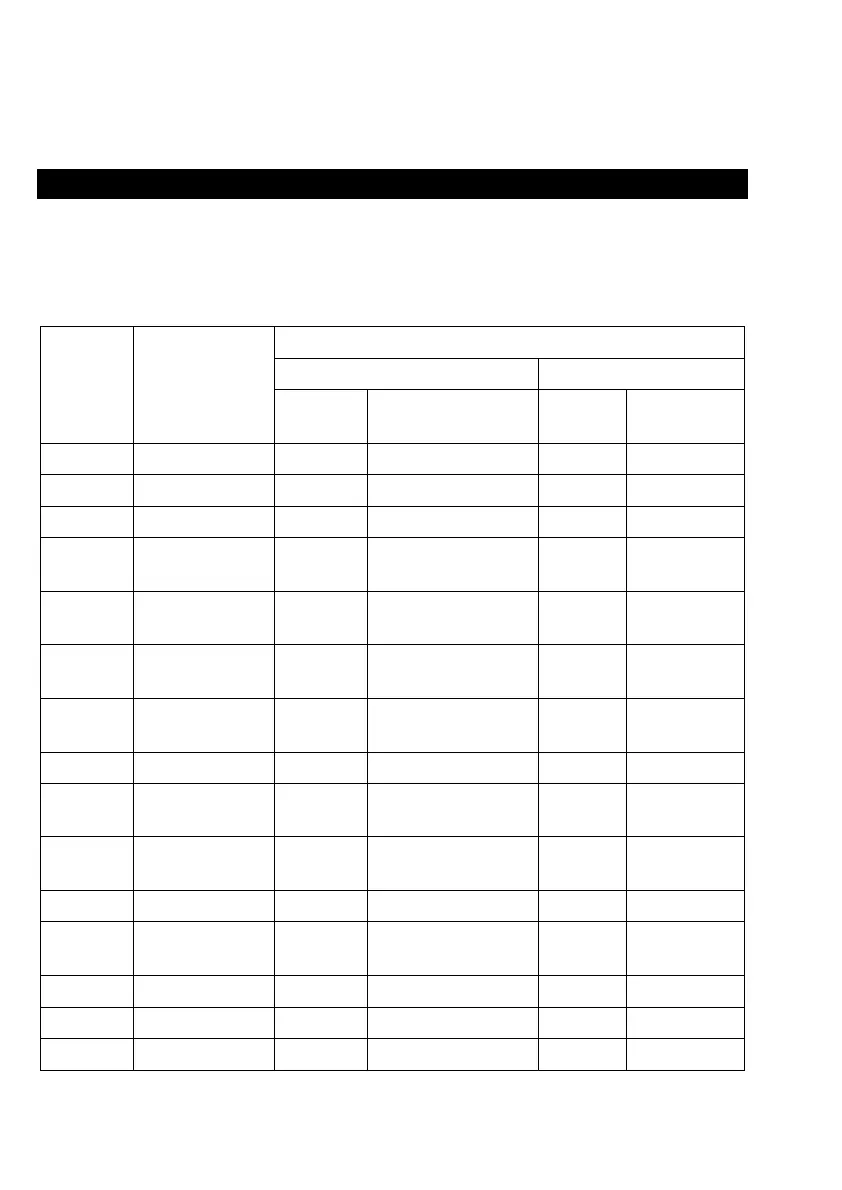
Light indication
Robot has two light indication, the upper is power and the under is recharging. Light has
three color: red, green and yellow. Light status have lights off, lights steady on, quick
blink and slow blink.
Item Contents
Definition of light
Color Status
Three
colors
Status
1 Power on Green Lights steady on Lights off
2 Power off Lights steady on Lights off
3 Cleaning Green Lights off Lights off
4 Recharging Green Lights steady on Yellow
Lights
steady on
5
Low battery
recharge
Green Lights steady on Red
Lights
steady on
6
During
Charging
Green Lights steady on Green Slow blink
7
Charging
finished
Green Lights steady on Green
Lights
steady on
8 WIFI AP Green Quick blink Green Quick blink
9
WIFI
connected
Green Lights steady on Lights off
10
Abnormal
warning
Red Quick blink Lights off
11 Standby mode Green Lights steady on Lights off
12
Sleeping
mode
Lights off Lights off
13 Low battery Red Quick blink Lights off
14 Not calibrated Red Quick blink Red Quick blink
15 Calibrated Green Lights steady on Light off


 To Next Page