72 | SAMLEX AMERICA INC.
SECTION 4 | Parameter Setup
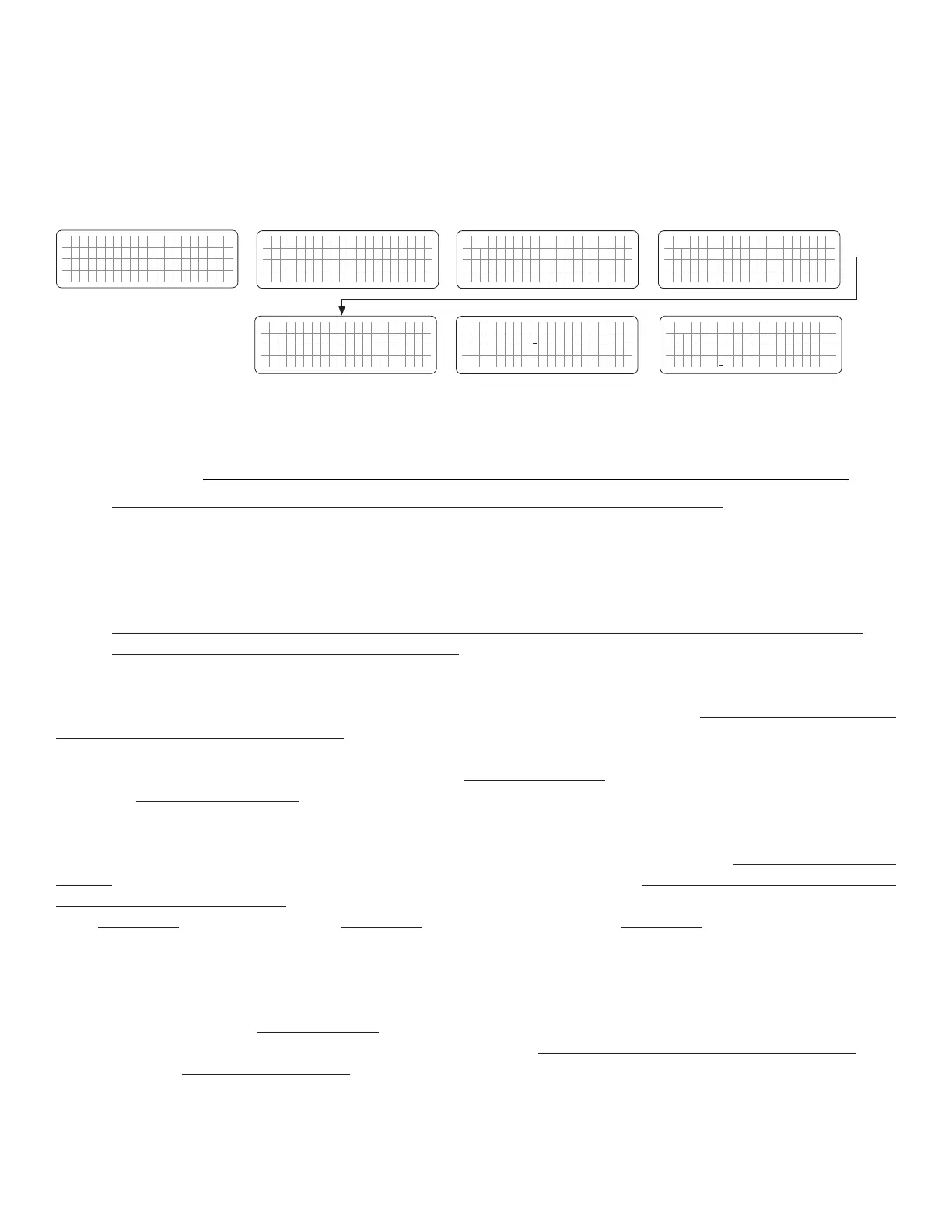
4.5.2.8.1 Programming Steps for Parameter “SYNCHRONIZATION”
ð ð
E V O - 1 2 1 2 F I n v e r t i n g
A C o u t p u t : 1 2 0 . 0 V
< 0 . 1 0 A
6 0 . 0 0 H z
Enter Key Down Key x 7 times
Any Operating Mode Screen from
Fig 3.1 to 3.5
[Above screen is Screen 1 of Fig 3.2(a)]
Password 8052
See Section 4.3.1
For programmable options, see Table 4.6,
Parameter Setup Screen No. 7 under
Column 1 for EVO-1212F/1212F-
HW/1224F/1224F-HW
S e l e c t G r o u p
* C H A R G E C U R V E
ð
S e l e c t P a r a m e t e r
* I N P U T S E T T I N G
ð
S e l e c t P a r a m e t e r
I N P U T S E T T I N G
* D E F A U L T F R E Q
0 = 6 0 H z
S e l e c t P a r a m e t e r
I N P U T S E T T I N G
* S Y N C H R O N I Z A T I O N
0 = F i n e
Down Key x 1 time
Enter Key
P a s s w o r d k e y i n
0 0 0 0
ð
Enter Key
S e l e c t P a r a m e t e r
I N P U T S E T T I N G
* S Y N C H R O N I Z A T I O N
0 = F i n e
ð
Enter Key
4.5.2.9 SYNC GRID (Table 4.6, Parameter Setup Screen No. 8 under Column 2 for EVO-2212/3012/2224/4024)
NOTE: Parameter “SYNC GRID” is not available for EVO-1212F/1212F-HW/1224F/1224F-HW.
In EVO-2212/3012/2224/4024, the frequency and phase of the Inverter Section are always kept synchronized with the AC
input source connected to terminals marked “GRID” (4,5,6 in Fig 2.3 in Owner’s Manual for EVO-2212/3012/2224/4024).
This facilitates faster and safer transfer of power between the Inverter Section and the AC input source.
NOTE: For supplementary details on synchronized transfer of AC power, please refer to Section 4.5.4 to 4.5.7 of
Owner’s Manual for EVO-2212/3012/2224/4024
Parameter “SYNC GRID” is used to program the desired sensitivity of frequency and phase synchronization of the
Inverter Section with the AC input voltage fed at the AC Input Terminals marked “GRID” (4,5,6 in Fig 2.3 in Owner’s
Manual for EVO-2212/3012/2224/4024).
2 programming options are available for this parameter: (i) Option “0= Fine” (Default option) – see Section 4.5.2.9(a)
below and (ii) Option “1= Coarse” – see Section 4.5.2.9(b) below.
When EVO-2212/3012/2224/4024 is operating in Inverting Mode (there is no AC input), its output frequency will be
equal to the frequency that has been selected by the programming parameter “DEFAULT FREQ” (TABLE 4.6 and Section
4.5.2.1). When AC input is made available at AC Input Terminals marked “GRID” (4,5,6 in Fig 2.3 in Owner’s Manual
for EVO-2212/3012/2224/4024), it is rst monitored for 2 sec. If it is within the programmed values of (i) frequency
limits (TABLE 4.4), (ii) low voltage limits (TABLE 4.5) and (iii) high voltage limits (TABLE 4.6), synchronization process is
initiated to synchronize the frequency and phase of the Inverter Section with the incoming AC input voltage. Details
are given below:
a) Parameter “SYNC GRID” set at Option “0= Fine” (Default)
This is the “Default Setting”. This setting is applicable when Grid / Inverter Generator is
connected to AC Input Terminals marked “GRID” (4,5,6 in Fig 2.3 in Owner’s Manual for EVO-
2212/3012/2224/4024). Synchronization control logic used in this option is suitable for more stable
frequency output of Grid / Inverter Generator. Under this option, the frequency and phase of the
Inverter Section are synchronized with the Grid as follows:


 To Next Page
 Loading...
