2016_01_13-16:00
6
836 828 R. 01/16
SAMOA Industrial, S.A. · Pol. Ind. Porceyo, I-14 · Camino del Fontán, 831 · 33392 - Gijón - Spain · Tel.: +34 985 381 488 · www.samoaindustrial.com
Maintenance
Use 2x1.5 V alkaline batteries size AAA.
Replacement battery
WARNING
METER SHOULD BE INSTALLED IN A POSITION ALLOWING
THE BATTERIES TO BE REPLACED WITHOUT REMOVING IT
FROM THE SYSTEM.
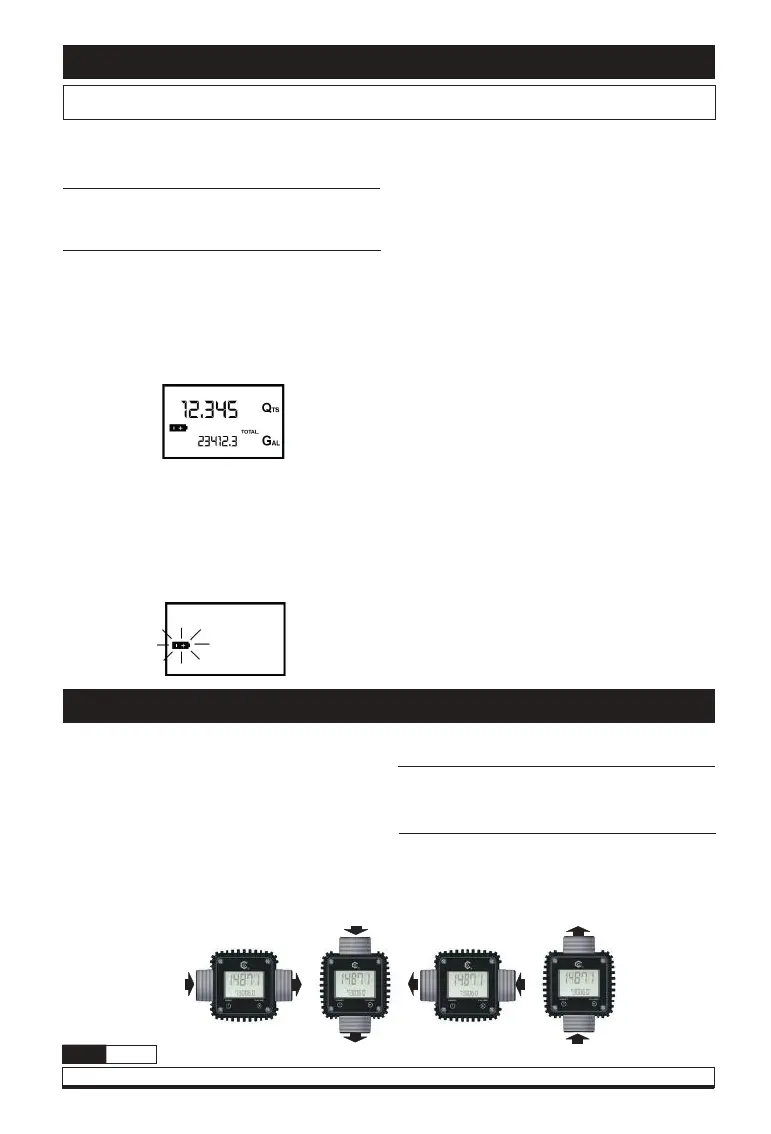
Meter features two low-battery alarm levels:
1. When the battery charge falls below the first
level on the LCD, the fixed battery symbol
appears. In this condition, meter continues to
operate correctly, but the fixed icon warns the
user that it is ADVISABLE to change the batteries.
2. If meter operation continues without
changing the batteries, the second battery
alarm level will be reached which will prevent
operation. In this condition the battery icon
starts to flash and is the only one to remain
visible on the LCD.
Change the batteries, proceed as follows:
1. Press RESET to update all the totals.
2. Loosen the 4 fixing screws of the lower
cover.
3. Remove the old batteries.
4. Place the new batteries in the same position
as the old ones.
5. Close the cover again, by positioning the
rubber protection as a gasket.
6. Meter will switch on automatically and
normal operation can be resumed.
The meter will display the same Reset Total, the
same Total and the same Partial indicated before
the batteries were changed.
After changing the batteries, the meter does not
need calibrating again.
Display positioning
The square shape of the meter body allows the
card to be rotated in its housing, thus ensuring
great versatility in positioning.
This allows easy display readings in any position.
The card housing is closed by a plastic cover
sealed through a rubber protection acting as a
gasket as well. This can be easily removed
unscrewing the 4 screws that fix both the cover
and the card (1).
ATTENTION
WHILE FIXING THE METER CARD, MAKE SURE THE
BATTERY CONTACT CABLE IS NOT PLACED ABOVE THE
CIRCULAR HOUSING OF THE BULB.


 To Next Page
 Loading...