AirLine Micro Earset 13
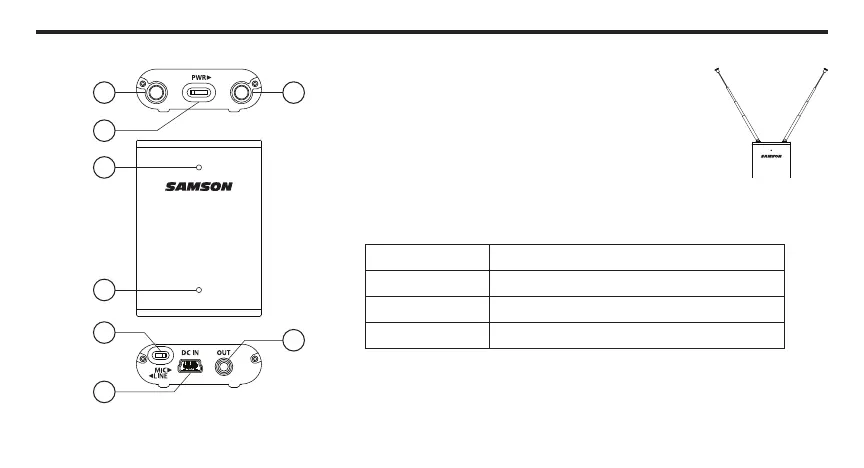
Guided Tour - AR2 Receiver
1. Antennas - The retractable antennas allow full
rotation for optimum placement. In normal operation,
both antennas should be fully extended and placed in
a vertical position, as shown below.
2. POWER Switch - Use this to turn the AR2 power on
and off.
3. Status Indicator - This three-color LED acts as a multi-function meter,
indicating power, transmitter tone-key status, transmitter mute, and
transmitter peak.
YELLOW AR2 Powered On, No Tone-Key Present
GREEN AH2 On, Normal Operation
Flashing GREEN AH2 Audio Muted
RED Transmitter Input Overloaded
4. Low Battery Indicator - This BLUE LED displays the status of the battery.
The Low Battery Indicator will flash BLUE when the unit is on, and the
battery is low. When recharging the AR2, the LED will be steady BLUE
until the battery is fully charged, then the indicator will turn off.
1 1
2
3
4
5
6
7


 To Next Page