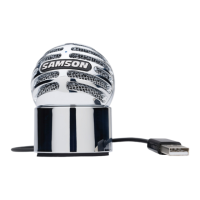
Meteor
Mic
·USB
Studio Condenser Microeho11e
=:::::
Quick Start
5.
Launch your
DAW,
turn
the microphone's
Volume knob down, and select the Meteor Mic
for the
input
and output.
6.
Set
up
a
mono
record track in
your
DAW
for
the
vocal track.
7.
Next, set the level
of
the Meteor M
ic.
There
are few ways
to
do
this depending on
your
preference and computer setup. One way
to
control
the
gain
is
to
set the microphone's in-
put
level in the Sound playback in Windows,
or
--..-~
.i.\'!=it.i in
the
Sound dialog box in System Preferences,
I \
if
you are using a
MAC
OS.
You
may also set the
gain
of
the microphone by raising
the
Input
level control in your
DAW.
If
you
see
the
Power/
Peak
LED
illuminate red, your signal will be distorted. Turn
the
MIC
level control
down
until
it
does
not
flash red.
8.
Speak
or
sing
into
the mic and raise the Meteor Mic's Volume knob until you reach a com-
fortable listening level.
11



 To Next Page