EasyManua.ls Logo

Samson Meteor Mic - Quick Start Guide

Samson Meteor Mic
26 pages
Print Icon
To Next Page IconTo Next Page
To Previous Page IconTo Previous Page
Loading...
Quick Start
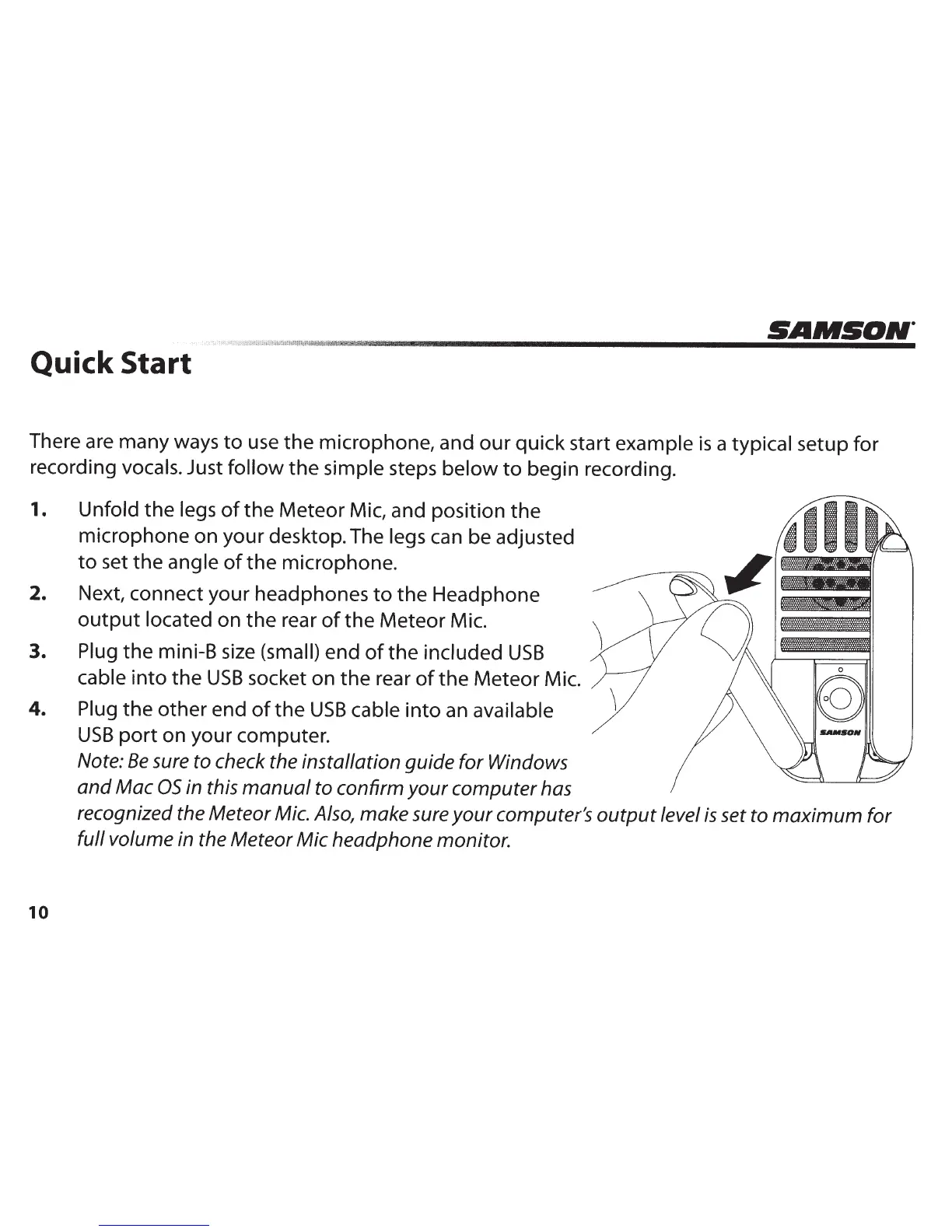
There are many ways
to
use
the
microphone, and
our
quick start
example
is
a typical setup
for
recording vocals.
Just
follow
the
simple
steps
below
to
begin recording.
1.
Unfold
the
legs
of
the
Meteor Mic, and position
the
microphone on your desktop. The
legs
can be adjusted
to
set
the
angle
of
the
microphone.
2.
Next, connect your headphones
to
the
Headphone
output
located on
the
rear
of
the
Meteor Mic.
3.
Plug
the
mini-B size
(small)
end
of
the included
USB
cable
into
the
USB
socket on
the
rear
of
the
Meteor Mic.
4.
Plug
the
other
end
of
the
USB
cable
into
an
available
USB
port
on your computer.
10
Note:
Be
sure
to
check the installation guide for Windows
and
Mac
OS
in this
manual
to confirm
your
computer
has
recognized the Meteor Mic. Also, make sure
your
computer's
output
level
is
set to
maximum
for
full volume in the Meteor
Mic
headphone monitor.

Other manuals for Samson Meteor Mic

Related product manuals