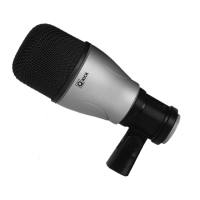
Need help?
Do you have a question about the Samson Q1U and is the answer not in the manual?
Guidance on optimizing input signal levels for optimal audio quality and avoiding distortion.
Explains how the Q1U receives power via USB and the function of the power LED indicator.
Describes the directional characteristics (super-cardioid) of the Q1U microphone.
Offers advice on positioning the Q1U for optimal sound quality, considering proximity effect.
Guidance on adjusting the microphone's input gain using software or operating system controls.
Discusses common 'P-popping' issues and methods to mitigate them, including pop filters.
Instructions for attaching the Q1U to a standard microphone stand using the included clip.
 General
| Type | Laptop microphone |
|---|---|
| Bit rate | 16 bit |
| Microphone frequency | 50 - 16000 Hz |
| Microphone direction type | Supercardioid |
| USB port | Yes |
| Device interface | USB |
| Connectivity technology | Wired |
| Impedance | 90 Ω |
| Product color | Gray |
 Weight and Dimensions
| Depth | 53 mm |
|---|---|
| Height | 180 mm |
| Microphone weight | 370 g |


 To Next Page