7
01 Getting Started
English
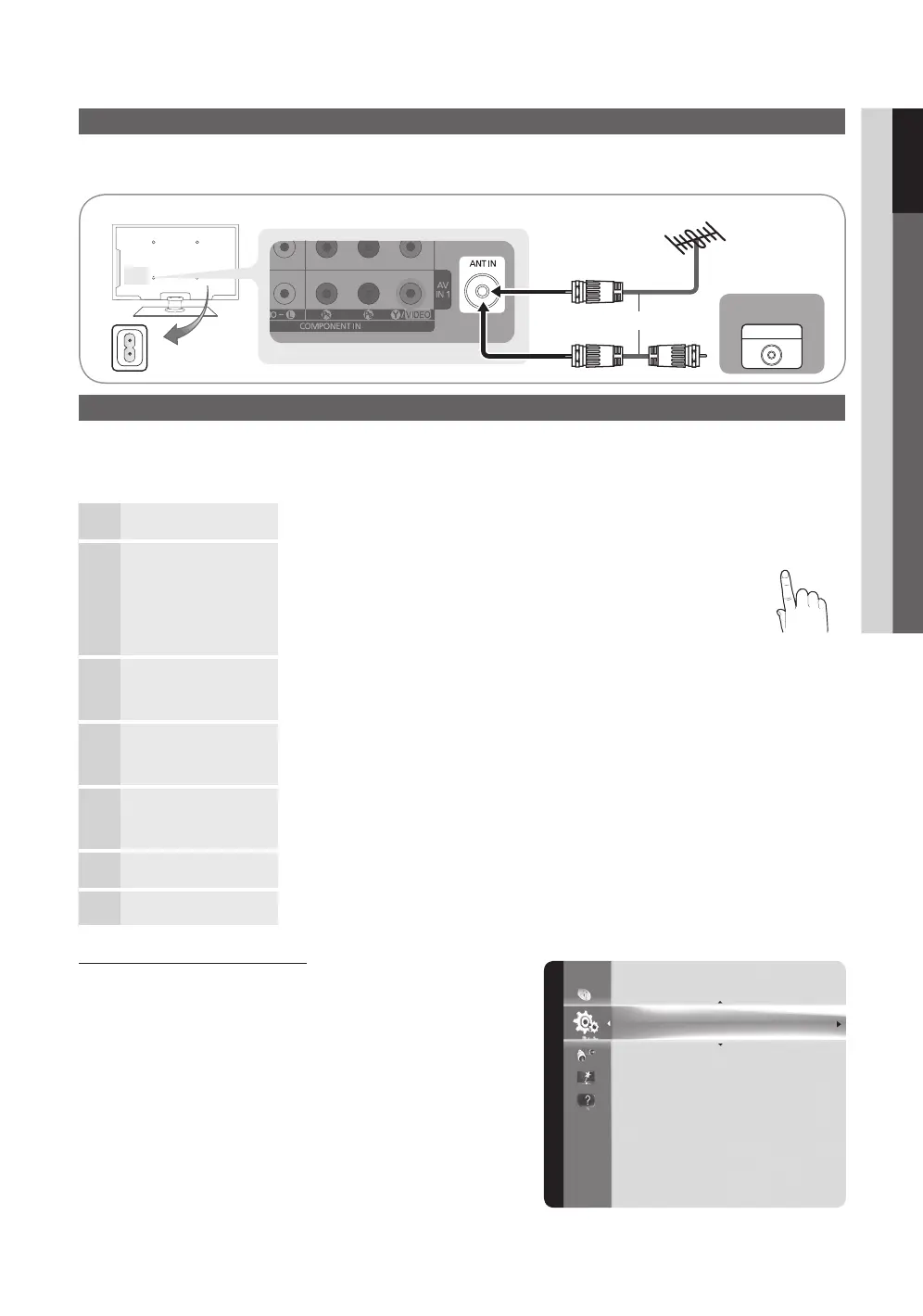
Connecting to an Antenna
When the TV is initially powered on, basic settings proceed automatically.
✎
Connecting the mains and antenna.
Plug & Play (Initial Setup)
When the TV is initially powered on, a sequence of on-screen prompts will assist in configuring basic settings. Press the
POWER
button. Plug & Play is available only when the Input source is set to TV.
✎
To return to the previous step, press the red button.
1
Selecting a language
Press the ▲ or ▼ button, then press the ENTER
button.
Select the desired OSD (On Screen Display) language.
P
POWER
FAV.CH
MEDIA.P
P.MODE
S.MODE
P.SIZE
CC
MTS
INFO
SLEEP
TOOLS
CH LIST
D
2
Selecting Store Demo
or Home Use
Press the ◄ or ► button, then press the ENTER
button.
y Select the Home Use mode. Store Demo Mode is for retail
environments.
y To return the unit’s settings from Store Demo to Home Use
(standard): Press the volume button on the TV. When you see the
volume in the OSD, press and hold MENU for 5 sec.
3
Selecting an antenna
Press the ▲ or ▼ button, then press the ENTER
button. Select Air, Cable or Auto.
✎
In Cable mode, you can select the correct signal source among STD, HRC, and IRC
by pressing the ▲, ▼, ◄ or ► button, then press the ENTER
button.
4
Selecting a channel The channel search will start automatically.
For more information, refer to Channel → Auto Program. (P. 12)
✎
Press the ENTER
button at any time to interrupt the memorization process.
5
Setting the Clock
Mode
Set the Clock Mode automatically or manually.
✎
If you select the Auto, set the daylight saving time.
Select the time zone which you live.
6
Viewing the HD
Connection Guide
The connection method for the best HD screen quality is displayed.
7
Enjoy your TV.
Press the ENTER
button.
If You Want to Reset This Feature...
MENU
→ Setup → Plug & Play → ENTER
Cable
ANT OUT
VHF/UHF Antenna
Plug & Play
Time
Menu Language : English
Caption : On
Security
Network
General
PIP : Off
Setup
or
Power Input
[LD610-ZA]BN68-03637A.indb 7 2011-03-02 �� 1:37:47


 To Next Page