EasyManua.ls Logo

Samsung 6400 - Turning on and Controlling the TV; Arrange the cables using the Cable Holder

Samsung 6400
58 pages
Print Icon
To Next Page IconTo Next Page
To Previous Page IconTo Previous Page
Loading...
01
eTurning
on
the
TV
and
Cabling
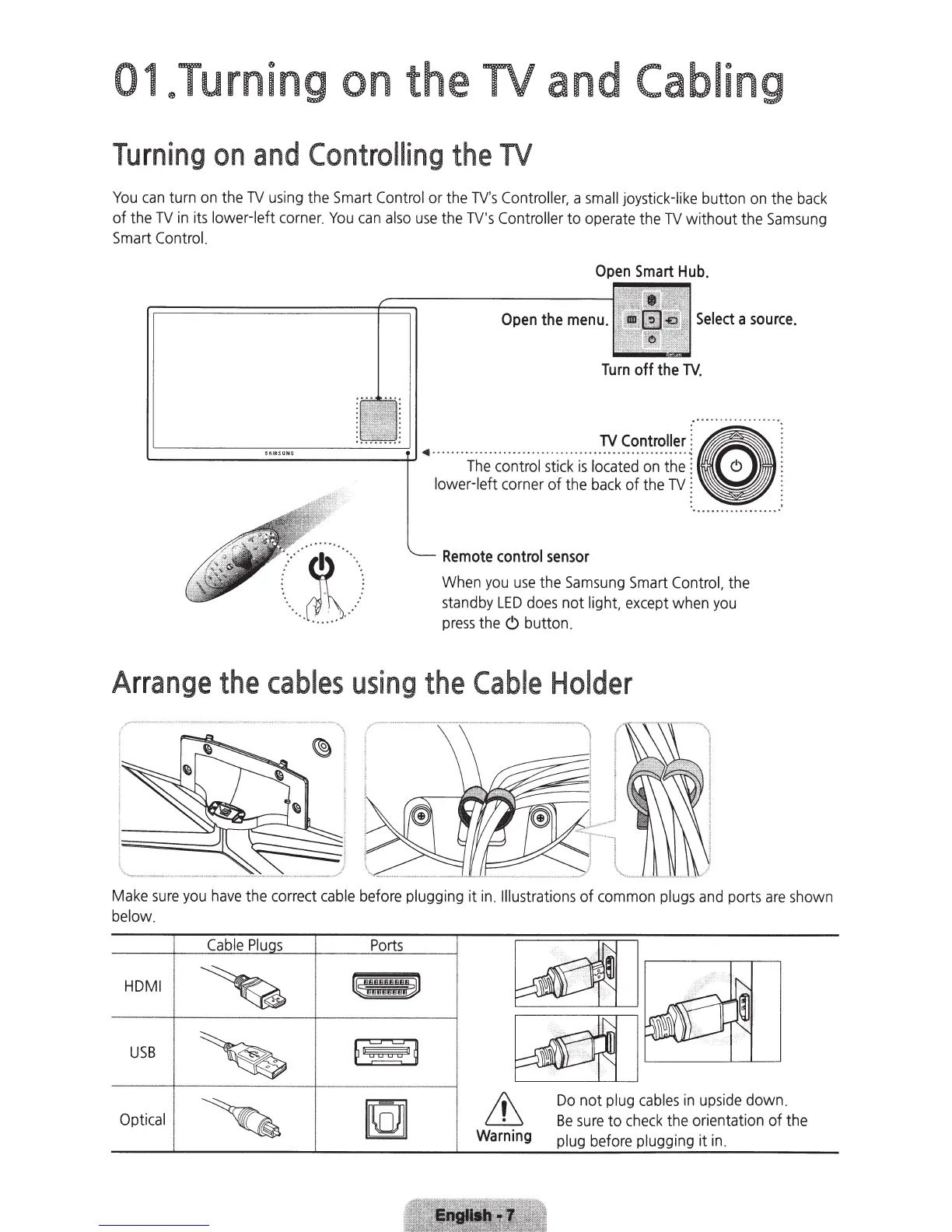
Turning
on
and
Controlling
the
TV
You
can
turn
on
the
TV
using
the
Smart
Control
or the
TV's
Controller,
a
small
joystick-l
ik
e
button
on
the
back
of the
TV
in
its
lower-left
corner.
You
can
also
use
the
TV's
Controller
to
operate
the
TV
without the
Samsung
Smart
Control.
Open
Smart
Hub.
Open
the
menu.
Select
a
source.
Turn
off
the
TV
.
~ . ~
•••
••
0
••
••
'-------------+-'
·
Th~·;~~~;~l
;i
i~k
;;·~~:i~~n~;:~:"
& j
lower-left
corner of the
back
of the
TV
~
~
~
·.
···
I ··
..
.
·
~
·
.
.
.
.
0
0
0
0
.
. .
0 0
0
.
.
••
J )
..
.
~
..
...
·
.....
.
..
..
..
......
:
Remote
control
sensor
When
you
use
the
Samsung
Smart
Control,
the
standby
LED
does
not
light,
except
when
you
press
the
<9
butto
n.
Arrange
the
cables
using
the
Cable
Holder
Make
sure
you
have
the correct
cable
before
plugging
it
in
.
Illustrations
of
common
plugs
and
ports
are
shown
below.
Cable
Plu
s
HDMI
U
SB
Opti
cal
Ports
&
Warning
Do
not
plug
cables
in
upside
down.
Be
sure
to
check
the
orientation of the
plug
bef
ore
plugging
it
in
.

Related product manuals