English - 61
Using the Energy Saving Feature
This feature adjusts the brightness of the TV in order to reduce power consumption. When watching TV at night, set the
"Energy Saving “ mode option to “High” to reduce eye fatigue as well as power consumption.
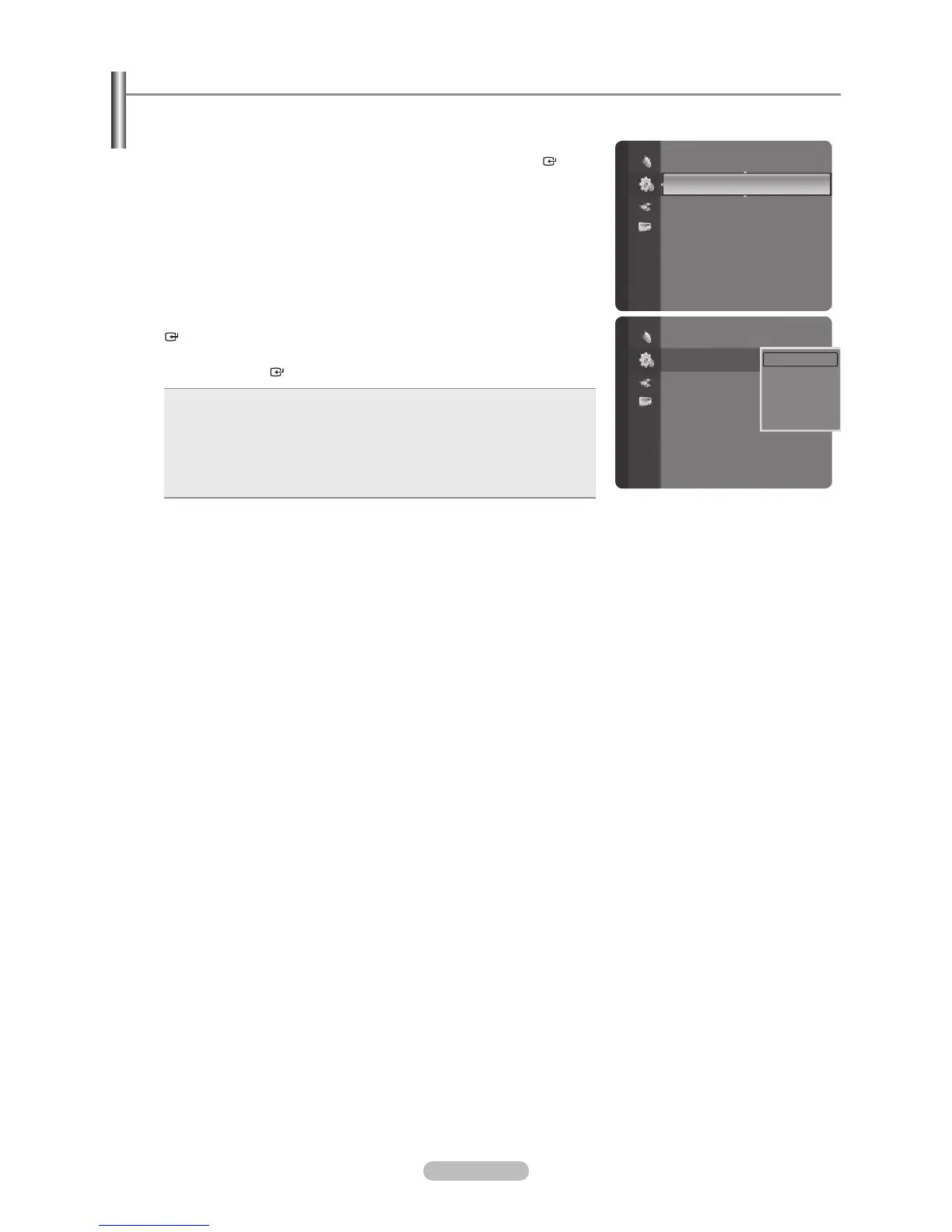
1. Press the MENU button to display the menu.
Press the or button to select “Setup”, then press the ENTER
button.
2. Press the or button to select “Energy Saving”, then press the ENTER
button. Select the required option (Off, Low, Medium, High, Auto) by
pressing the or button.
Press the ENTER
button.
Off: Turns off the energy saving function.
Low: Sets the TV to low energy saving mode.
Medium: Sets the TV to medium energy saving mode.
High: Sets the TV to high energy saving mode.
Auto: Automatically adjusts the brightness of the TV screen in
accordance with the scenes.
•
•
•
•
•
Press the EXIT button to exit.
Setup
External Settings
Entertainment : Off
Energy Saving : Off
PIP
SW Upgrade
Setup
External Settings
Entertainment : Off
Energy Saving : Off
PIP
SW Upgrade
Off
Low
Medium
High
Auto





 To Next Page