English - 83
Automatic Network Setup
If you connect a LAN cable in a location that supports DHCP, the Internet Protocol (IP) Settings are automatically
congured.
Please check if a LAN cable is connected rst.
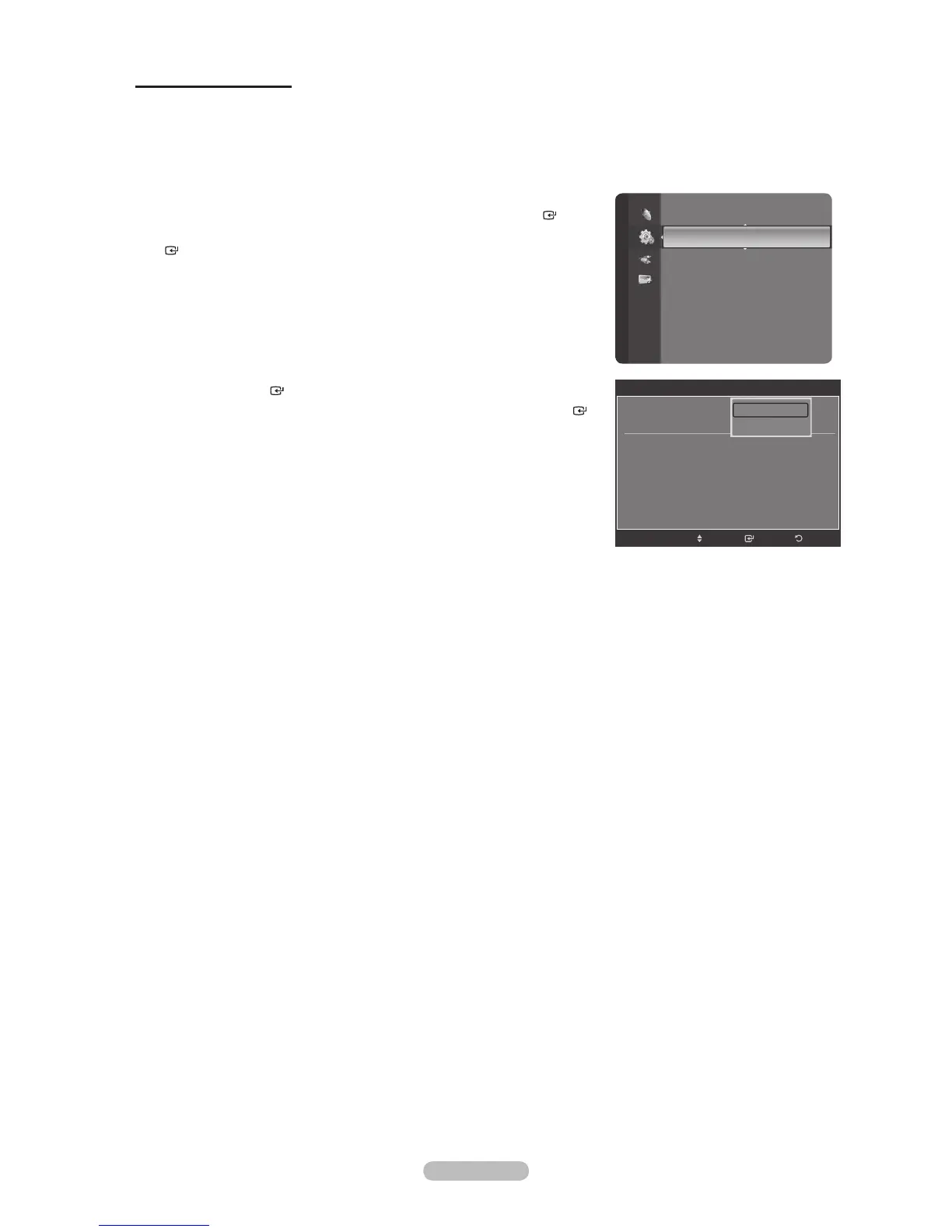
1. Press the MENU button to display the menu.
Press the or button to select “Setup”, then press the ENTER
button.
2. Press the or button to select “Network Setup”, then press the ENTER
button.
3. Press the ENTER
button to select “Internet Protocol Setup”.
4. Press the or button to select “Auto Setup”, then press the ENTER
button.
The Internet Protocol is set automatically.
Select “Network Test” to check the network connectivity.
(Refer to page 86)
Press the EXIT button to exit.
°
°
°
Setup
Language : English
Time
Network Setup
V-Chip
Caption
External Settings
Entertainment : Off
Energy Saving : Off
PIP
SW Upgrade
Network Setup
Internet Protocol Setup : Auto Setup
Network Test
EnterMove
Return
Auto Setup
Manual Setup





 To Next Page