❚
Listening to Surround Sound Using a Soundbar and Multiroom Audio Devices
o
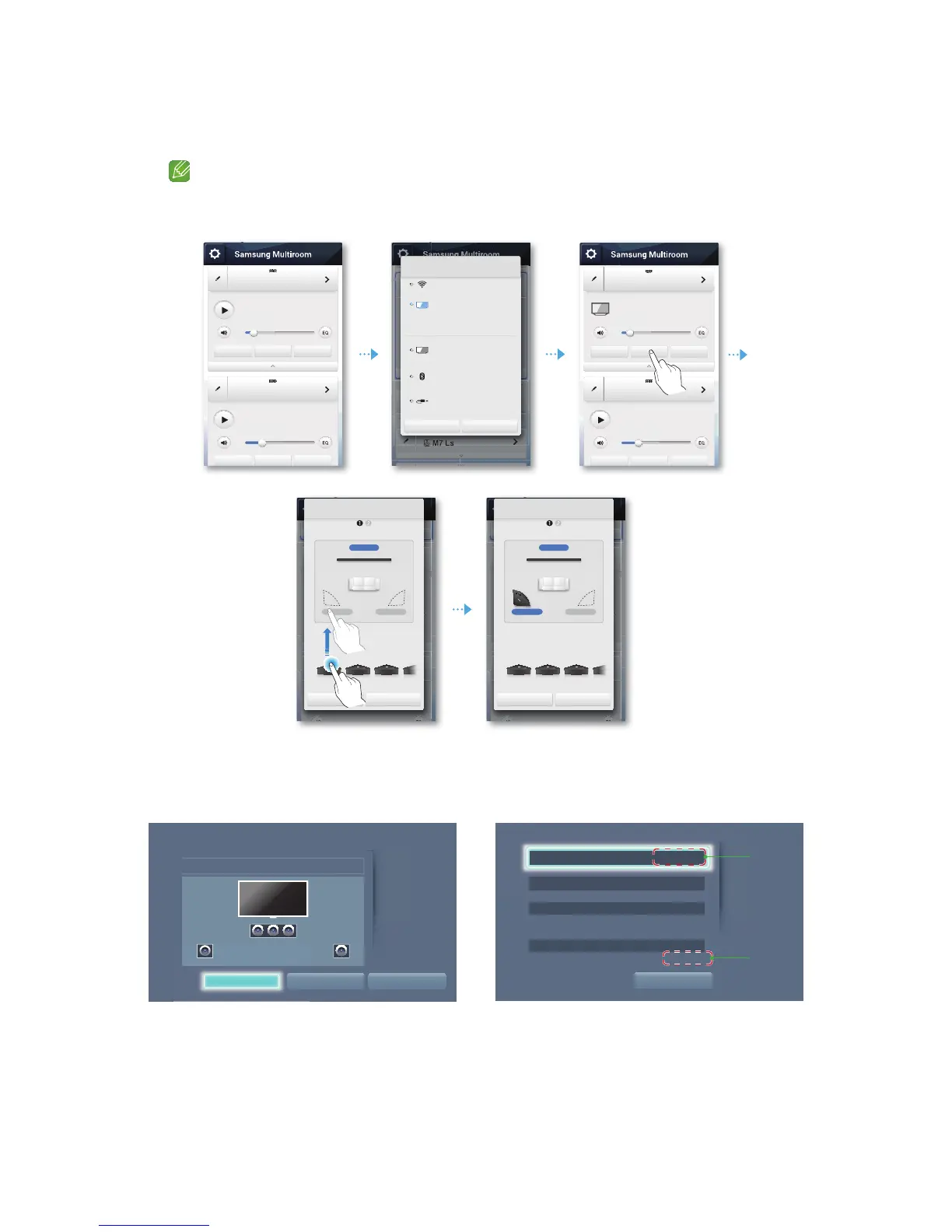
You can set up Surround+Soundbar mode using the Multiroom App or the menu on your TV. See the instructions below.
o If the audio source transferred to the Soundbar is encoded in DTS format, sound will be produced
only through the speakers that correspond to Front Left and Front Right.
`
Setting Up Surround+Soundbar Mode Using the Multiroom App
`
Setting Up TV Surround +Soundbar Mode Using Your TV's Menu.
o Settings
Speaker Settings
Multiroom Link
Soundbar+Surround
9
4
[Samsung] Soundbar 1
[Samsung] Soundbar 2
No Music
No Music
Source
Source
Surround
Surround
Group
Group
[Samsung] Soundbar 1
[Samsung] Soundbar 2
[TV] Samsung Model Name 1
No Music
Source
Source
Surround
Surround
Group
Group
Multiroom Audio 1
[Samsung] Soundbar 1
No Music
Source Surround Group
Source
Wi-Fi
[TV] Samsung Model Name 1
Connect your speakers and
[TV] Samsung Model Name 1 via Wi-Fi to
enjoy surround sound.
TV soundConnect
Bluetooth
AUX
Cancel OK
Stereo & Surround : Setup
[Samsung] Soundbar
[Samsung] M* 1 [Samsung] M* 2 [Samsung] M* 3 [Samsung]...
Front L+R
Surround RSurround L
Move the speaker by dragging it to the
desired location.
Cancel Next
Front L+R
Stereo & Surround : Setup
[Samsung] Soundbar
[Samsung] M* 1
[Samsung] M* 2 [Samsung] M* 3 [Samsung] M* 4
Surround RSurround L
Move the speaker by dragging it to the
desired location.
Cancel Next
Settings
Multiroom Link
OK Speaker Test
Soundbar+Surround
Volume Level
Surround Left Surround Right
Speaker Settings
OK
TV Sound Output Multiroom Link
XXXXXXXX
XXXXXXXX
Multiroom Link
~
XXXXXXXX
~
Settings Surround
~
XXXXXXXX
~
XXXXXXXX
k
e












 To Next Page