E-13
ENGLISH
Bio-Pure Filter Installation (Optional)
Open the front grille by pulling the tabs on the grille.
2
Remove the front grille.
3-1 Remove the safety clips.
3-2 Open the front grille about 45° and pull it forward.
3
Pull out the air filter.
4
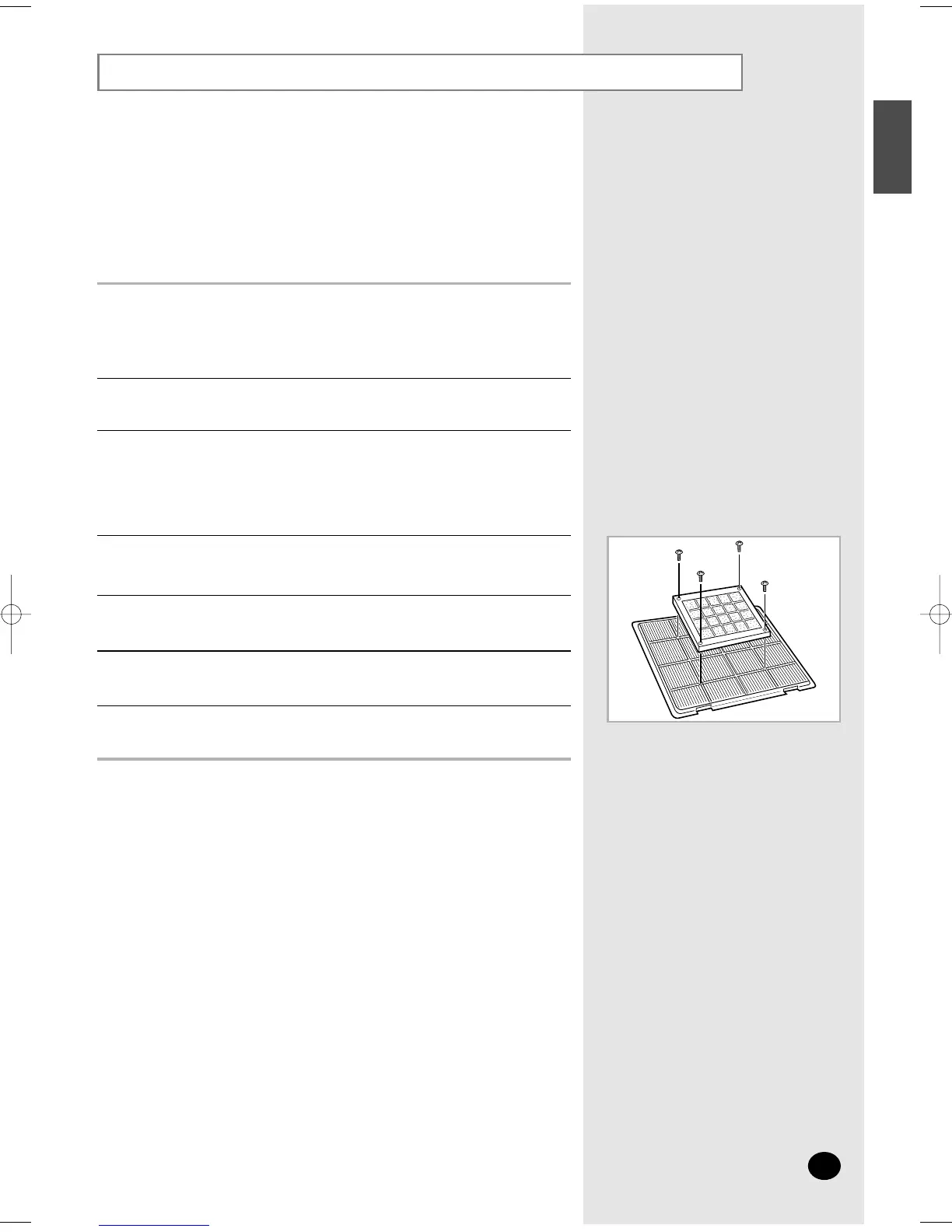
Locate the bio-pure filter on the center of air filter.
5
Secure the bio-pure filter with four screws.
6
Reinstall the air filter, the front grille and the safety clips.
7
Do not remove the packing from a bio-pure filter until you wish
to use the filter, as it will lose its properties.
NN
NN
oo
oo
tt
tt
ee
ee
The air conditioner can be fitted with a Bio-Pure filter to remove minute dust
particles. The service life of the filter is approximately three months depending
on the time during which the air conditioner is used.
Remove the vinyl packing from the filter.
1



 To Next Page