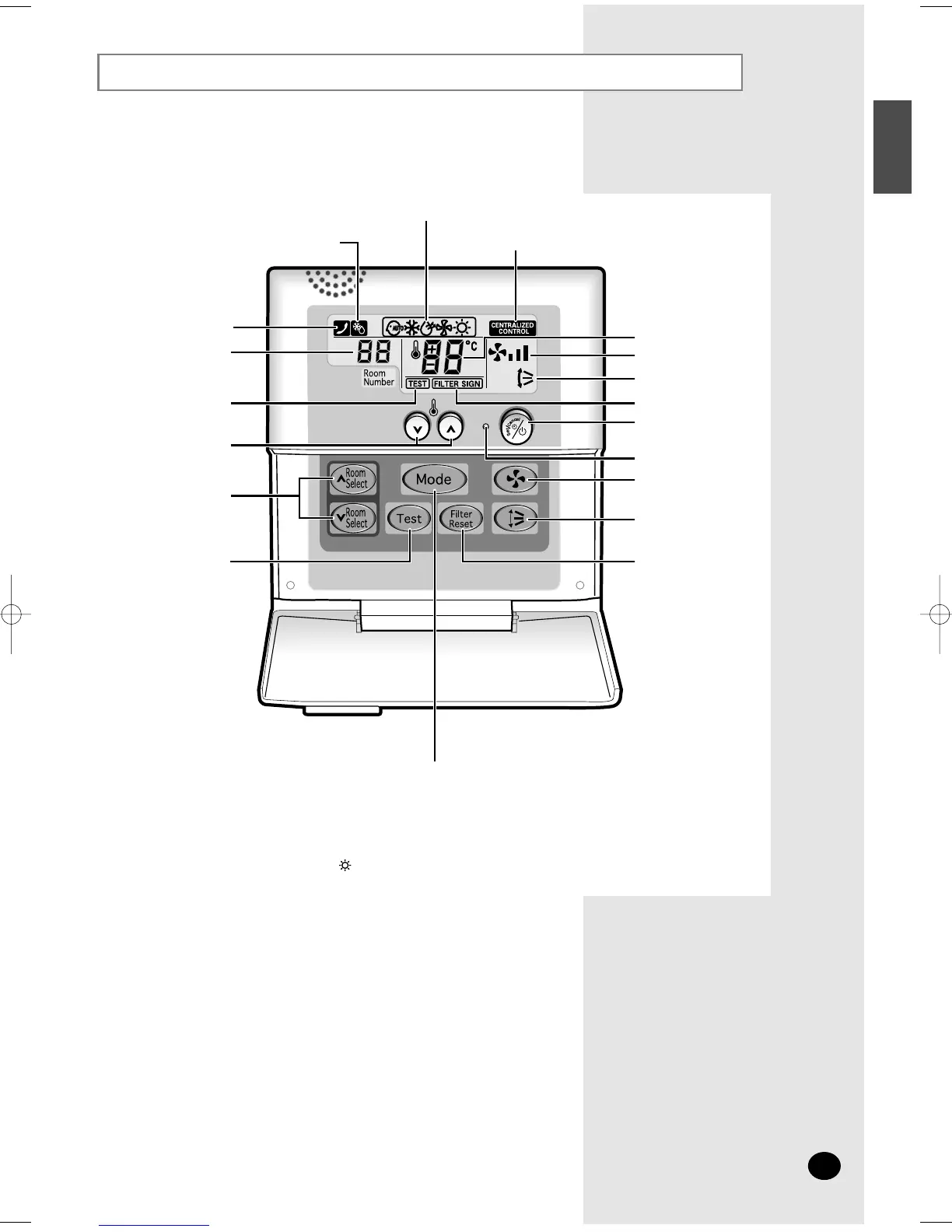
Function Controller
E-9
ENGLISH
The function controller is an additional controller which is used with the centralized controller.
To use the function controller, refer to an appropriate manual.
◆
Test button is for your installation specialist. You must NOT press it.
◆ After cleaning the air filter, press the filter reset button. Then the wired remote controller
will display the FILTER SIGN indicator when the time to clean the air filter.
◆ The heating mode( ) is not selected in cooling only models.
NN
NN
oo
oo
tt
tt
ee
ee
Mode selection button
Room number display
Test indicator
Indoor unit selection button
Test button
Filter Reset button
Swing button
Temperature adjustment
buttons
Temperature setting
Fan speed
Air flow direction
Filter Sign indicator
On/Off & Timer
Set/Cancel button
Fan speed adjustment
button
On/Off indicator
Centralized controller indicator
Communication error indicator
Removing frost indicator
(Except Cooling Only Models)
Operating mode



 To Next Page