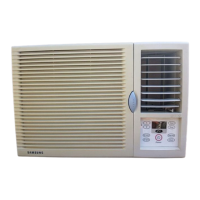
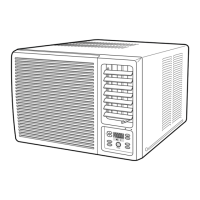
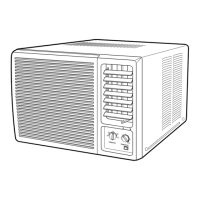
This document describes a Samsung air conditioner, providing details on its function, technical specifications, usage, and maintenance.
Function Description
The Samsung air conditioner is designed to provide cooling and air circulation for indoor spaces. It operates as a window-type room air conditioner, suitable for residential use. The device can be used to cool a room, adjust air flow direction, and manage temperature and humidity levels. It features a remote control for convenient operation, allowing users to set various modes and timers.
Important Technical Specifications
The air conditioner models are categorized by their power supply and frequency:
- *******AA/AB: 115V~, 60Hz
- *******BA/BB/BC/BD/BE: 220V~, 60Hz
- *******CA/CB/CC/CD: 230-208V~, 60Hz
- *******DA: 200-220V~, 50Hz
- *******EA/EB/EC: 220-240V~, 50Hz
The maximum permissible system impedance at the power junction box is 0.24 ohms. The maximum permissible mains impedance will not be exceeded when the branch to the power outlet is fed from a junction box with a rated current of 32A.
The device is designed for specific outdoor temperature ranges:
- Cooling: 21°C to 32°C approx. (Indoor Temperature) and 21°C to 43°C approx. or 21°C to 54°C approx. (Middle East) (Outdoor Temperature).
- Indoor Humidity: 80% or less.
Installation requires proper grounding and adherence to electrical safety standards. Depending on the voltage, different plug types are used:
- 115V 15 AMP circuit: "parallel" type
- 230V(208V) 20 AMP circuit: "perpendicular" type
- 230V(208V) 30 AMP circuit: "tandem" type
The unit dimensions vary by model:
- Model "A": 750mm (width), 180mm (height), 250mm (depth)
- Model "N***": 750mm (width), 180mm (height), 250mm (depth)
- Model "M***": 750mm (width), 220mm (height), 240mm (depth)
Minimum clearance for installation includes 500mm on the left and right sides, and 300mm above the unit. The wall thickness should be greater than 150mm.
Usage Features
The air conditioner offers several operating modes and settings:
- Cooling Your Room: To initiate cooling, press the (On/Off) button. The operating mode indicator (COOL or FAN) will illuminate. The air conditioner starts up in the mode selected when the unit was last used. The unit beeps twice. If the COOL indicator is not lit, press the (Cool) button on the remote control or the MODE button on the unit. To adjust temperature, press the (Temp) buttons. The temperature can be set between 18°C and 30°C.
- Airing Your Room: To circulate stale air, press the (On/Off) button. The operating mode indicator (COOL or FAN) will illuminate. If the FAN indicator is not lit, press the (Fan) button on the remote control or the MODE button on the unit. To set fan speed, press the (Fan Speed) button.
- Adjusting Air Flow Direction Horizontally: Press the (Air Swing) button on the remote control to swing the inner air flow blades automatically left and right. To stop the blades moving, press the (Air Swing) button again.
- Adjusting Air Flow Direction Vertically: The air flow blades can be adjusted upwards or downwards manually. It is recommended to form dew on the surface of the blades or drip from the blades for optimal performance.
- Setting the On Timer: This feature allows users to set a period from 1 to 24 hours after which the air conditioner will turn on automatically. Press the (Timer) button on the remote control or unit. Use the (Temp) buttons to adjust the desired time.
- Setting the Off Timer: Similar to the On Timer, this feature allows setting a period from 1 to 24 hours after which the air conditioner will turn off automatically. Press the (Timer) button and adjust the time.
- Setting the Sleep Timer: This timer automatically turns off the air conditioner after a period of 8 hours. Press the (Sleep) button. The temperature increases by 1°C after 1 hour and remains for 7 hours.
- Selecting Energy Saving Mode: Press the (Energy Saver) button. The fan and compressor cycle on and off together. The fan will continue to run for a short time after the compressor cycles off. If the Sleep Timer is active, the Energy Saving mode will be cancelled.
Maintenance Features
Regular maintenance is crucial for optimal performance and longevity of the air conditioner.
Troubleshooting
- Air conditioner does not operate at all: Check the circuit breaker, power cable, and if the operating mode indicator is lit up.
- Air conditioner does not operate with the remote control: Check remote control batteries and ensure you are close enough to the unit.
- No beep is heard when you press (On/Off) on the remote control: Check remote control batteries.
- Air conditioner does not cool: Check if the correct operating mode has been selected (COOL), if the room temperature is low, if dust is blocking the air filter, or if there is no obstacle blocking the air flow.
- Air flow direction does not change when you press the (Air Swing) button: Check if the air conditioner has been switched on.
- Timer is not correctly triggered: Check that the timer has been programmed correctly.
- Odours are permeated in the room during air conditioning: Air the room.
Safety Precautions
- The air conditioner must be plugged into its own specific power source, which must be installed in compliance with national wiring, earthing, and safety regulations.
- Do not place clothing or other materials over it.
- Never spill liquids of any kind into the unit.
- Do not insert anything between the air outlet blades.
- Always ensure that the power cable is in good condition.
- Do not attempt to repair the unit yourself.
- Do not place any blocking objects in front of the unit.
- If the remote control will not be used for a long time, remove the batteries.
- Before throwing out the device, it is necessary to pull back the battery cells and get rid of them safely.
This air conditioner is manufactured by Samsung Electronics.

 Need help?
 General

 To Next Page