Airing Your Room
E-9
ENGLISH
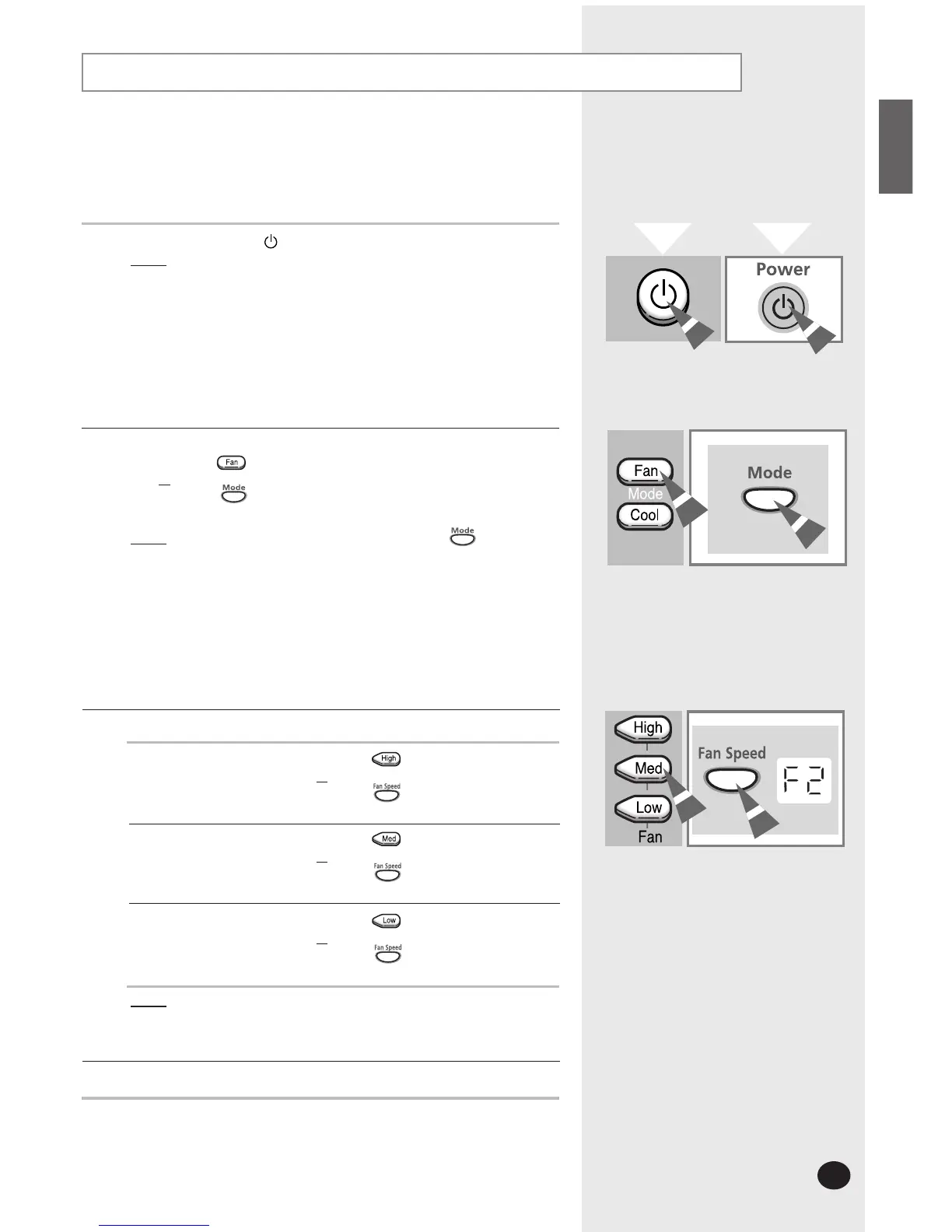
If the atmosphere in your room is stale, you can air it using the Fan
feature.
When you operate the air conditioner, air flow blades are open and
half closed automatically to give the proper air flow.
1
If necessary, press the (On/Off) button.
Result
: ◆ The air conditioner starts up in the mode selected
when the unit was last used.
◆ The unit beeps twice.
2
If the Fan speed (F1,F2,F3) is not displayed on the unit:
◆ Press the button on the remote control
or
◆ Press the button on the unit one or more times
Until the fan speed (F1,F2,F3) is displayed.
Result
: ◆ The unit beeps each time you press the button.
◆ The air conditioner starts up in the Fan mode.
➢
◆ You can change modes at any time.
◆ When the air conditioner is in the Fan mode, the
temperature is not displayed; in this case, you do not
need to set the temperature.
3
To set the fan speed to...
Then...
Result
: Each time you press a button, the unit beeps.
4
To control the direction of the air flow, refer to page 10~11.
High ◆ Press the button on the remote control.
or
◆ Press the button on the unit until F3
lights up
Med ◆ Press the button on the remote control.
or
◆ Press the button on the unit until F2
lights up
Low ◆ Press the button on the remote control.
or
◆ Press the button on the unit until F1
lights up
Remote Control
Control Panel



 To Next Page