✎
■
When the player displays the Blu-ray disc menu of a commercially recorded
movie disc, you must select Play Movie or Start in the disc menu, and then
press the
v
button to play the movie.
■
You can perform software upgrades using the USB Host jack with a USB flash
memory stick only
.
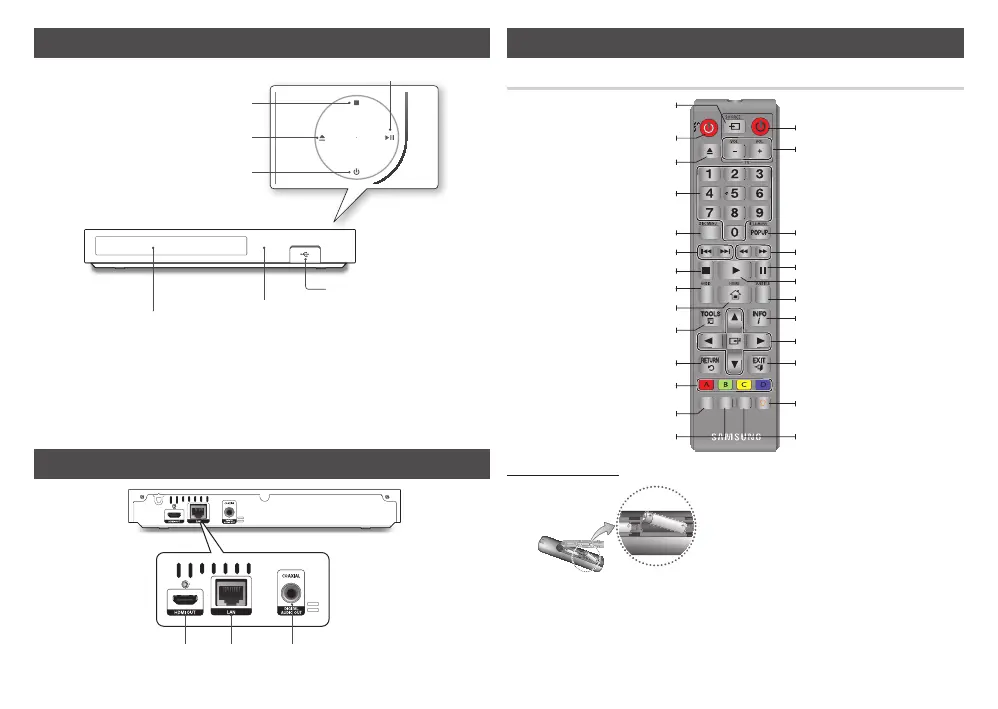
BONUS REPEAT
A-B
VIEW
REPEAT LIGHT
Press to open and close the disc tray.
After setup, allows you to set the input
source on your TV.
Turn the player on and off.
Return to the previous menu.
These buttons are used both for
menus on the player and also several
Blu-ray Disc functions.
Press the number buttons to operate
options.
Use to enter the disc menu.
Press to skip backwards or forwards.
Press to search a disc backwards or
forwards.
Allows you to repeat A-B disc.
Use to access various audio functions
on a disc (Blu-ray Disc/DVD).
Press to stop a disc.
Press to move to the Home screen.
Turn the TV on and off.
TV volume adjustment.
Press to pause a disc.
Press to play a disc.
Allows you to repeat a title, chapter,
track, or disc.
Press to use the Tools menu.
Use to display the playback information
when playing a Blu-ray Disc/DVDs.
Use to select menu items and change
menu values.
Press to exit the menu.
Use to enter the Popup menu/Title
menu.
Press to switch the Blu-ray Disc/DVD's
subtitle language.
Press to use the bonusview function.
For using at night or when the room
is dark.(If this button is set to On,
battery usage time will be reduced.)
✎
■
If the remote does not operate properly:
●
Check the polarity (+/–) of the batteries.
●
Check if the batteries are drained.
●
Check if the remote sensor is blocked
by obstacles.
●
Check if there is any fluorescent lighting
nearby.
!
■
Dispose of batteries according to local
environmental regulations. Do not put
them in the household trash.
■
Do not dispose of batteries in a fire.
■
Do not short circuit, disassemble or
overheat the batteries.
■
Danger of explosion if battery is
incorrectly replaced. Replace only with
the same or equivalent type.


 To Next Page