Settings
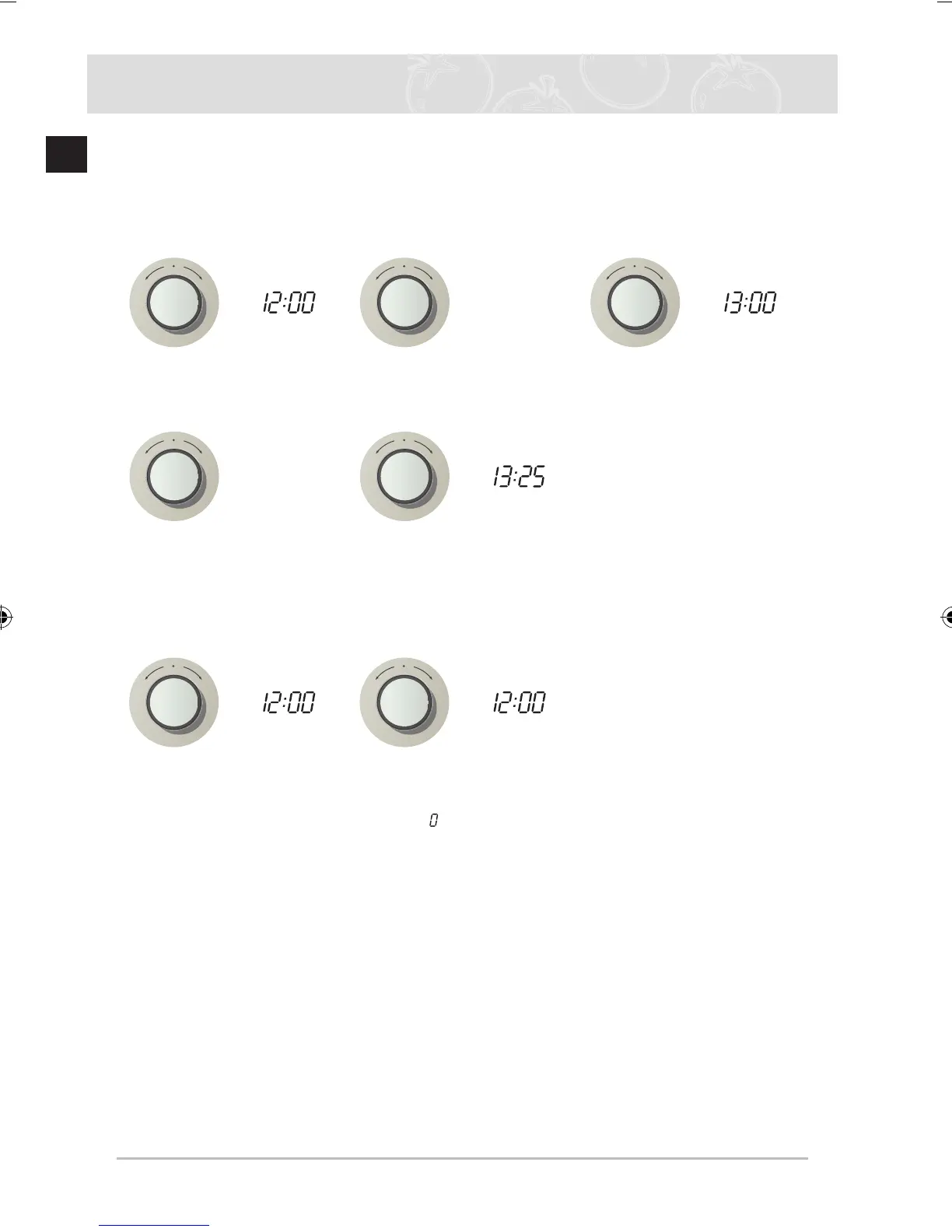
Time setting
If the oven is pluged to the power suply for the first time, its display will illuminate for short time
and after 3 seconds 12:00 starts to blink. Before the oven can be used the time setting must be
completed.
1
Press Time Select
Knob, hour figures
blink.
2
Turn Time Select
Knob, set desired
time in hours.
3
Press Time Select
Knob, minute figures
blink.
4
Turn Time Select
Knob, set desired
time in minutes.
5
Press Time Select
Knob to confirm.
Set Timer
1
Turn Time Select
Knob, set timer time. 2
Press Time Select
Knob to confirm.
✉ While the timer is operating, the “ ” mark on the left side of the screen rotates to
indicate the process.
If you want to stop the timer operation, set the timer to 0:00.
While it is operating, press the Time selection knob to display the clock for the
current time.



 To Next Page