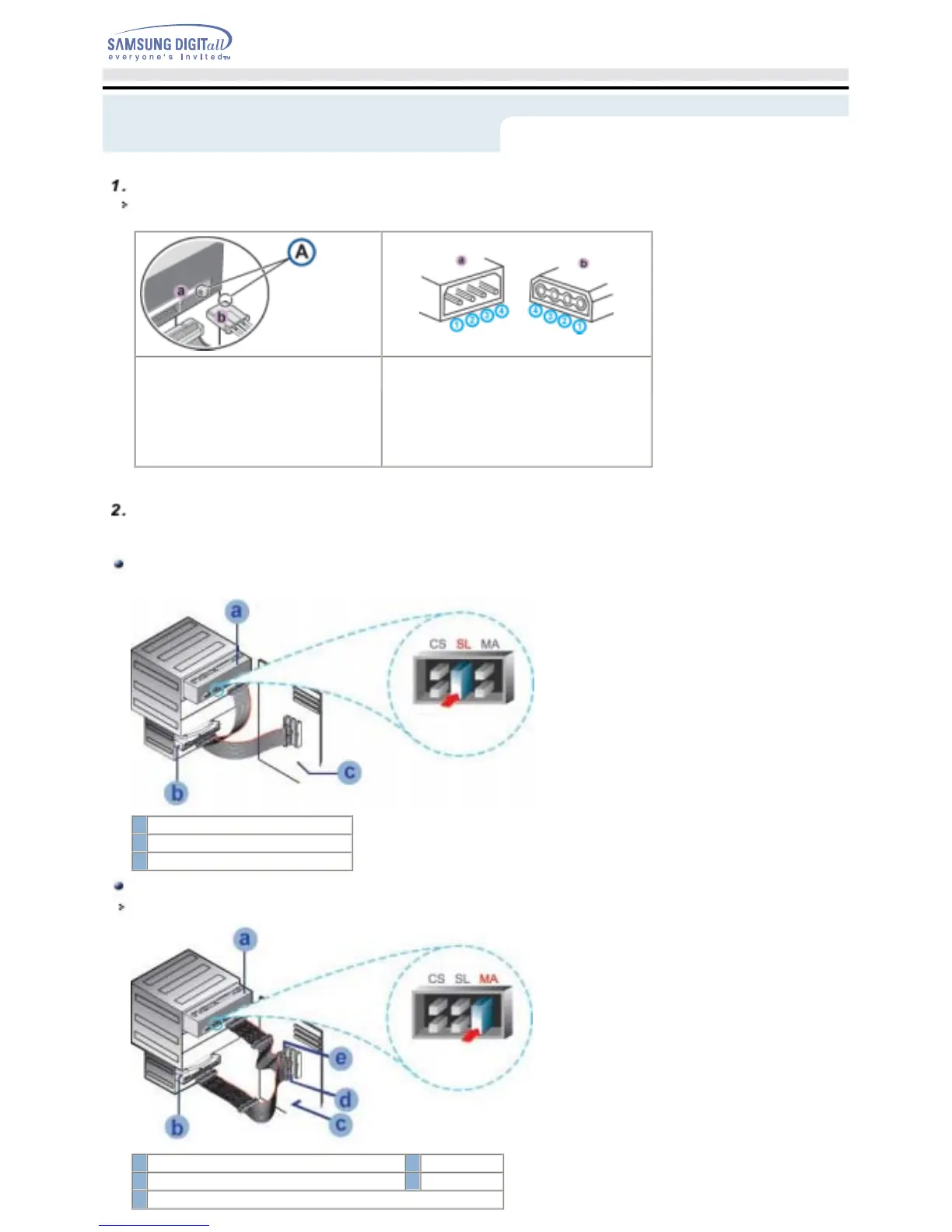
A -
Cut Side
2
Ground
3
Ground
4
+12V DC
Note:
An improperly connected power cable may cause trouble. Check the direction of the power connector
and the incline side of the COMBO drive before connecting.
Connecting the E-IDE cable
Insert the IDE cable (40-pin), which is connected to the hard disk to the interface terminal.
(Place the red line of the cable close to the Pin 1.)
When using one E-IDE cable
Connect the cable to the SL (Slave) of the Master/Slave Select Terminal at the rear of the COMBO drive.
a : Slave Drive (Choose the SL Jumper)
b : Hard Drive
c : MainBoard
When using two E-IDE cable
If there is only one COMBO drive, select MA (Master).
a : Master Drive (Choose the MA Jumper)
b : Hard Drive
c : MainBoard d : Primary 1
e : Secondly 1
Connecting the power cable
The 4-pin power cable from the internal power unit of your computer must be connected to the power
terminal on the rear of the COMBO drive.
1
+5V DC
Setup
English - 10


 To Next Page