26
ENG
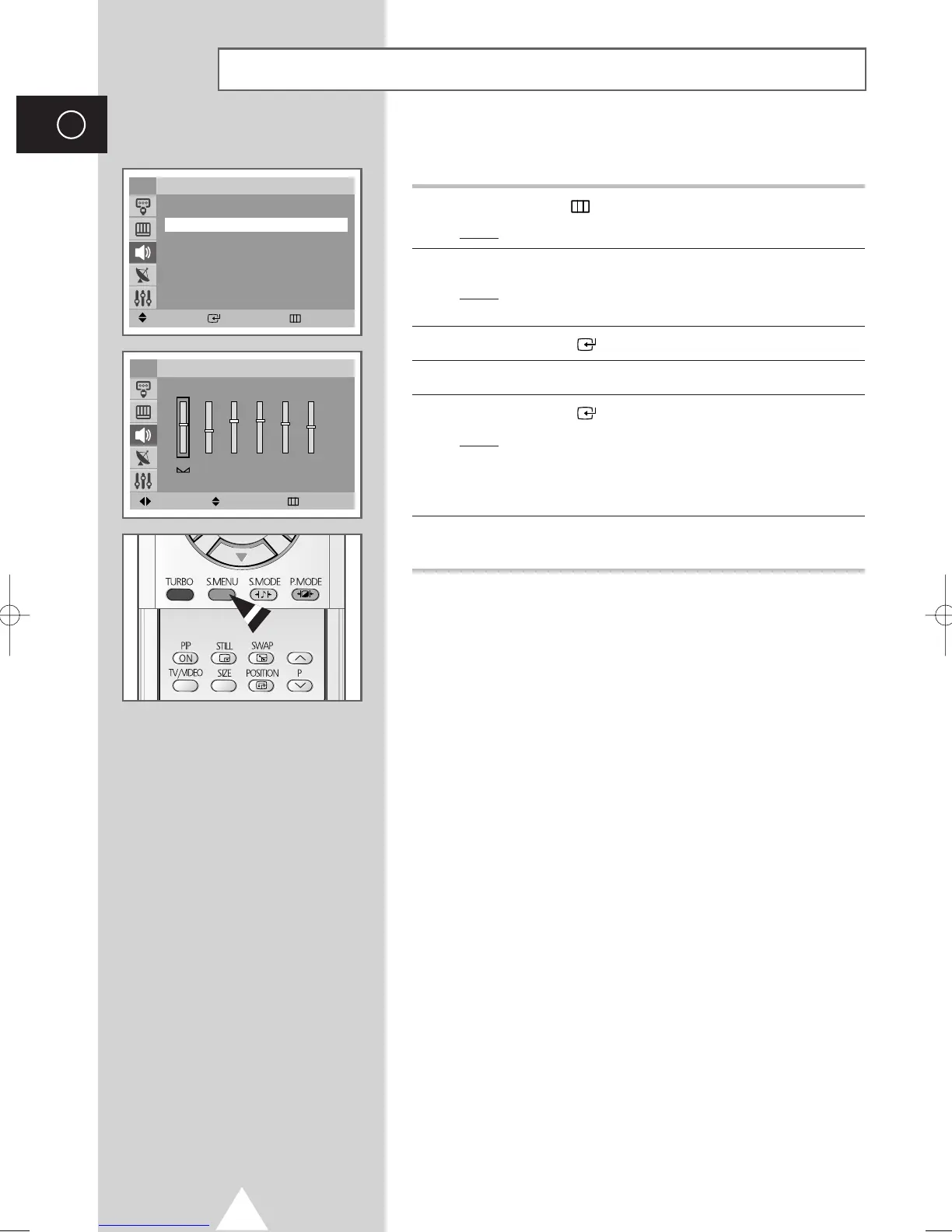
The sound settings can be adjusted to suit your personal preferences.
1 Press the MENU ( ) button.
Result
: The main menu is displayed.
2 Press the ▼ or ▲ button to select Sound.
Result
: The options available in the Sound group are
displayed.
3 Press the ENTER ( ) button.
4 Press the ▼ or ▲ button to select Equalizer.
5 Press the ENTER ( ) button.
Result
: The options available in the Equalizer group are
displayed.
➢
You can also display this group simply by pressing the
S.MENU (Sound Menu) button.
6 Select the option to be adjusted by pressing the œ or √ button.
Press the
▼ or ▲ button to reach the required setting.
➢
If you make any changes to these settings, the sound
standard is automatically switched to
Custom.
Adjusting the Sound Settings
Move Enter Return
Sound
Mode : Standard
√√
Equalizer
√√
Auto Volume : Off
√√
Dolby Virtual : Off
√√
Pseudo Stereo : Off
√√
Turbo Plus : Off
√√
TV
100 300 1K 3K 10K
Move Adjust Return
Equalizer
TV
R
L
AA68-03418A-00Eng_UMG_TM76 6/2/04 11:49 AM Page 26



 To Next Page