28
ENG
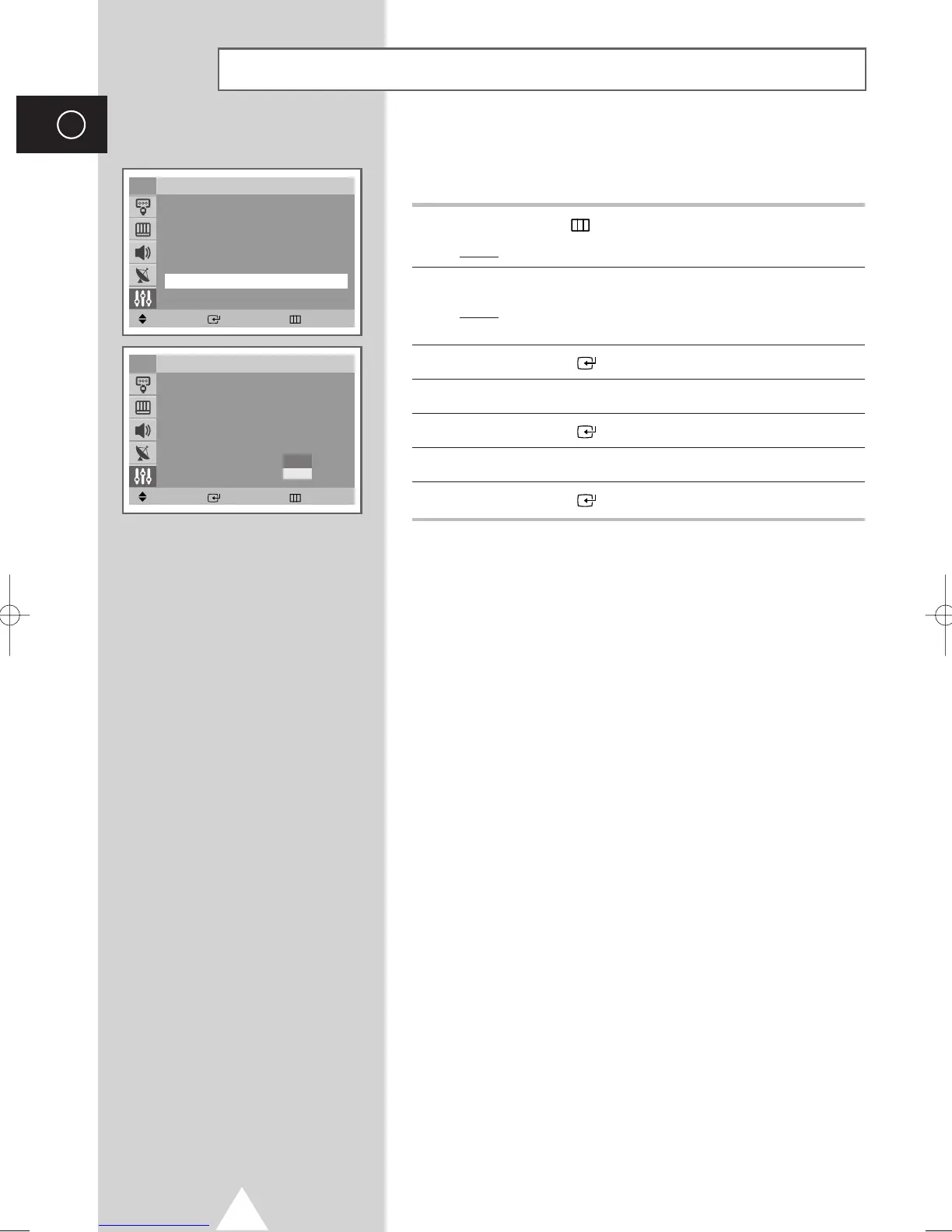
Selecting the Melody
You can hear clear melody sound when the television is powered on
or off.
1 Press the MENU ( ) button.
Result
: The main menu is displayed.
2 Press the ▼ or ▲ button to select Setup.
Result
: The options available in the Setup group are
displayed.
3 Press the ENTER ( ) button.
4 Press the ▼ or ▲ button to select Melody.
5 Press the ENTER ( ) button.
6 Press the ▼ or ▲ button to select On (activating) or Off .
7 Press the ENTER ( ) button.
Move Enter Return
Setup
Plug & Play
√√
Language : English
Time
√√
Child Lock
√√
Blue screen : Off
√√
Melody : On
√√
Demonstration
√√
TV
Move Enter Return
Setup
Plug & Play
√√
Language : English
Time
√√
Child Lock
√√
Blue screen : Off
√√
Melody : On
√√
Demonstration
√√
TV
Off
On
AA68-03418A-00Eng_UMG_TM76 6/2/04 11:49 AM Page 28



 To Next Page