11
ENG
● CONNECTIONS
connections
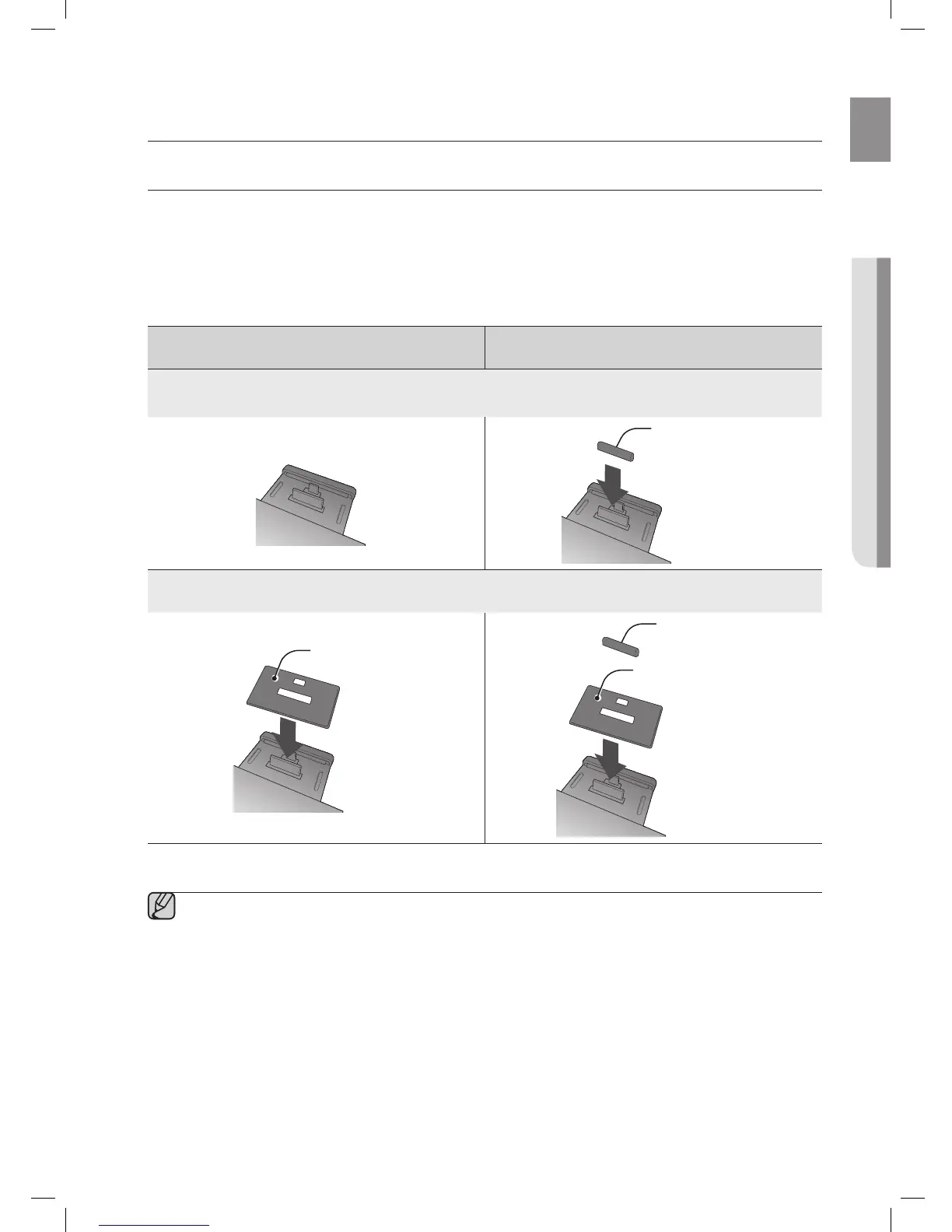
USING THE SPACER COVER
Attach the space cover if you want to dock a Samsung Galaxy or Apple device having no protective case onto the
Dual Dock.
- Use it for stable installation of your device considering the shape of the device.
The Dual Dock also comes with a protective cover for the 30-pin Apple device connector. Use the protective cover
for the 30-pin connector when you attach the 5-pin Samsung Galaxy device.
See the illustrations below for additional instructions.
<For Apple Device Users> <For Galaxy Device Users>
When docking a device, use appropriate support considering the docking device’s protective case
or the device’s shape for further stability.
Protective Cover
Used for docking devices having no protective case on it.
Spacer Cover
Spacer Cover
Protective Cover
▪ It is impossible to attach a device to the Dual Dock that has a case thicker than 1.5 mm or an unusual
rounded bottom.



 To Next Page