EasyManua.ls Logo

Samsung DA-E570 - Connecting Devices to the Dual Dock

Samsung DA-E570
22 pages
Print Icon
To Next Page IconTo Next Page
To Previous Page IconTo Previous Page
Loading...
12
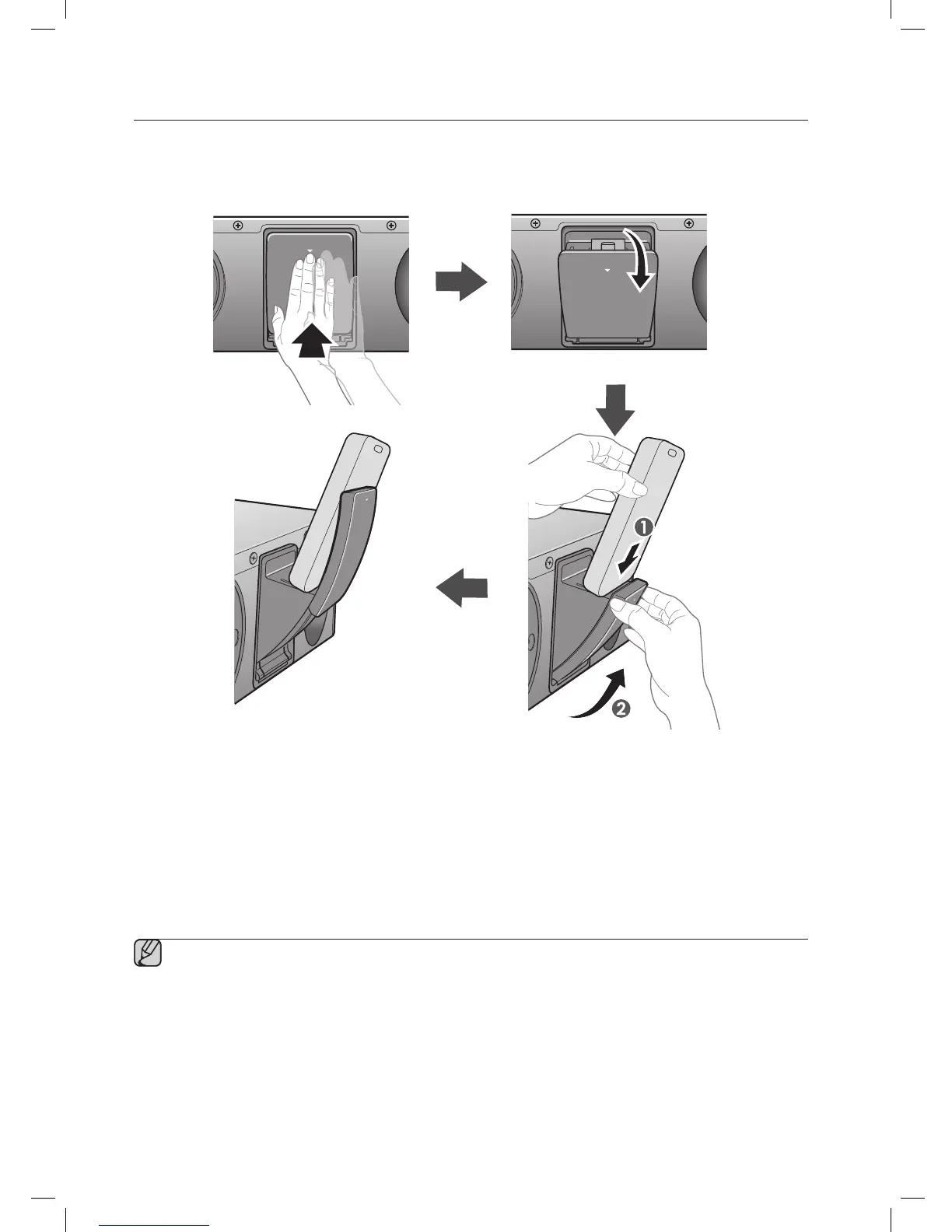
CONNECTING A DEVICE TO THE DUAL DOCK
How to connect a device to the Dual Dock.
1. The DUAL DOCK is located on the back of the product. To open, push it in gently.
2. If you have a Samsung Galaxy device, connect the device to the 5 pin (smaller) connector to connect to the Dual
Dock. If you have a Apple device, connect the device to the 30 pin (larger) connector on the Dual Dock.
3. Lift the device support up as shown to prevent the device from sliding or falling off the Dual Dock.
Turn on your Samsung Galaxy device before you attach it to the Dual Dock.
This unit doesn't support the simultaneous docking of Samsung Galaxy and Apple devices.
Connect your Samsung Galaxy or Apple device to the Dual Dock before starting Docking mode.
(See page 16)

DC 12V 2A
AUX IN
ONLY FOR SERVICE
PUSH
PUSH
DC 12V 2AAUX IN ONLY FOR SERVICE
PUSH
DC 12V 2AAUX IN ONLY FOR SERVICE
PUSH
DC 12V 2A
AUX IN
ONLY FOR SERVICE
DC 12V 2A
AUX IN
ONLY FOR SERVICE
PUSH
PUSH
DC 12V 2AAUX IN ONLY FOR SERVICE
PUSH
DC 12V 2AAUX IN ONLY FOR SERVICE
PUSH
DC 12V 2A
AUX IN
ONLY FOR SERVICE
DC 12V 2A
AUX IN
ONLY FOR SERVICE
PUSH
PUSH
DC 12V 2AAUX IN ONLY FOR SERVICE
PUSH
DC 12V 2AAUX IN ONLY FOR SERVICE
PUSH
DC 12V 2A
AUX IN
ONLY FOR SERVICE
DC 12V 2A
AUX IN
ONLY FOR SERVICE
PUSH
PUSH
DC 12V 2AAUX IN ONLY FOR SERVICE
PUSH
DC 12V 2AAUX IN ONLY FOR SERVICE
PUSH
DC 12V 2A
AUX IN
ONLY FOR SERVICE

Related product manuals