EasyManua.ls Logo

Samsung DVD-L70 - User Manual

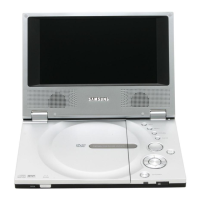
Samsung DVD-L70
59 pages
Print Icon
To Next Page IconTo Next Page
Loading...
UK
Portable DVD Player
DVD-L75
DVD-L70

Other manuals for Samsung DVD-L70

Questions and Answers

  • C
    Casey GarciaAug 14, 2025
    Why Samsung DVD-L70 Portable DVD Player battery pack won’t charge?
    • L
      Loretta HaynesAug 15, 2025
      If the battery pack on your Samsung Portable DVD Player won't charge: * Make sure the DVD player is turned off, as it cannot charge while on. * If the battery pack is hot, allow it to cool down before attempting to charge it. * Consider using a fully charged battery pack or the AC adapter instead.
  • B
    Beth ParkerAug 18, 2025
    Why Samsung Portable DVD Player has no picture or sound?
    • T
      tuckerrichardAug 18, 2025
      If your Samsung Portable DVD Player is not showing a picture or playing sound, here are a few things you can check: * Make sure the video and audio cables are securely connected. * Confirm that the disc is a compatible format like DVD (region number 1 or all), DVD-RW, or AUDIO CD. * Ensure the disc isn't scratched or dirty. * Verify the label-side of the disc is facing up. * If viewing with a TV, check that the TV channel is set to VIDEO or AV.
  • J
    Jamie HernandezAug 21, 2025
    What to do if Samsung DVD-L70 Portable DVD Player remote control won’t work?
    • T
      Tiffany BrownAug 21, 2025
      If the remote control for your Samsung Portable DVD Player isn't working, try these steps: * Ensure the battery is correctly inserted, matching the “+” and “-” directions. * Replace the battery with a new one, as the current battery may be dead. * Make sure you are pointing the remote control directly at the remote control sensor on the DVD player. * Remove any obstacles that might be blocking the signal between the remote control and the sensor.
  • A
    Alyssa BullockAug 25, 2025
    How to reset password on Samsung DVD-L70?
    • E
      erobertsAug 26, 2025
      To reset the password on your Samsung Portable DVD Player: 1. Turn on the unit without a disc inside. 2. Simultaneously press the STOP and PLAY buttons on the unit for three seconds. The Select Menu Language display will appear. 3. Select the desired language using the UP or DOWN button. 4. Press the MENU button on the remote to select Parental Mode. The Parental Mode will unlock. 5. Press the DOWN button to select Parental. 6. Press ENTER, and the Create Password display will appear, allowing you to set a new rating level and password.
  • J
    Jacqueline WellsAug 28, 2025
    What to do if Samsung DVD-L70 power does not turn on or suddenly turns off?
    • C
      Cheryl IngramAug 28, 2025
      If your Samsung Portable DVD Player isn't turning on or is suddenly turning off: * Ensure the AC power cord is securely plugged into an AC outlet. * Try turning the power off and then back on.
  • M
    Melissa BensonAug 31, 2025
    What to do if Samsung Portable DVD Player battery pack is in place but the power does not turn on or suddenly turns off?
    • R
      ryan28Sep 1, 2025
      If the battery pack is properly installed in your Samsung Portable DVD Player, but the device won't power on or shuts off unexpectedly, ensure that the battery pack is adequately charged. If it's not, you should recharge it.
  • K
    Karen JacobsSep 3, 2025
    Why Samsung Portable DVD Player power does not turn on?
    • J
      Janet VasquezSep 3, 2025
      If your Samsung Portable DVD Player is not turning on, try replacing the battery pack with a fully charged one or use the AC adapter.
  • C
    Christopher RodriguezSep 7, 2025
    What to do if Samsung DVD-L70 Portable DVD Player power charge lamp quickly?
    • J
      Jeremiah Little Jr.Sep 7, 2025
      If the power charge lamp on your Samsung Portable DVD Player flashes quickly, remove the DC cord from the battery pack and then plug it back in. If the battery pack is installed, remove the DC cord from it before performing this procedure.
  • K
    Katie PetersonSep 10, 2025
    Why Samsung DVD-L70 power charge lamp does not light (Battery pack won’t charge)?
    • L
      Linda WalterSep 10, 2025
      If the power charge lamp on your Samsung Portable DVD Player isn't lighting up and the battery pack isn't charging: * Ensure the DVD player is within a temperature range of 50°F~86°F. Charging may be prevented if the DVD player is overheated and the battery pack’s internal temperature is too high. * Check that the DC cord of the AC adapter is correctly plugged in.

Summary

Safety and Operating Instructions

Key Safety Precautions

Essential safety guidelines for operating the DVD player.

Product Safety Information

Laser Safety Warning

Caution regarding potential hazardous radiation exposure from the laser system.

Disc Type and Playback Compatibility

Front Panel Component Identification

Right Panel Port Identification

Bottom Panel Component Identification

Remote Control Button Functions

Remote Control Operation Guide

Battery Installation

Step-by-step instructions for inserting the battery into the remote control.

Connecting to a Television

AC Adapter Usage Guidelines

Battery Pack Charging Information

Battery Pack Operation and Charging

Playing a Disc: Initial Steps

Initial Setup Procedure

Steps for the first-time setup of language preferences before playing a disc.

Disc Insertion and Playback

Procedures for opening the disc cover, placing, and starting disc playback.

Repeat Playback Modes

Aspect Ratio Adjustment (EZ View)

DVD Aspect Ratio Settings

How to adjust the picture aspect ratio for DVDs on different TV types.

Aspect Ratio Settings for TV

TV Aspect Ratio Modes

Explanation of various aspect ratio modes (Wide, Screen Fit, Zoom) for 16:9 and 4:3 TVs.

Selecting Audio Language

Selecting Subtitle Language

Using the Setup Menu

Language Settings Configuration

Audio and Subtitle Options Setup

Display Setup Options

Parental Control Setup and Password

Cautionary Notes: Player Usage

Cautions on Using the Player

Warnings and precautions for using the DVD player in various environments.

Cautionary Notes: Battery Pack Safety

Battery Pack Handling Dangers

Critical warnings regarding battery disassembly, metal objects, heat, and water exposure.

Cautionary Notes: Battery Pack Management

Troubleshooting Common Issues

Troubleshooting: Picture and Sound Problems

Troubleshooting: DVD and Battery Operation

Technical Specifications

Car Power Adapter Usage

Using the Car Power Adapter

Instructions for connecting and using the car power adapter as a power source.

Car Power Adapter Safety Precautions

Samsung DVD-L70 Specifications

General IconGeneral
I/O ports1 x L/R Stereo Out 1 x Composite Video Out
Video outComposite
Dimensions (WxDxH)200 x 140 x 28 mm
Maximum HDD recording time2.5 h
Disc types supportedCD-ROM, DVD-ROM
Number of optical discs1 discs
Aspect ratio16:9
Product colorSilver
Weight and Dimensions IconWeight and Dimensions
Weight680 g

Related product manuals