019
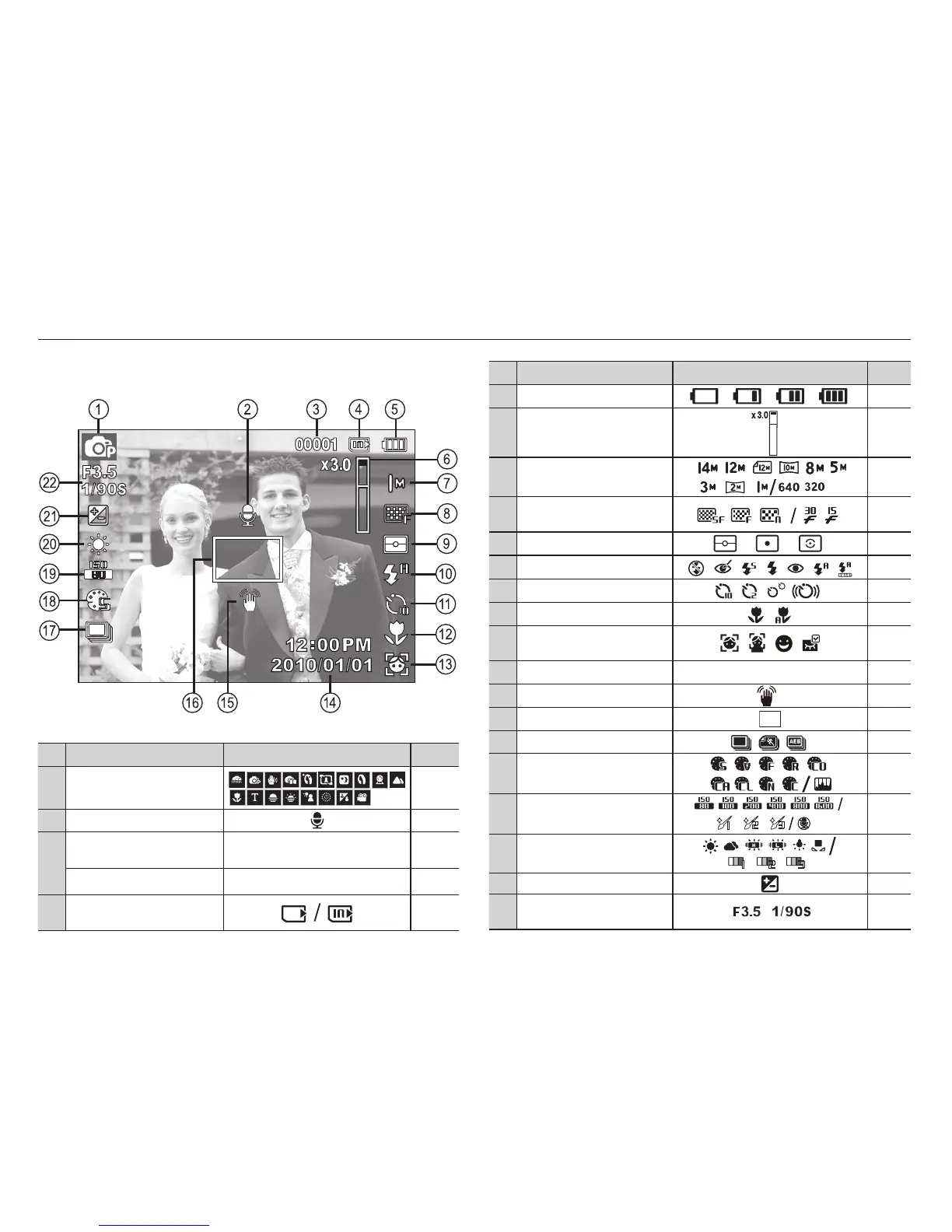
The LCD monitor displays information about the shooting
functions and selections.
LCD monitor indicator
No. Description Icons Page
1 Recording mode
p.21
2 Voice Memo
p.48
3
Number of available shots
remaining
00001 p.17
Remaining time 00:00:00 p.17
4
Memory card icon /
Internal memory icon
-
[Image & Full Status]
No. Description Icons Page
5 Battery
p.15
6
Optical / Digital Zoom bar /
Digital Zoom rate
p.29
7 Photo Size / Movie Size
p.38
8
Image Quality /
Frame Rate
p.39
9 Metering
p.44
10 Flash
p.33
11 Self-timer
p.36
12
Macro
p.31
13
Face Detection · Self-Portrait
· Smile Shot · Blink Detection
p.41
14 Date / Time 2010/01/01 12:00 PM p.54
15 Camera shake Warning
p.28
16
Auto Focus Frame
p.44
17 Drive mode
p.47
18
Photo Style Selector /
Image adjust
p.45/
46
19
ISO / Face Retouch /
Without voice
p.40/
43/49
20
White Balance
/
Face Tone
p.40/
43
21
Exposure compensation
p.39
22
Aperture Value /
Shutter Speed
-


 To Next Page