4
Connecting network
NOTE
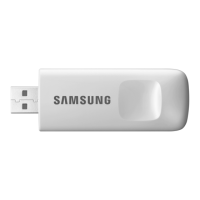
• ThisSMARTHOMEADAPTERsupportonlybelowthree
encryption.
‐ Open(Noencryption),WPA/TKIP,WPA2/AES
‐ YoumaynotbeabletoestablishWi-Ficonnectionif
othertypeofencryptionisused.
• ForSMARTHOMEADAPTERinstallation,selectSMART
READYappliancelocationneartowirelessrouter.In
caseWi-Fisignalstrengthisweakened,SmartThings
appmaybedisconnecteddependingontheWi-Fi
signalstrength.
• Smart-PhoneshouldbeintheWi-Fisignalzonetouse
SmartThingsapp.
• ForMobilebroadbandinternetaccess,SmartThings
appcanbeusedwhenMobileBroadbandAdapteris
activatedtouseWi-Fi.
• ThisproductsupportsonlyDHCP(DynamicHost
CongurationProtocol).Ifusersuseanexisting
wirelessrouter,theDHCPserveroptionfunction
shouldbeactivated.
• Selectachannelforthewirelessrouterthatisnot
currentlybeingused.
• Ifawirelessrouterisconnectedbyotherthanthe
abovemodes,theroutermaynotbeconnectedwith
theSMARTHOMEADAPTERormaynotwork.Touse
802.11n,usingWPA2/AESisrecommended.
SmartThings app


 To Next Page