6
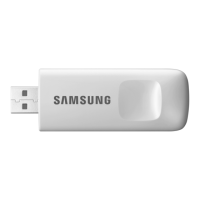
Connecting the wireless IP router with an
SMART HOME ADAPTER
• Forwirelessrouterinstallation,refertotheuser
manualofthecorrespondingrouter.
• SamsungSMARTHOMEADAPTERsupportsthe
communicationprotocolsofIEEE802.11b/g/n(2.4GHz).
• Forwirelessrouterinstallation,refertotheuser
manualofeachmanufacturingcompany.
Samsungdoesnotprovidecustomerswiththe
wirelessroutermanual.
• Uncertiedroutermaynotbeabletoconnectwithan
SMARTHOMEADAPTER.
• Certiedrouterhasthelogoofbelowonthepackage
orusermanual.
Downloading the SmartThings app
• YoucandownloadtheSmartThingsapponyoursmart
phonebysearching"SmartThings(SamsungConnect)"
onPlayStore,GalaxyAppsoriPhoneappStore.
SmartThings (Samsung Connect)
Samsung Electronics Co., Ltd.
NOTE
• TheSmartThingsappisnotcompatiblewithtablets
andsomedevices.
‐ AndroidOS6.0orlater(withatleast2GBRAM)is
recommended.
‐ Supportedscreenresolutions:1280x720(HD),1920
x1080(FHD),2560x1440(WQHD)
SmartThings app


 To Next Page