27
Selecting Audio/Subtitle Language
•
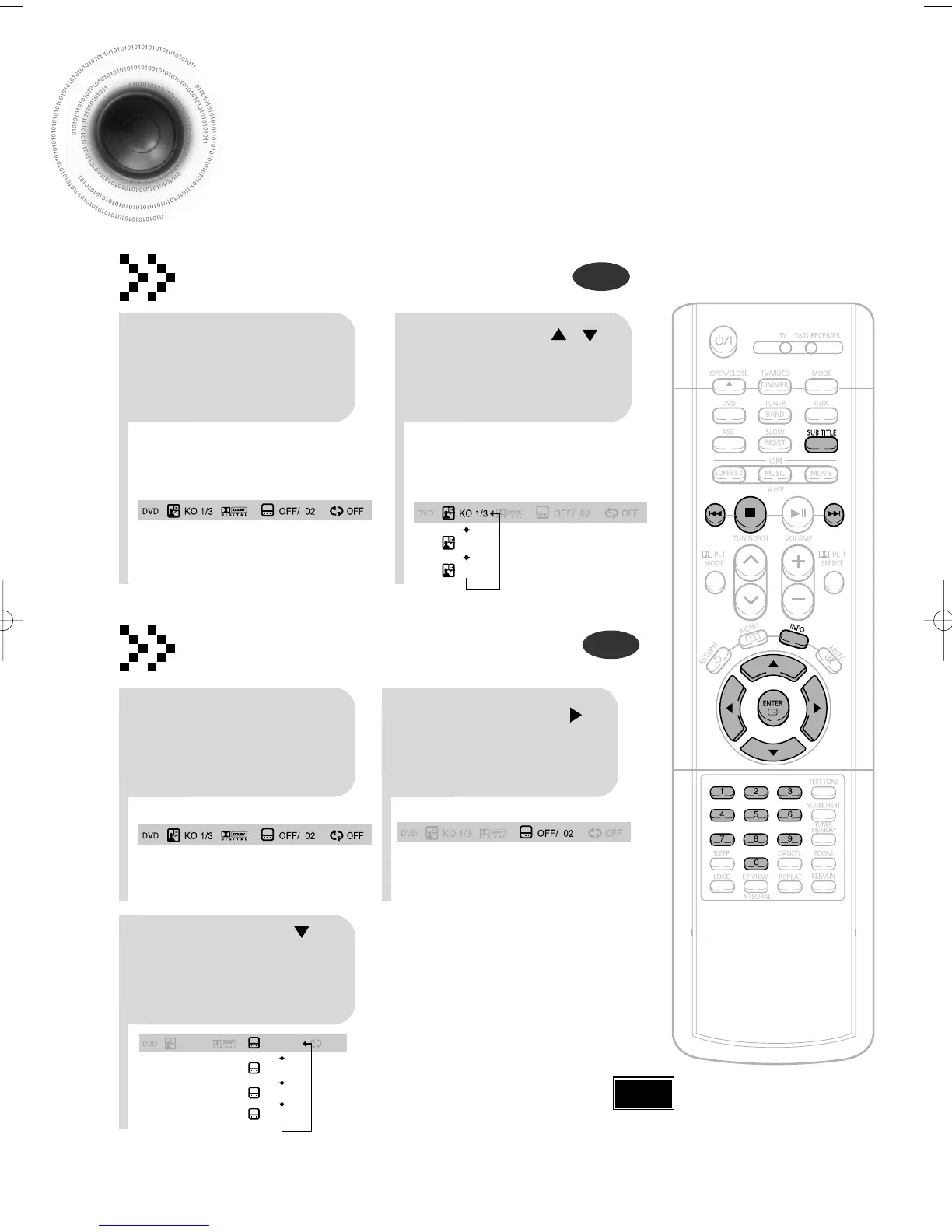
Depending on the number of languages on a
DVD disc, a different audio language (KOREAN,
ENGLISH, JAPANESE, etc.) is selected each
time the button is pressed.
2
Press Cursor ,
buttons or numeric
buttons to select the
desired audio language.
1
Press INFO button
twice.
•
You can use the SUBTITLE
button on the remote control to
select a subtitle language.
•
Depending on the disc, the
Subtitle and Audio Language
functions may not work.
Audio Language Selection Function
DVD
Subtitle Language Selection Function
DVD
Note
KO 1/3 KO 01/ 03
OFF
EN 02/ 03
JA 03/ 03
OFF / 03
2
Press Cursor
button to move to
SUBTITLE display.
1
Press INFO button
twice.
3
Press Cursor
button or numeric
buttons to select
the desired subtitle.
1p~30p(DB350/1650)-XSG 2004.9.18 9:32 AM Page 30


 To Next Page