58
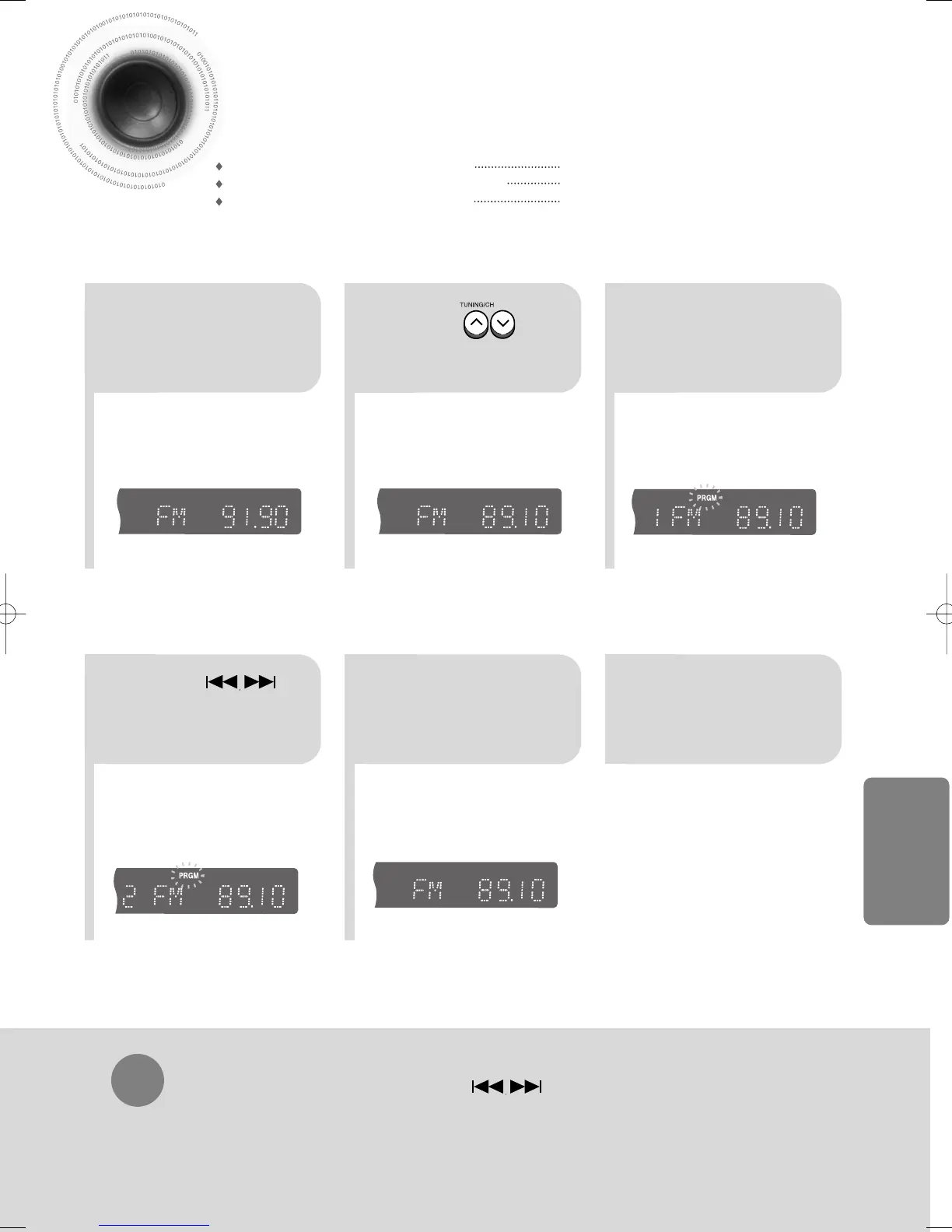
Presetting Stations
To tune in to a preset station, press on the
remote control to select a channel.
•
Refer to Step 2 on page 57 to
automatically or manually tune in
to a station.
21
•
Each time the button is pressed,
the band switches between
"FM
➝
MW
➝
LW".
TITLE
CHAP
PRGM RDS RT
ST
TUNED
kHz
MHz
TITLE
CHAP
PRGM RDS RT
ST
TUNED
kHz
MHz
•
“PRGM” flashes in the display.
3
Example: Presetting FM 89.1 in the memory
Press to
select "89.10".
Press the
TUNER(BAND)
button and select
•
Press the TUNER MEMORY button before
‘PRGM’ disappears from the display.
•
‘PRGM’ disappears from the display and
the station is stored in memory.
54
•
You can select between 1 and
15.
TITLE
CHAP
RDS RT
ST
TUNED
kHz
MHz
Press the TUNER
MEMORY button.
Press the TUNER
MEMORY button.
6
To preset another
station, repeat
steps 2 to 5.
Press to
select preset
number.
RADIO OPERATION
You can store up to:
15 FM stations
8 MW stations
7 LW stations
• FM Frequency Modulation
• AM(MW) Medium Wave
• LW Long Wave
33P~70P(DB750M)-GB 12/24/03 2:36 PM Page 59


 To Next Page
 Loading...