EasyManua.ls Logo

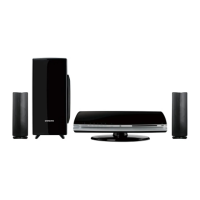
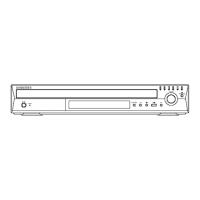
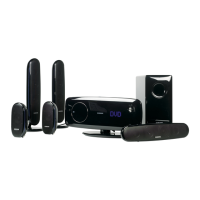
Samsung HT-X250 - Service Manual

Samsung HT-X250
74 pages
Print Icon
To Next Page IconTo Next Page
Loading...
DVD RECEIVER AMP
Basic Model : HT-X250
SERVICE
Manual
DVD RECEIVER AMP SYSTEM Features
*
Multi-Disc Playback & FM Tuner
* DVD-Audio compatible
*
USB Host support
* Dolby Pro Logic II
* DTS (Digital Theater Systems)
* TV Screen Saver Function
* Power Saving Function
* Customized TV Screen Display
* HDMI
* AV SYNC Function
*
Anynet+(HDMI-CEC) Function
- Confidential -
MODEL : HT-X250
* Application : HT-X200/X250
All manuals and user guides at all-guides.com
all-guides.com

Other manuals for Samsung HT-X250

Questions and Answers

  • E
    Emily BrownAug 14, 2025
    Why is my Samsung Home Cinema speakers remote control not working?
    • S
      sbassAug 14, 2025
      The remote control may not work because it is being operated outside of its effective range. Also, check if the batteries are dead or if you have correctly selected the appropriate mode (TV/DVD) on the remote.
  • H
    Heather KaiserAug 17, 2025
    What to do if there is no sound from my Samsung Home Cinema speakers?
    • J
      Jacqueline McdanielAug 17, 2025
      If no sound is coming from your Samsung Home Cinema speakers, first verify that the speaker connections are correct. Then, check if the speaker settings are customized correctly. Finally, ensure the disc you are playing is not severely damaged.
  • M
    Maria PhillipsAug 20, 2025
    Why Dolby Digital 5.1 CH Surround Sound is not produced on my Samsung Home Cinema speakers?
    • M
      Misty CarrollAug 21, 2025
      Dolby Digital 5.1 CH Surround Sound will only work if the disc has the "Dolby Digital 5.1 CH" mark, indicating it was recorded with 5.1 channel audio. Also, verify that the audio language is correctly set to DOLBY DIGITAL 5.1-CH in the information display.
  • M
    Maureen JordanAug 25, 2025
    What to do if playback does not start on Samsung Home Cinema speakers?
    • J
      Jonathan PittsAug 25, 2025
      If playback doesn't start on your Samsung Home Cinema speakers, check if the DVD's region code is compatible. Note that CD-ROMs and DVD-ROMs are not supported by this DVD player. Also, ensure that the rating level settings are correct.
  • D
    Debra GonzalezAug 27, 2025
    Why can sound be heard only from a few speakers and not all six on my Samsung Home Cinema speakers?
    • A
      Andrew BrownAug 27, 2025
      When playing a CD or listening to the radio, sound is only output to the front speakers (L/R). To use all six speakers, select "PRO LOGIC II" by pressing PL II (Dolby Pro Logic II) on the remote. Also, ensure the DVD disc is 5.1-CH compatible. In the audio setup, C, SL, and SR should be set to SMALL, not NONE.
  • H
    Holly MejiaAug 30, 2025
    What to do if I cannot eject the disc from my Samsung Home Cinema speakers?
    • S
      Sarah NelsonAug 30, 2025
      If you cannot eject the disc from your Samsung Home Cinema speakers, make sure the power cord is securely plugged into the outlet. Then, try turning the power off and back on.
  • E
    elizabeth95Sep 3, 2025
    Why playback does not start immediately when pressing Play/Pause on my Samsung Home Cinema speakers?
    • N
      Natalie GambleSep 3, 2025
      If playback doesn't start immediately when you press the Play/Pause button on your Samsung Home Cinema speakers, it may be due to a deformed or scratched disc. Try wiping the disc clean.
  • J
    Jacob LeeSep 6, 2025
    How to receive radio broadcast on Samsung Home Cinema speakers?
    • J
      James MartinSep 6, 2025
      To receive radio broadcasts on your Samsung Home Cinema speakers, ensure the antenna is properly connected. If the antenna signal is weak, try installing an external FM antenna in an area where reception is better.
  • K
    Kevin BrooksSep 10, 2025
    What to do if I forgot the password for rating level on Samsung Home Cinema speakers?
    • A
      Adam GreerSep 10, 2025
      If you've forgotten the password for the rating level on your Samsung Home Cinema speakers, with the message (NO DISC) on the main unit's display, press and hold the STOP button on the main unit for more than 5 seconds. The display will show “INITIALIZE”, and all settings will revert to default. Then, press the POWER button. Note that this RESET function will erase all stored settings, so use it only when necessary.

Summary

Precautions

Safety Precautions

Detailed safety guidelines for handling and servicing the unit.

Servicing Precautions

Guidelines for safe and proper repair procedures.

ESD Precautions

Handling procedures to prevent damage from static electricity.

Laser Product Safety

Warnings and precautions related to laser product safety.

HDD Precautions

Precautions for data maintenance and handling of HDDs.

Product Description

Features

Overview of the product's key features and capabilities.

Product Functions

Speaker Connection

How to connect the speakers to the unit.

Main Functions

Explanation of core operational functions like disc playback.

Audio;Subtitle Language Selection

How to choose audio and subtitle tracks for discs.

Adjustments

DVD Flash Initialization and Update

Procedure for initializing DVD flash and updating firmware.

Disassembly Guide

Separate Cabinet Top

Step-by-step guide to disassembling the cabinet top.

Separate Rear Cover

Step-by-step guide to disassembling the rear cover.

Separate Chassis Back

Step-by-step guide to disassembling the chassis back.

Separate PCB

Step-by-step guide to disassembling the PCB.

Troubleshooting

Main Unit Issues

Troubleshooting flowchart for main unit problems.

Output Problems

Troubleshooting flowchart for output issues.

Power Protection Issues

Diagnosing and resolving power protection problems.

Fan Error Troubleshooting

Troubleshooting steps for fan error messages.

Communication Failure

Troubleshooting for communication errors between components.

Voltage Failure

Troubleshooting steps for voltage-related failures.

Exploded Views and Parts List

Exploded View

Visual diagram showing component assembly.

Parts List

List of all parts with part numbers and quantities.

Block Diagram

System Block Diagram

Overall system block diagram.

Wiring Diagram

Wire Sheet

Detailed wiring schematic of the system.

PCB Diagram

Main PCB Layout

Printed circuit board layout for the main unit.

Main PCB Description

Detailed description of the main PCB and its connectors.

Schematic Diagrams

Main MPEG Schematic

Schematic diagram for the main MPEG section.

Main MICOM Schematic

Schematic diagram for the main MICOM section.

Main HDMI Schematic

Schematic diagram for the main HDMI section.

Main DSP Schematic

Schematic diagram for the main DSP section.

Main AMP Schematic

Schematic diagram for the main amplifier section.

Main Jack 1 Schematic

Schematic diagram for the main jack connections (part 1).

Main Jack 2 Schematic

Schematic diagram for the main jack connections (part 2).

Main LED Schematic

Schematic diagram for the main LED display.

Key Schematic

Schematic diagram for the front panel key controls.

SMPS Schematic

Schematic diagram for the Switched-Mode Power Supply.

Circuit Board Descriptions

PCB Assembly Layout

Visual layout of the main PCB assembly.

SMPS, Main, Front PCB Functions

Functional overview of SMPS, Main, and Front PCBs.

Amp, HDMI, Video PCB Functions

Functional overview of Amp, HDMI, and Video sections.

New Functions

USB Entertainment Features

Describes USB features like movie playback and DRM-free host.

Wireless Home Theater System

Highlights wireless ready home theater system capabilities.

HDMI Features

Explains HDMI features like digital streaming and CEC.

Samsung HT-X250 Specifications

General IconGeneral
Audio decodersDolby Digital, Dolby Pro Logic II, DTS
RMS rated power600 W
Audio output channels5.1 channels
Audio formats supportedMP3, WMA
Center speaker RMS power100 W
USB version2.0
Supported radio bandsFM
Radio Data System (RDS)No
Number of optical discs1 discs
Optical disc player typeDVD player

Related product manuals