EasyManua.ls Logo

Samsung HW-F550 - User Manual

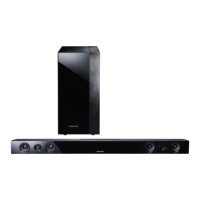
Samsung HW-F550
25 pages
Print Icon
To Next Page IconTo Next Page
Loading...
Crystal Surround Air Track
(Active Speaker System)
user manual
imagine the possibilities
Thank you for purchasing this Samsung product.
To receive a more complete service,
please register your product at
www.samsung.com/register
HW-F550
HW-F551

Questions and Answers

  • S
    Stephanie CoxJul 31, 2025
    Why is there no sound coming from my Samsung HW-F550?
    • F
      Felicia Maynard MDAug 1, 2025
      If your Samsung Speaker System isn't producing sound, ensure it's correctly connected to your TV. Check if the Mute function is activated and deactivate it by pressing the Mute button. Also, verify that the volume isn't set to the minimum and adjust it accordingly.
  • L
    Laura HicksAug 7, 2025
    What to do if my Samsung HW-F550 Speaker System remote control is not working?
    • S
      sbarnettAug 7, 2025
      If the remote control for your Samsung Speaker System isn't working, first, try replacing the batteries with new ones. If that doesn't solve the problem, make sure you're not too far from the main unit and move closer.
  • J
    John WaltonAug 15, 2025
    What to do if SoundShare (TV pairing) failed on Samsung HW-F550 Speaker System?
    • A
      Andrew PetersonAug 15, 2025
      If the SoundShare (TV pairing) failed on your Samsung Speaker System, note that SoundShare is supported by some Samsung TVs released after 2012. Check your TV to see if it supports SoundShare. Ensure your TV's firmware is up to date. If an error occurs during connection, press the button for 5 seconds to reset the product.
  • T
    Teresa AcostaAug 22, 2025
    How to fix reversed left/right channel sound on Samsung HW-F550 Speaker System?
    • B
      blevinstrevorAug 22, 2025
      If the sound from the left and right channels is reversed on your Samsung Speaker System, check the left and right audio output cables from the TV to ensure they are connected correctly.

Summary

SAFETY INFORMATION

Safety Warnings

Essential warnings to reduce risk of electric shock and injury.

Electrical Safety Precautions

Instructions for preventing electric shock and fire hazards.

DESCRIPTIONS

Front Panel Overview

Identifies and explains the controls and display on the front panel.

Rear Panel Connections

Details the various input/output ports on the rear panel.

REMOTE CONTROL

Tour of the Remote Control

Explains the function of each button on the remote control.

CONNECTIONS

CONNECTIONS

Connecting the Wireless Subwoofer

Steps to link the main unit and the wireless subwoofer.

CONNECTIONS

Connecting via HDMI Cable

How to connect external devices using HDMI for audio/video.

Connecting via Audio;Optical Cable

Steps for connecting devices using analog audio or digital optical cables.

FUNCTIONS

Bluetooth Functionality

Overview of using Bluetooth for wireless audio streaming.

FUNCTIONS

Connecting to a Bluetooth Device

Step-by-step guide for pairing a Bluetooth device with the unit.

FUNCTIONS

SoundShare TV Connection

Guide to connect unit to Samsung TV via Bluetooth for SoundShare.

Software Upgrade Process

Instructions for upgrading the unit's firmware using a USB drive.

FUNCTIONS

USB Device Connection

Instructions for connecting and using USB storage devices.

FUNCTIONS

FUNCTIONS

FUNCTIONS

TROUBLESHOOTING

Unit Not Turning On

Checks and remedies for power issues.

Function Not Working

Troubleshooting steps for unresponsive functions.

No Sound Produced

Solutions for audio output problems.

Remote Control Malfunction

Steps to fix issues with the remote control.

SoundShare Pairing Failure

Troubleshooting steps for failed SoundShare TV connection.

Samsung HW-F550 Specifications

General IconGeneral
Audio decodersDolby Digital, DTS
RMS rated power310 W
Audio output channels2.1 channels
Audio Return Channel (ARC)Yes
Subwoofer typeActive subwoofer
Subwoofer connectivityWireless
Cables includedAudio (3.5mm)
Receiver includedNo
Product colorBlack
Wall mountable-
Audio formats supportedAAC, FLAC, MP3, OGG, WAV
Consumer Electronics Control (CEC)Anynet+
Apple docking compatibilityNot supported
Soundbar dimensions (WxDxH)943 x 60 x 55 mm
Subwoofer dimensions (WxDxH)291 x 291 x 369 mm
Bluetooth version2.1+EDR
USB 2.0 ports quantity1
Power sourceAC
Package weight13800 g
Weight and Dimensions IconWeight and Dimensions
Soundbar weight2200 g
Subwoofer weight7250 g

Related product manuals