E (Effect) button : Resize
《69》
Change the resolution (size) of pictures taken. Select [Start image] to save an
image to be the start-up image.
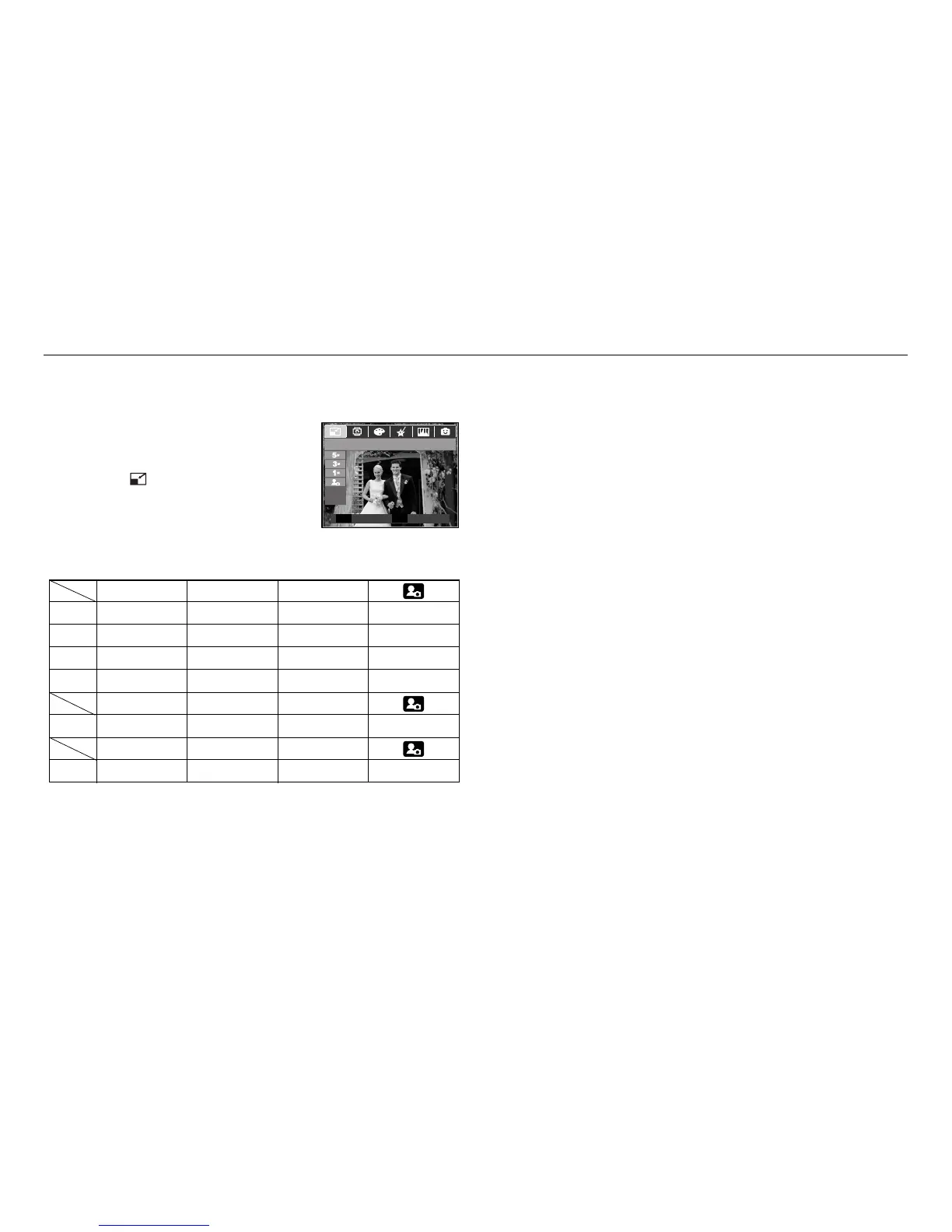
1. Press the play mode button and press the E
button.
2. Press the Left / Right button and select the
[RESIZE] ( ) menu tab.
3. Select a desired sub menu by pressing the Up /
Down button and press the OK button.
5M 3M 1M
8M ●●●●
5M ●●●
3M ●●
1M ●
5M 3M 1M
7M ●●●●
2M 1M
6M ●●●
■Image Resize Types (● : Selectable)
RESIZE
Move Exit
EE
- A large sized image can be resized to a smaller sized image, but not vice versa.
- Only JPEG images can be resized. Movie clip (AVI), Voice recording (WAV) files
can’t be resized.
- You can change the resolution of only those files compressed in the JPEG 4:2:2
format.
- The resized image will have a new file name. The [Start Image] image is stored
not on the memory card but on the internal memory.
- If a new user image is saved, one of the two user images will be deleted in order.
- If the memory capacity is insufficient to store the resized image, a [Memory Full!]
message will appear on the LCD monitor and the resized image can't be stored.


 To Next Page