English - 38
Setting the Sleep Timer
The sleep timer automatically shuts off the TV after a preset time (30, 60, 90, 120, 150 and 180 minutes).
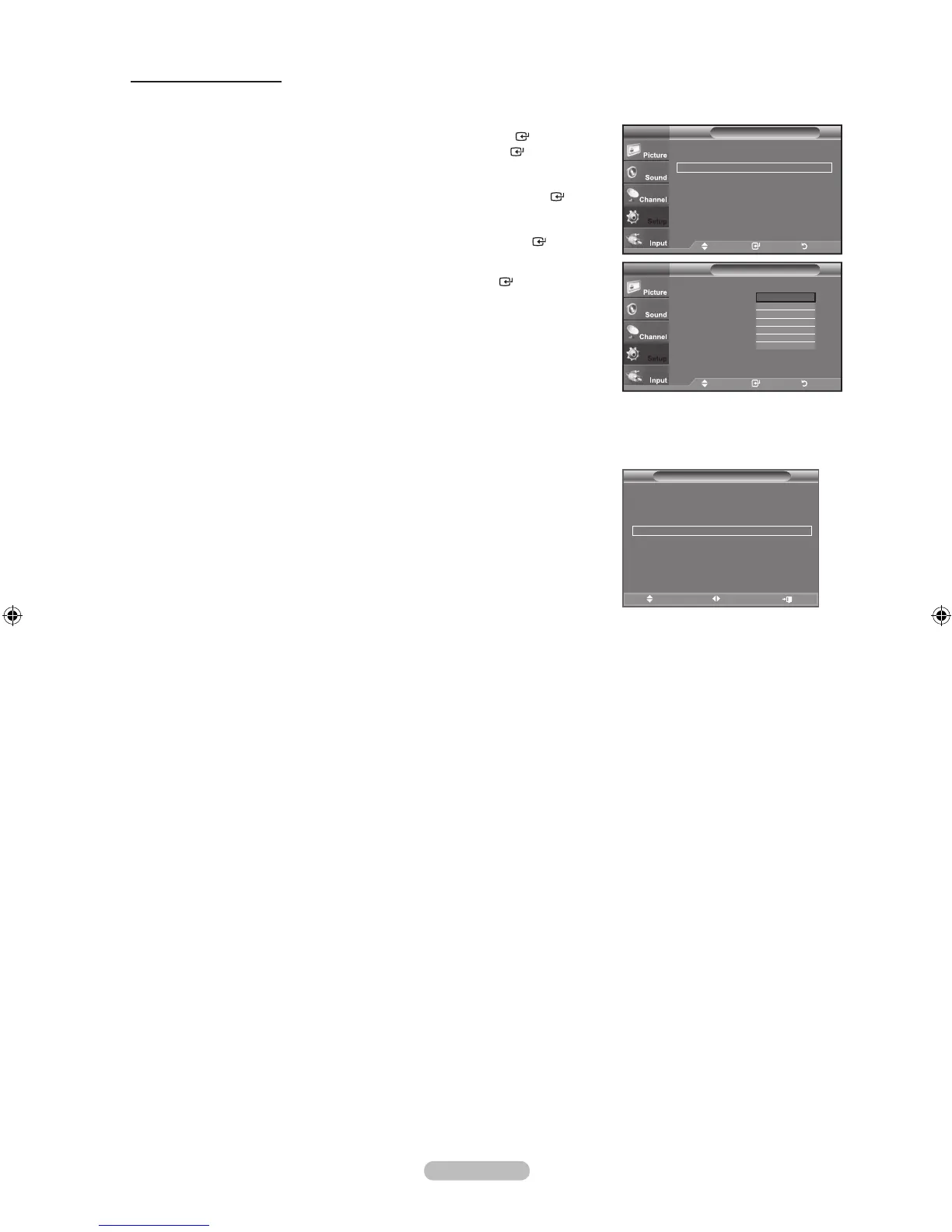
1. Press the MENU button to display the menu.
Press the ▲ or ▼ button to select "Setup", then press the ENTER
button.
Press the ▲ or ▼ button to select "Time", then press the ENTER
button.
2. Press the ▲ or ▼ button to select "Sleep Timer", then press the ENTER button.
3. Press the ▲ or ▼ button to select the minute, then press the ENTER button.
To cancel the set sleep timer:
Press the ▲ or ▼ button to select “Off”, then press the ENTER button.
4. Press the EXIT button to exit.
Easy Setting
1. Press the TOOLS button on the remote control.
2. Press the ▲ or ▼ button to select “Sleep Timer”.
3. Press the ◄ or ► button to select the minute.
4. Press the EXIT or TOOLS button to exit.
Setup
Plug & Play ►
Language : English ►
Time ►
Caption ►
External Settings ►
Entertainment : Off ►
Energy Saving : Off ►
AV Color System : Auto ►
PIP ►
TV
Move Enter Return
Time
Clock Set : 12 : 00 am
Sleep Timer : Off
Timer 1 : Inactivated
Timer 2 : Inactivated
Timer 3 : Inactivated
TV
Move Enter Return
Off
30
60
90
120
150
180
Tools
Anynet+ (HDMI-CEC)
Picture Mode : Standard
Sound Mode : Custom
Sleep Timer ◄ Off ►
SRS TS XT : Off
Energy Saving : Off
MTS : Stereo
Move Adjust Exit







 To Next Page