ENG
16
15
Connecting External Components
Connecting the FM Antennas
FRONT -H FRONT -H
FRONT -L FRONT -L
SUBWOOFER
2.1CH SPEAKERS OUT
ANTENNA
IMPEDANCE
FRONT:4 SUBWOOFER:3
R L
R L
FM (75 )
L
AUX IN 2
VIDEO OUT
HDMI OUT
R
COMPONENT VIDEO OUT
EXT(AV)
YP
B PR
ANTENNA
FM (75 )
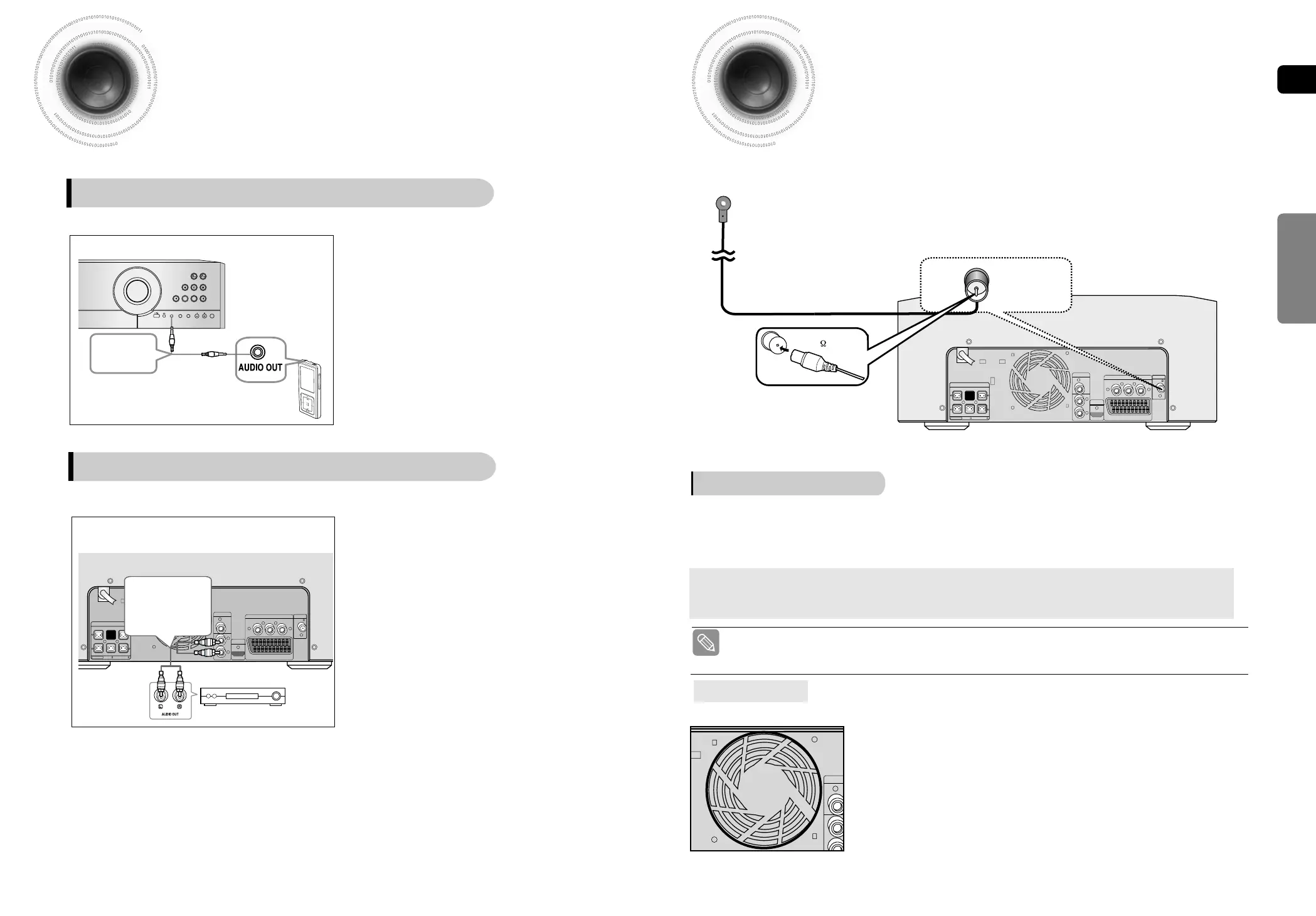
FM Antenna (supplied)
The cooling fan supplies cool air to the unit to prevent overheating.
Please observe the following cautions for your safety.
•
Make sure the unit is well-ventilated. If the unit has poor ventilation, the
temperature inside the unit could rise and may damage it.
•
Do not obstruct the cooling fan or ventilation holes. (If the cooling fan or
ventilation holes are covered with a newspaper or cloth, heat may build up
inside the unit and fire may result.)
Cooling Fan
FM antenna connection
1. Connect the FM antenna supplied to the FM 75Ω COAXIAL terminal as a temporary measure.
2. Slowly move the antenna wire around until you find a location where reception is good, then
fasten it to a wall or other rigid surface.
•
If reception is poor, connect an outdoor antenna.
Before attaching a 75Ω coaxial cable (with a standard type connector), disconnect the supplied FM
antenna.
CONNECTIONS
AUX1 : Connecting an External Component/MP3 player
VOLUME
AUX IN 1
MIC1 MIC2 MIC VOL ECHO
TUNERDVD/CD USBAUX
AUX1 : Front Panel
Audio Cable
(not supplied)
Components such as an MP3 Player
1 Connect AUX IN 1 (Audio) on the MINI COMPACT
front panel to the Audio Out of the external
component/MP3 player.
2 Press the AUX button to select <AUX1> input.
The mode switches as follows : AUX 1 ➝ AUX 2.
FRONT -H FRONT -H
FRONT -L FRONT -L
SUBWOOFER
2.1CH SPEAKERS OUT
ANTENNA
IMPEDANCE
FRONT:4 SUBWOOFER:3
R L
R L
FM (75 )
L
AUX IN 2
VIDEO OUT
HDMI OUT
R
COMPONENT VIDEO OUT
EXT(AV)
YP
B PR
AUX2 : Rear Panel
Audio Cable
(not supplied)
If the external analog
component has only
one Audio Out, connect
either left or right.
1 Connect AUX IN 2 (Audio) on the MINI COMPACT
rear panel to the Audio Out of the external analog
component.
■
Be sure to match connector colors.
2 Press the AUX button to select <AUX2> input.
The mode switches as follows : AUX 1 ➝ AUX 2.
AUX2 : Connecting an External Analog Component
Analog signal components such as a VCR.
• This unit does not receive AM broadcasts.
1~38-DA66-RDS ENG 2008.5.22 2:48 PM Page 18



 To Next Page