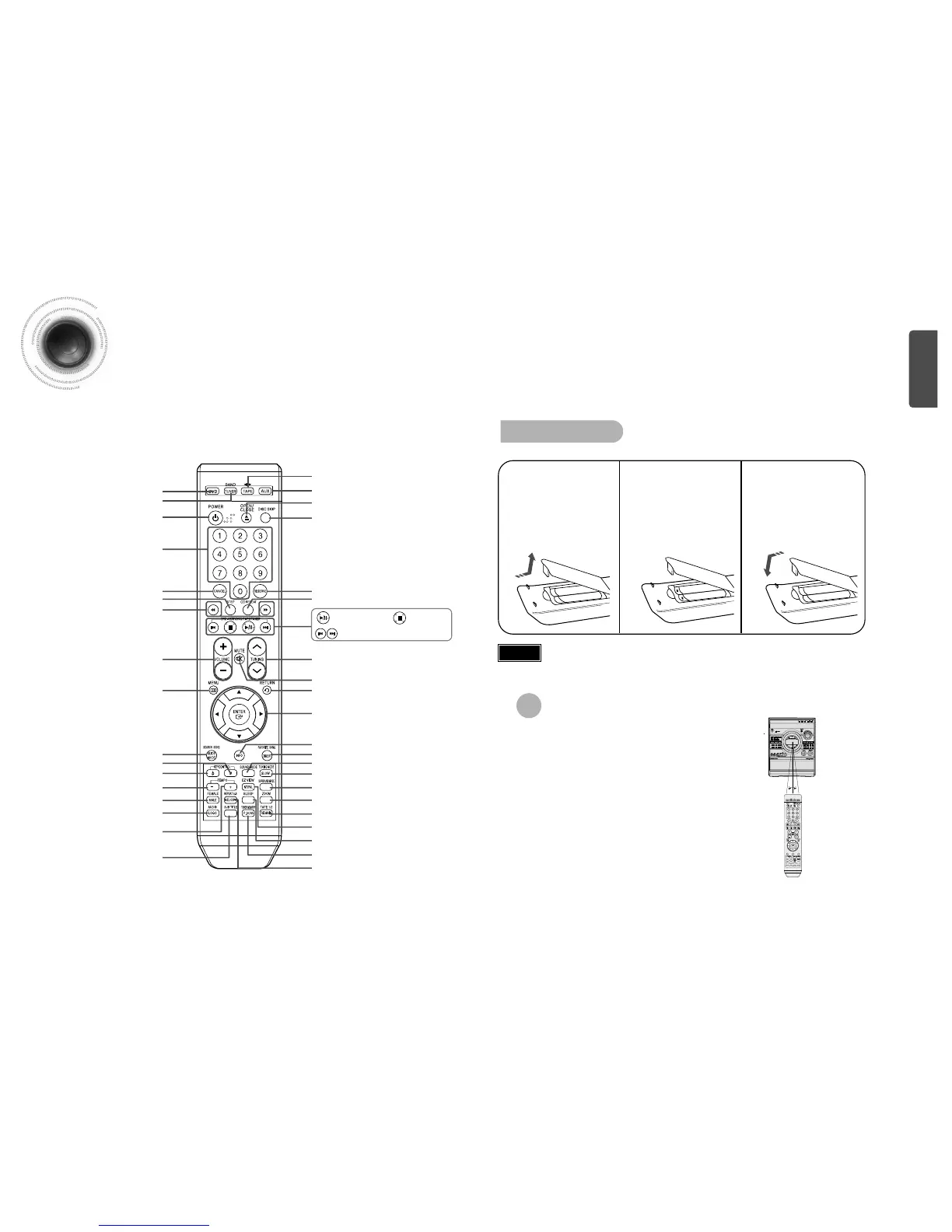
The remote control can be used up to approximately 23
feet/7 meters in a straight line. It can also be operated at
a horizontal angle of up to 30° from the remote control
sensor.
Range of Operation of the Remote Control
—Remote Control—
7
Description
PREPARATION
KEYCONTROL b button
VOLUME button
MENU button
POWER button
DVD button
TUNER(BAND) button
RESERVE button
CD REPEAT button
Number(0~9) buttons
DISC SKIP button
OPEN/CLOSE button
AUX button
TAPE button
Cursor/Enter button
SOUND MODE button
ZOOM button
REPEAT A-B/MELODY button
SLEEP button
TUNER MEMORY/P.SCAN button
EZ VIEW/NT/PAL button
RETURN button
SURROUND MODE button
TUNING MODE/SLOW button
INFO button
MUTE button
SEARCH SONG/SLIDE MODE button
TUNING button
FEMALE/MALE button
TEMPO- button
TEMPO+ button
SUB TITLE button
CANCEL button
STEP button
SEARCH buttons
FAVORITE SONG/DIGEST button
KEYCONTROL # button
Play/Pause button
Tuning Preset/CD Skip button
Stop button
AUDIO/LOGO button
Caution
Remove the battery
cover in the direction
of the arrow.
1
Insert two 1.5V AAA
batteries, paying
attention to the correct
polarities (+ and –).
2
Replace the battery
cover.
3
Follow these precautions to avoid leaking or cracking cells:
•
Place batteries in the remote control so they match the polarity:(+) to (+)and (–)to (–).
•
Use the correct type of batteries.Batteries that look similar may differ in voltage.
•
Always replace both batteries at the same time.
•
Do not expose batteries to heat or flame.
Insert Remote Batteries
TAPE1/2/REMAIN button


 To Next Page