9-10Samsung Electronics
Troubleshooting
9-3-6 Checking EEV
See 12-5 "Fault Diagnosis of Major Parts".
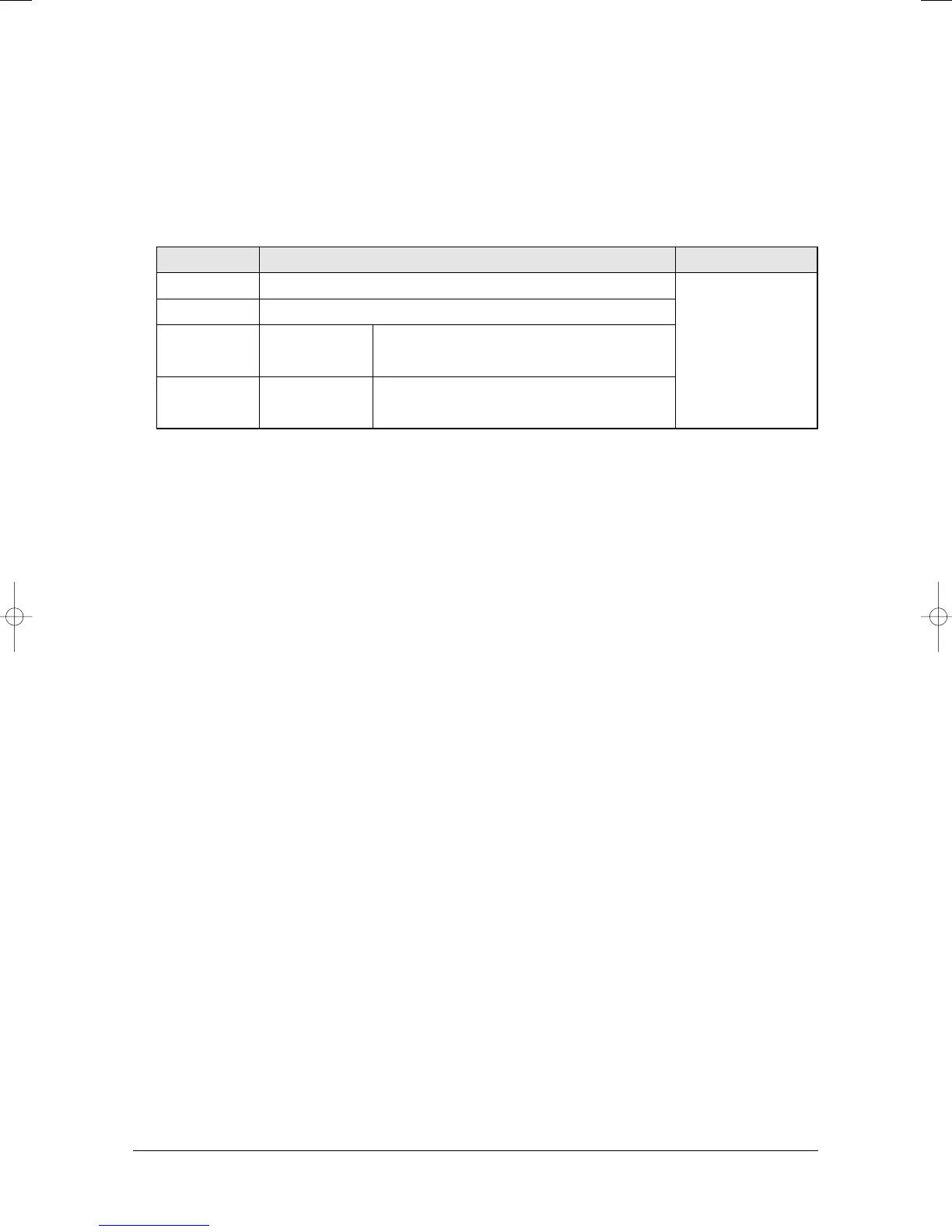
Current EEV step value can monitored with "VIEW MODE"
Press K4 key on the outdoor display PCB for several time to change the display to current EEV value.
Left 1 digit of the LED is data index and Right 3 digits is the value.
9-3-7 Pipe matching
See 12-2 "Checking and Testing operations".
9-3-8 Checking Motor in indoor unit
See 12-5 "Fault Diagnosis of Major Parts".
Index Value Remark
3 EEV-A step
4 EEV-B step
5
6 EEV-D step
MH040FXEA2/MH052FXEA2/MH14✳✳2X/MH16✳✳2X/
MH18✳✳2X/MH19✳✳2X/MH052FXEA2A/MH18VV1X/
MH19VV1X Always Zero
MH040FXEA2/MH052FXEA2/MH14✳✳2X/MH16✳✳2X/
MH18✳✳2X/MH19✳✳2X/MH052FXEA2A/MH18VV1X/
MH19VV1X/MH060FXEA3A Always Zero
EEV-C step
The step value range is
between Zero and 480.




 To Next Page