Reference for Installation
10-5Samsung Electronics
1. Check the piping connections.
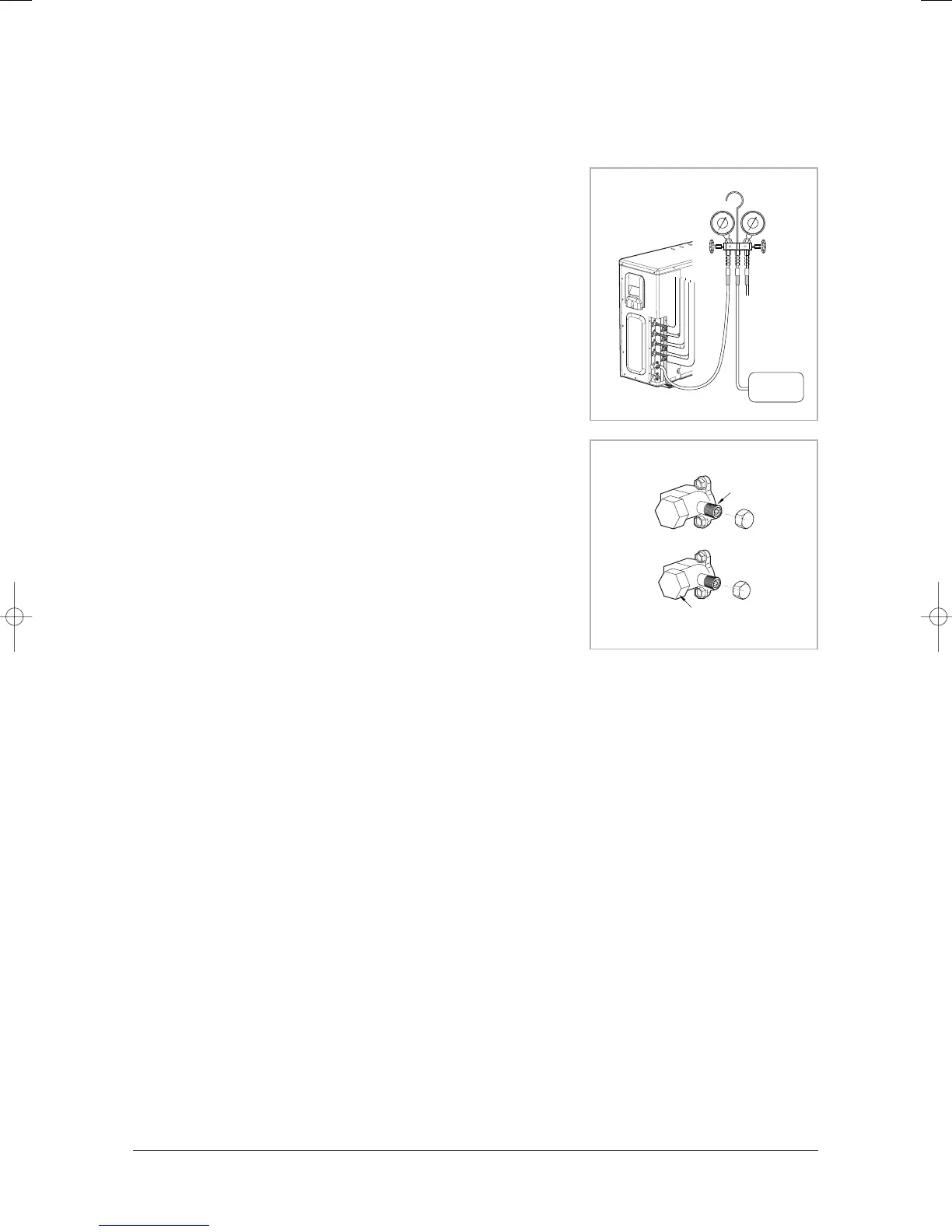
2. Connect the charging hose of low pressure side of manifold gauge to the
packed valve having a service port (5/8'' Packed valve) as shown at the
figure (Value stem : 1/2'' - 20UNF).
3. Open the valve of the low pressure side of manifold gauge counter-
clockwise.
4. Purge the air from the system using vacuum pump for about 30 minutes.
• Close the valve of the low pressure side of manifold gauge clockwise.
• Make sure that pressure gauge show -0.1MPa(-76cmHg) after about
30 minutes.
• This procedure is very important in order to avoid gas leak.
• Turn off the vacuum pump.
• Remove the hose of the low pressure side of manifold gauge.
5. Set valve cork of both liquid side and gas side of packed valve to the
open position.
6. Mount the valve stem nuts and the service port cap to the valve,
and tighten them at the torque of 183kgf•cm with a torque wrench.
7. Check for gas leakage.
• At this time, especially check for gas leakage from the 3 way valve’s
stem nuts, and from the service port cap.
■ MH068FXEA4/MH080FXEA4/MH30✳✳2X/MH070FXEA4A/MH080FXEA4A
A
B
C
D
Vacuum
Pump
Service port
Valve stem
Stem cap



 To Next Page