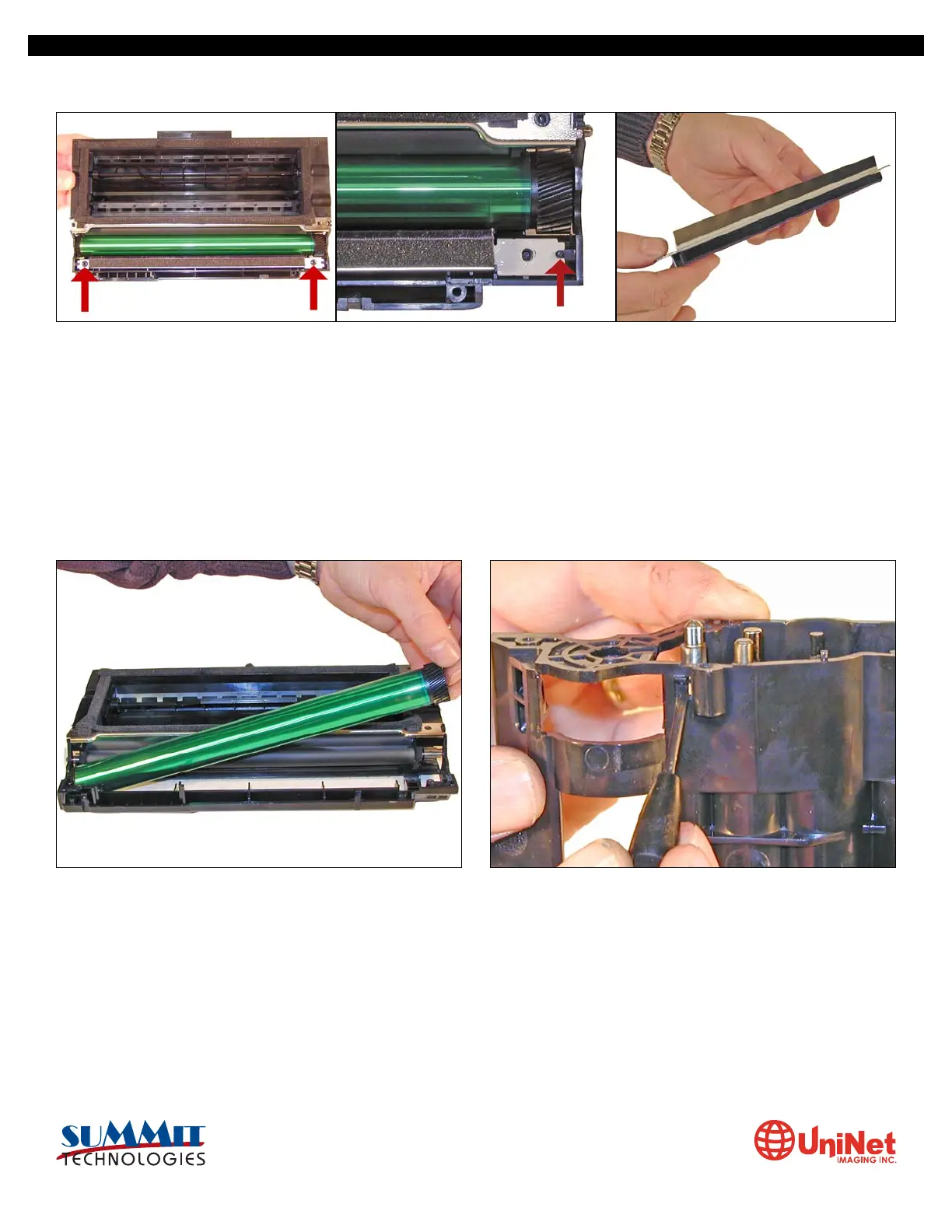
9. With the PCR cleaner assembly removed, the drum can eas-
ily be removed by lifting it out.
Clean out any remaining toner from the cartridge.
10. Press in on the bottom tab of the developer roller plate
(right gear side) to release it.
8. There are two screws on the PCR cleaner assembly. Remove them and gently pry the blade up. Be careful not to damage the
alignment pins. This PCR cleaner also has what can be considered a wiper blade. It is a very flimsy blade attached to the metal
bar. Wipe this blade down with a clean lint free cloth before re-installing.
It is very important that the PCR cleaner be cleaned. Vacuum or blow off any residual toner from the foam/felt.
SAMSUNG ML 2250 • CARTRIDGE REMANUFACTURING INSTRUCTIONS
3232 West El Segundo Blvd., Hawthorne, California 90250 USA • Ph +1 424 675 3300 • Fx +1 424 675 3400 • techsupport@uninetimaging.com • www.uninetimaging.com
© 2009 UniNet Imaging Inc. All trademark names and artwork are property of their respective owners. Product brand names mentioned are intended to show compatibility only. UniNet Imaging does not warrant downloaded information.


 To Next Page
 Loading...










