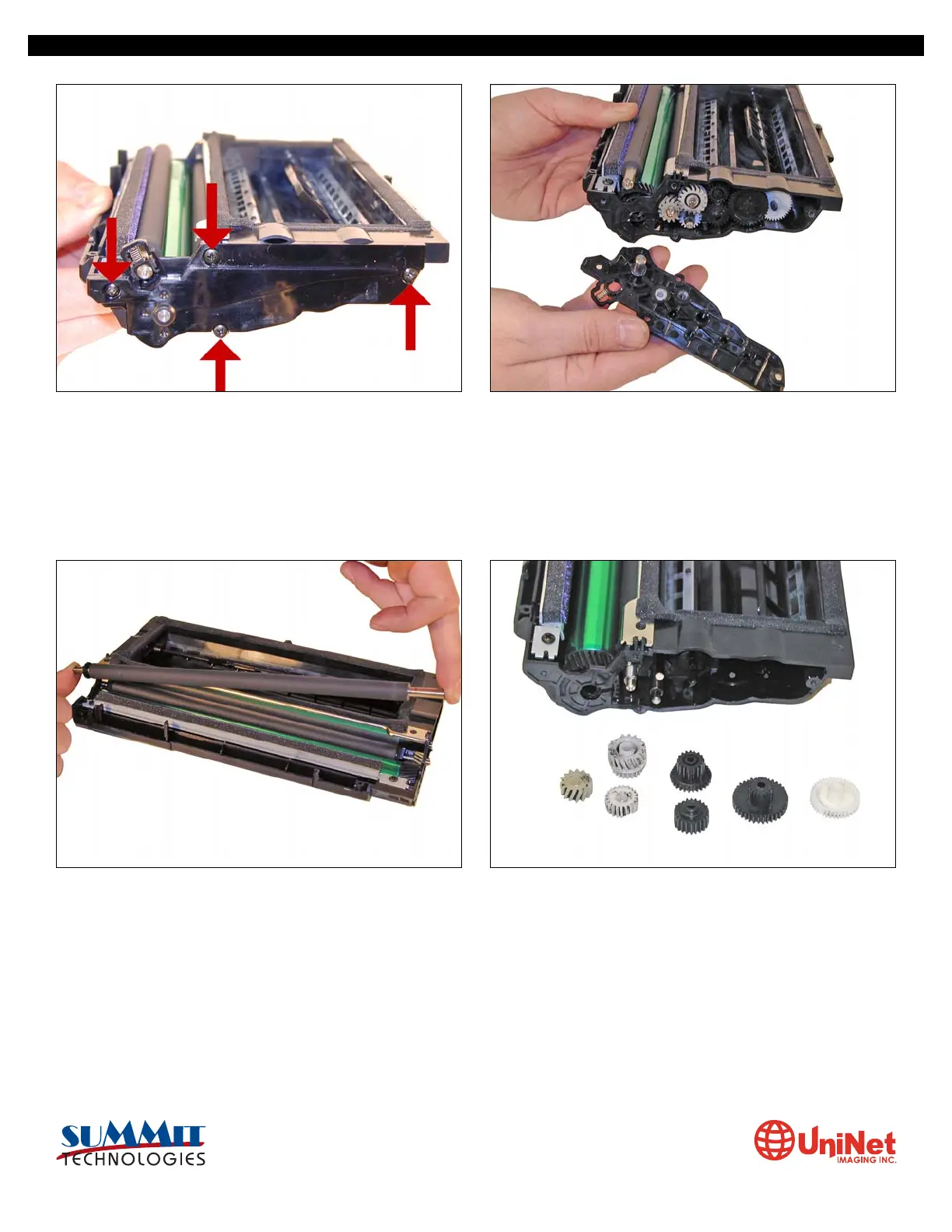
5. Remove the four screws on the right side end cap. Remove the end cap.
6. Remove the PCR. 7. Also on the right side there is a series of gears under the end
cap. Make a note of the location of each gear, and remove
them.
Clean the PCR with your normal PCR cleaner.
WARNING: Do not clean the OEM PCR with alcohol, as this will
remove the conductive coating from the roller. If the PCR is an
aftermarket, follow the cleaning methods recommended by
the manufacturer. If the PCR is an OEM, we recommend it be
cleaned with your standard PCR cleaner.
SAMSUNG ML 2250 • CARTRIDGE REMANUFACTURING INSTRUCTIONS
3232 West El Segundo Blvd., Hawthorne, California 90250 USA • Ph +1 424 675 3300 • Fx +1 424 675 3400 • techsupport@uninetimaging.com • www.uninetimaging.com
© 2009 UniNet Imaging Inc. All trademark names and artwork are property of their respective owners. Product brand names mentioned are intended to show compatibility only. UniNet Imaging does not warrant downloaded information.













 To Next Page