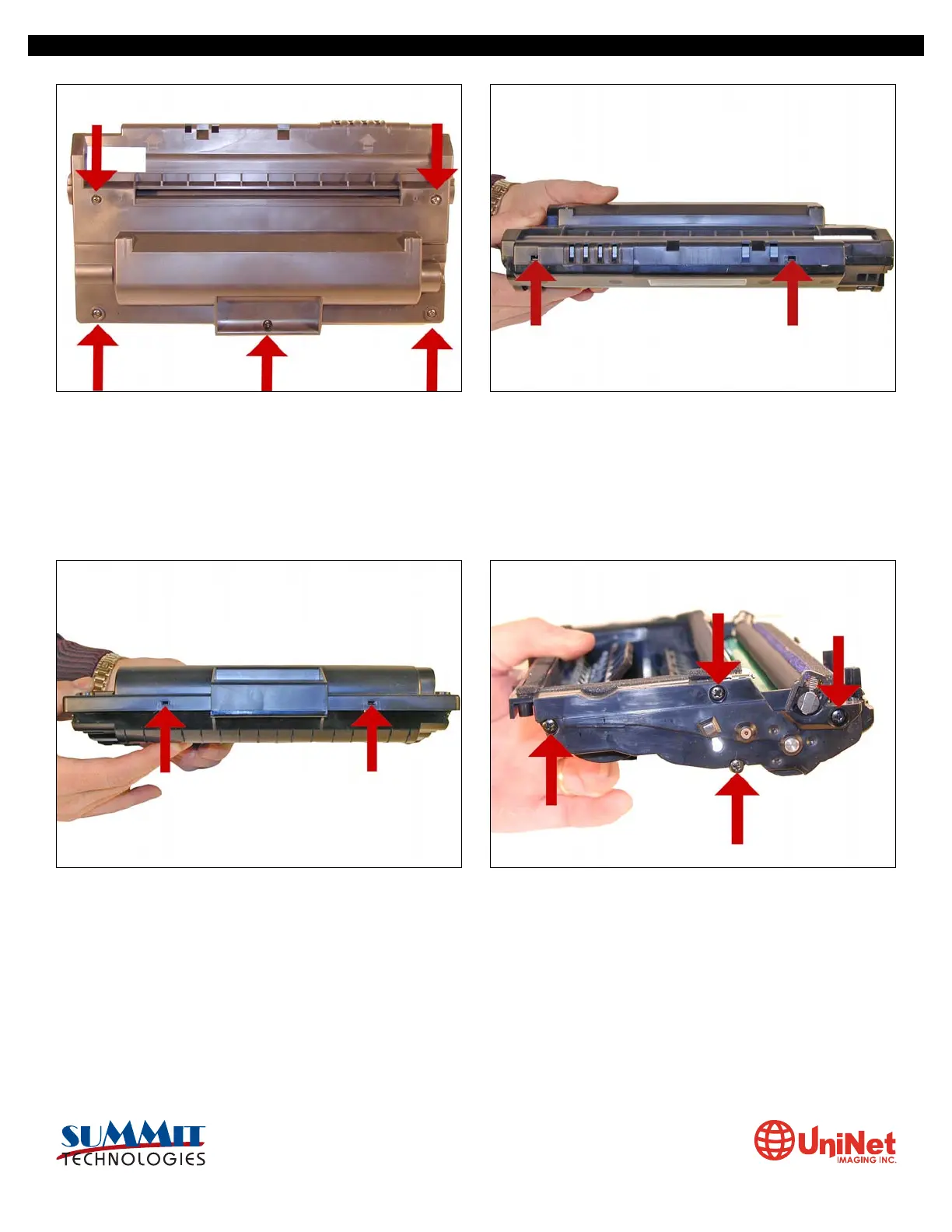
1. Place the cartridge with the handle facing up. Remove the
five top cover screws.
2. On the front edge of the cartridge, there are two tabs. Press
these two tabs in, and lift the front edge of the cover up.
3. Next to the handle of the cartridge to the right and left, there
are two more plastic tabs. GENTLY press them in, and remove
the cover.
CAUTION: The upper half of the toner hopper is being removed.
If there is a lot of toner left in the hopper, it can dump out all
over! Vacuum the hopper clean.
4. With the toner hopper away from you, remove the four
screws on the left side end cap. Remove the end cap.
SAMSUNG ML 2250 • CARTRIDGE REMANUFACTURING INSTRUCTIONS
3232 West El Segundo Blvd., Hawthorne, California 90250 USA • Ph +1 424 675 3300 • Fx +1 424 675 3400 • techsupport@uninetimaging.com • www.uninetimaging.com
© 2009 UniNet Imaging Inc. All trademark names and artwork are property of their respective owners. Product brand names mentioned are intended to show compatibility only. UniNet Imaging does not warrant downloaded information.













 To Next Page