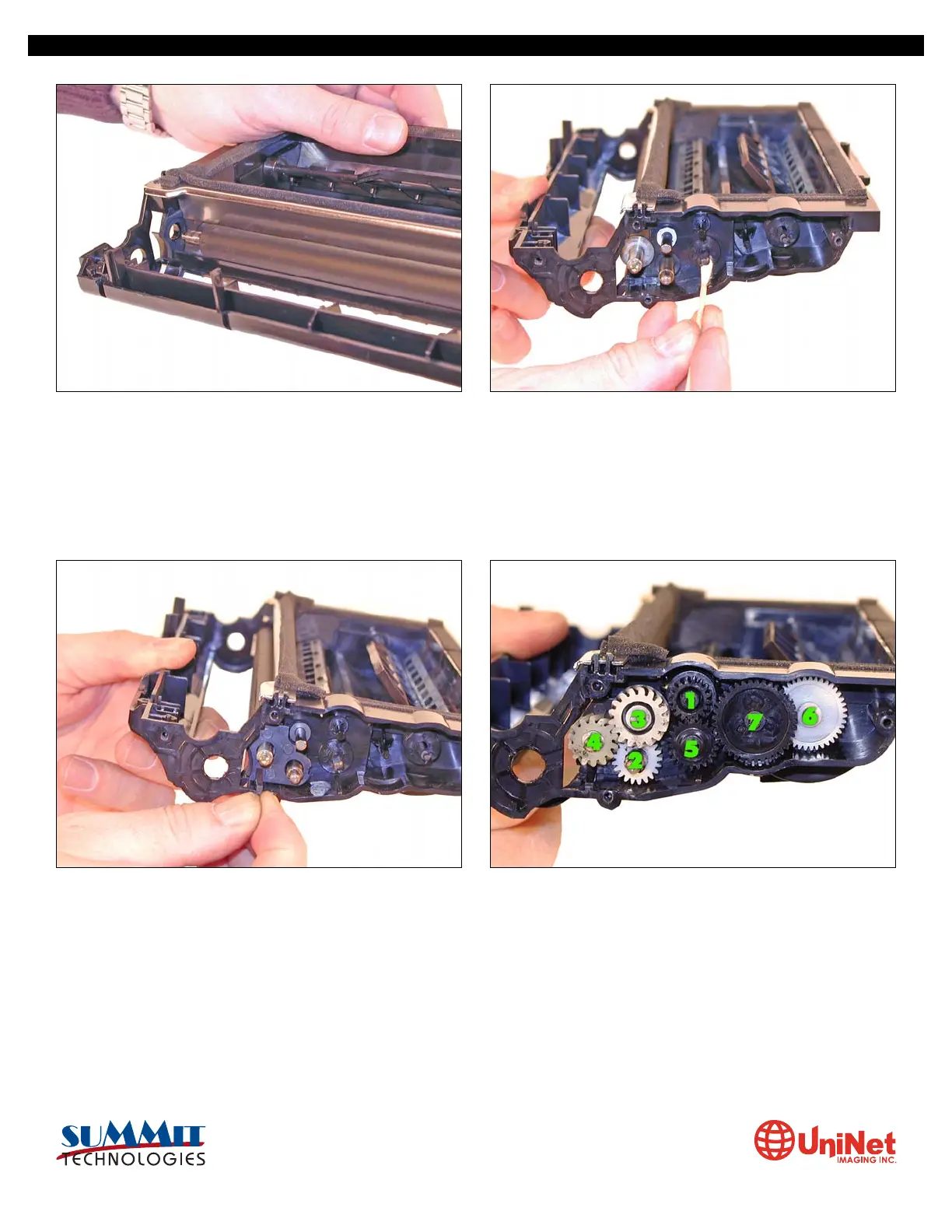
15. Replace the developer roller, and flat washers. 16. If no grease is left on the gears and gear shafts, or it is
contaminated with toner clean it all off. Replace it with white
lithium grease. Be sure to clean and grease the gear shafts,
and inside the gear.
17. Install the roller plate. Make sure the tab is locked in place. 18. Replace the roller plate and seven gears. Look carefully at
the picture of the gears. Each gear must fit in this exact way.
The gears labeled in order of installation.
SAMSUNG ML 2250 • CARTRIDGE REMANUFACTURING INSTRUCTIONS
3232 West El Segundo Blvd., Hawthorne, California 90250 USA • Ph +1 424 675 3300 • Fx +1 424 675 3400 • techsupport@uninetimaging.com • www.uninetimaging.com
© 2009 UniNet Imaging Inc. All trademark names and artwork are property of their respective owners. Product brand names mentioned are intended to show compatibility only. UniNet Imaging does not warrant downloaded information.


 To Next Page
 Loading...










