EasyManua.ls Logo

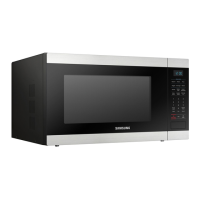
Samsung MS32DG4504A Series - User Manual

Samsung MS32DG4504A Series
28 pages
Print Icon
To Next Page IconTo Next Page
Loading...
Microwave Oven
User manual
MS32DG4504A***
User_MS32DG4504ATTC_DE68-04755K-00_EN.indd 1User_MS32DG4504ATTC_DE68-04755K-00_EN.indd 1 2/7/2024 3:27:27 PM2/7/2024 3:27:27 PM

Questions and Answers

  • E
    Eric MartinezAug 3, 2025
    Why can't I press the buttons on my Samsung MS32DG4504A Microwave Oven?
    • J
      Julie HallAug 3, 2025
      If the buttons on your Samsung Microwave Oven aren't pressing properly, there might be foreign matter stuck between them; remove it. For touch models, wipe any moisture from the exterior. Also, check if the Child lock is activated and deactivate it if necessary.
  • S
    Shelia PughAug 7, 2025
    Why is the time not displayed on my Samsung MS32DG4504A?
    • M
      Megan RiosAug 7, 2025
      If the time is not displayed on your Samsung Microwave Oven, it is possible that the Eco (power-saving) function is activated. To restore the display, turn off the Eco function.
  • M
    Matthew NavarroAug 11, 2025
    Why Samsung MS32DG4504A Microwave Oven is not working?
    • A
      Allen HughesAug 11, 2025
      If your Samsung Microwave Oven isn't working, first ensure that it's properly connected to a power source. Also, make sure the door is fully closed. If there's any debris or foreign material obstructing the door's safety mechanisms, remove it and try again.
  • A
    Aaron WillisAug 16, 2025
    Why does my Samsung MS32DG4504A power off during operation?
    • M
      martinezsamuelAug 16, 2025
      The power of your Samsung Microwave Oven may turn off during operation due to several reasons. It could be due to extended cooking time, so allow the oven to cool down. Check if the cooling fan is working, ensure there's food inside during operation, and verify sufficient ventilation space around the oven. Also, make sure the oven is connected to a dedicated socket.
  • W
    walshbenjaminAug 20, 2025
    Why is my Samsung Microwave Oven exterior too hot?
    • A
      Aaron GarciaAug 20, 2025
      If the exterior of your Samsung Microwave Oven gets too hot during operation, ensure there is enough ventilation space around it, as there are intake/exhaust outlets on the front and rear. Also, remove any objects placed on top of the oven.
  • E
    emilyparkerAug 25, 2025
    What to do if my Samsung MS32DG4504A Microwave Oven stops in the middle of cooking?
    • D
      Dakota DavisAug 25, 2025
      If your Samsung Microwave Oven unexpectedly stops during operation, it might be because the door was opened to turn food over. To resume, simply press the Start/+30s button again.
  • R
    rebekahdavisAug 29, 2025
    What to do if my Samsung MS32DG4504A makes a popping sound and doesn't work?
    • D
      donnadavisAug 29, 2025
      A popping sound during operation of your Samsung Microwave Oven that is not working could be caused by cooking sealed food or using a container with a lid. Avoid using sealed containers, as they may burst due to expansion of the contents.

Summary

Safety Instructions

Important Safety Instructions

Key safety warnings and precautions for using the microwave oven safely and correctly.

General Safety

General guidelines for installation, operation, and maintenance to ensure safe usage.

Microwave Warning

Specific warnings about microwave heating, especially regarding beverage boiling and first aid.

Microwave Oven Precautions

Precautions for using microwave-safe utensils and avoiding hazards like arcing or overheating.

Limited Warranty

Details on what the Samsung warranty covers and what is excluded for repairs and accessories.

Grounding Method

Instructions on how to properly ground the microwave oven to prevent electrical hazards.

Installation

Accessories

Description of accessories provided with the microwave oven, like roller ring and turntable.

Installation Site

Guidelines for choosing a suitable and safe location for the microwave oven, including ventilation.

Turntable

Instructions on installing and checking the turntable for proper rotation.

Maintenance

Cleaning

Procedures for cleaning the oven interior, door, and turntable to prevent impurities and odors.

Replacement (Repair)

Information on when to contact a qualified technician for repairs, as parts are not user-removable.

Care Against an Extended Period of Disuse

Recommendations for storing the oven when not in use for extended periods to prevent dust and moisture damage.

Oven Features

Oven

Diagram showing the different parts of the microwave oven interior.

Control Panel

Diagram and list of buttons and functions on the microwave's control panel.

Oven Use

How a Microwave Oven Works

Explanation of how microwaves cook food and the basic principles of operation.

Checking That Your Oven Is Operating Correctly

A simple procedure to test if the microwave oven is functioning correctly using water.

Setting the Time

Instructions on how to set the current time on the microwave oven's display.

Cooking;Reheating

Step-by-step guide on how to cook or reheat food using the microwave function.

Power Levels and Time Variations

Explanation of how power levels affect cooking time and a table of power settings.

Adjusting the Cooking Time

How to increase or decrease the cooking time using the Dial Knob or Start/+30s button.

Stopping the Cooking

Methods to temporarily or completely stop the cooking process and how to resume it.

Setting the Energy Save Mode

How to activate and deactivate the energy-saving mode on the oven.

Using the Home Dessert Features

Guide to using 10 pre-programmed settings for desserts without manual time/power adjustment.

Using the Auto Cook Features

Guide to 18 pre-programmed cooking times for various foods, adjustable by serving size.

Using the Power Defrost Features

How to use programmed settings to automatically defrost meat, poultry, fish, bread, and cake.

Using the Keep Warm Features

Function to keep food hot until served, with a maximum time of 99 minutes.

Using the Deodorization Features

How to use the deodorization function to remove odors or smoke from the oven interior.

Using the Lock (3 sec) Features

Instructions for activating and deactivating the child lock feature to prevent accidental operation.

Using the Favorite Features

How to store and recall up to two custom cooking programs for frequent use.

Using the Favorite Setting

Step-by-step guide to saving and recalling favorite cooking settings.

Switching the Beeper Off

How to turn the oven's beeper sound on or off using a key combination.

Cookware Guide

Troubleshooting and Information Code

Troubleshooting

A table listing common problems, their causes, and recommended actions for resolution.

Technical Specifications

Detailed specifications of the microwave oven, including model, power, dimensions, and weight.

Samsung MS32DG4504A Series Specifications

General IconGeneral
BrandSamsung
ModelMS32DG4504A Series
CategoryMicrowave Oven
LanguageEnglish

Related product manuals