EasyManua.ls Logo

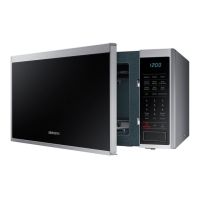
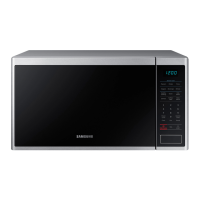
Samsung MS32J5133B series - User Manual

Samsung MS32J5133B series
64 pages
Print Icon
To Next Page IconTo Next Page
Loading...
Microwave
oven
MS32J5133B*/MS40J5133B*
User manual
MS32J5133BT_SA_DE68-04325B-00_EN.indd 1 2015-02-06 �� 11:08:45

Questions and Answers

  • M
    Mary EdwardsSep 9, 2025
    Why are there water drips and steam emitting from my Samsung MS32J5133B?
    • J
      Joshua TaylorSep 9, 2025
      It is normal to observe water drips, steam emitting through a door crack, or water remaining in the oven, depending on the food being cooked. This is not an oven malfunction. Let the oven cool and then wipe it with a dry dish towel.
  • S
    stevenreynoldsAug 25, 2025
    Why does my Samsung Microwave Oven stop while in operation?
    • J
      Jessica MorrisonAug 25, 2025
      If your Samsung Microwave Oven stops mid-operation, it's likely because the door was opened to turn the food. Simply press the Start button again to resume cooking.
  • S
    Stephanie SmithAug 25, 2025
    Why does the power turn off during Samsung MS32J5133B operation?
    • J
      Justin NguyenAug 26, 2025
      If your Samsung Microwave Oven power turns off during operation, it could be due to several reasons. First, if the oven has been cooking for a long time, allow it to cool down. Ensure the cooling fan is working. Make sure there is food inside the oven while operating. Check that the oven has sufficient ventilation space, maintaining the gaps specified in the installation guide. Avoid using multiple power plugs in the same socket; dedicate one socket solely for the oven.
  • S
    stevengillSep 23, 2025
    Why does the turntable come out of place in my Samsung MS32J5133B Microwave Oven?
    • G
      garciaheatherSep 23, 2025
      If the turntable in your Samsung Microwave Oven comes out of place or stops turning, check if the roller ring is missing or not properly installed. Install the roller ring correctly and try again.
  • H
    Hailey BarrySep 10, 2025
    Why does the brightness inside my Samsung MS32J5133B Microwave Oven vary?
    • A
      amy02Sep 10, 2025
      The brightness inside your Samsung Microwave Oven varies because it changes depending on power output changes according to function. This is normal and not a malfunction.
  • A
    Alvin NelsonSep 14, 2025
    What to do if there are sparks during cooking in my Samsung Microwave Oven?
    • C
      Cynthia TurnerSep 14, 2025
      If you see sparks during cooking in your Samsung Microwave Oven, it's likely due to the use of metal containers during the oven/thawing functions. Do not use metal containers.
  • M
    Michael RodriguezSep 4, 2025
    What to do if the warm function does not work in Samsung MS32J5133B Microwave Oven?
    • M
      Michelle StoneSep 4, 2025
      If the warm function is not working in your Samsung Microwave Oven, it could be due to the oven not working correctly, cooking too much food at once, or using improper cookware. To check if the oven is working, place one cup of water in a microwave-safe container and run the microwave for 1-2 minutes to see if the water heats up. If not, reduce the amount of food you're cooking and try again. Also, ensure you're using a cooking container with a flat bottom.
  • R
    Ryan ChapmanSep 4, 2025
    Why Samsung MS32J5133B Microwave Oven immediately starts to work when power is connected?
    • V
      Victoria HansonSep 5, 2025
      If your Samsung Microwave Oven starts immediately when you connect the power, it indicates that the door is not properly closed. Ensure the door is fully closed and check again.
  • S
    Sarah TylerSep 23, 2025
    What to do when cooking sensor is needed to check on Samsung Microwave Oven?
    • B
      blackrebeccaSep 23, 2025
      Press the Stop/Cancel button and operate again. If it occurs again, turn off the microwave oven over 30 seconds and try setting again. If it appears again, call your local SAMSUNG Customer Care Centre.
  • K
    Kelly PerezAug 29, 2025
    What to do if my Samsung MS32J5133B door cannot be opened properly?
    • R
      Roberto MartinAug 30, 2025
      If the door of your Samsung Microwave Oven cannot be opened properly, it may be because food residue is stuck between the door and the oven interior. Clean the oven to remove any residue, and then try opening the door again.

Summary

Safety instructions

Microwave function safety

Safety precautions specific to microwave function use.

General safety precautions

General safety guidelines for operating the appliance.

Microwave energy exposure precautions

Steps to prevent excessive microwave energy exposure.

Installation

Installation site requirements

Guidelines for selecting a suitable location to install the oven.

Maintenance

Cleaning the oven

Procedures for cleaning the interior and exterior of the oven.

Operations

Simple cooking steps

Basic instructions for cooking food and defrosting frozen food.

Manual microwave operation

How to use the oven manually for cooking with power level adjustments.

Sensor cook functions

Using automatic cooking based on food's moisture detection.

Auto cook programs

Utilizing pre-programmed recipes for various food types.

Auto reheat guide

Reheating leftover or precooked food using automatic settings.

Cooking Smart

Troubleshooting

Checkpoints for common issues

Table of common problems, their causes, and recommended actions.

Information codes

Explanations and actions for error codes displayed by the oven.

Samsung MS32J5133B series Specifications

General IconGeneral
BrandSamsung
ModelMS32J5133B series
CategoryMicrowave Oven
LanguageEnglish

Related product manuals