Need help?
Do you have a question about the Samsung MX-ST40B and is the answer not in the manual?
General warnings to reduce risk of electric shock and hazards.
Precautions regarding fire, electric shock, moisture, and chemicals.
Advice on avoiding water, liquids, and ensuring plug accessibility.
Supplier's Declaration of Conformity and FCC compliance statement.
Precautions, exposure limits, and compliance for FCC regulations.
Equipment tested and found to comply with limits for Class B digital devices.
Perchlorate warning applicable to primary Lithium coin cells in California.
Warning regarding chemicals known to cause cancer and reproductive harm.
Essential instructions for safe operation and maintenance of the product.
How dropping or mechanical shock can affect waterproof performance.
Avoid water pressure and hot air/water to maintain unit integrity.
Ensure port covers are closed properly to maintain waterproof and dustproof performance.
Ensure proper power supply, ventilation, and avoid extreme environments.
Unplug during thunderstorms, handle batteries properly, and follow disposal guidelines.
Avoid extreme temperatures and understand their effects on charging and volume.
Charge battery fully every 6 months to maintain performance during long non-use.
Provides safety instructions, installation, components, connections, and specifications.
Access detailed manual online via QR code or Samsung website for downloads.
Troubleshooting steps for power-on issues and non-working functions.
Solutions for sound dropouts, no sound, and Bluetooth connection problems.
Troubleshooting steps for remote control and Group connection failures.
Information on Bluetooth word mark and logos, and their ownership.
Information on Qualcomm aptX product and trademarks.
Information on how to contact Samsung regarding open source licenses.
Note that manual figures may differ from actual product appearance.
Conditions for fees and recommendations for troubleshooting before service.
Detailed specifications of the MX-ST40B model, including dimensions, power, and battery.
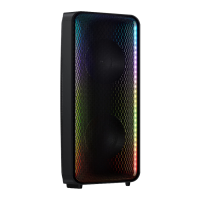
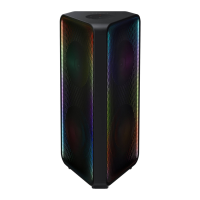
Identifies the main unit and details the remote control and batteries.
Information about the power cord and how to insert remote batteries.
Overview of the controls and indicators on the top panel of the Sound Tower.
Explanation of Bluetooth pairing and adding stereo functions.
Description of GROUP PLAY OUT, AUX2/GROUP PLAY IN terminals, and AUX1 jack.
Description of the power connection port for supplying electrical power.
Instructions on how to connect the Sound Tower to an electrical outlet.
Guide on setting up Group Play using audio cables for wired connection.
Steps to connect multiple Sound Towers wirelessly in a group.
How music is played from the HOST system to all connected units.
Important notes on TV connection, environmental factors, and error indicators.
Procedures to disconnect wireless Group Play mode.
Explanation of LED states for wireless Group Play connection status.
Steps to connect two Sound Towers for stereo sound via smartphone.
How to play music from a connected smartphone in Stereo Group mode.
Notes for Stereo Group mode, including compatibility and error indicators.
Connecting two Sound Towers for stereo sound with a Samsung TV.
How to connect the Sound Tower to a Samsung TV via Bluetooth.
Notes on TV connection, party mode, and app connectivity.
Procedure to terminate the Stereo Group mode.
Explanation of LED states for Stereo Group connection status.
Instructions for connecting external devices using analog audio cables.
Connecting AUX1 and AUX2 inputs to source device audio outputs.
Steps for the initial Bluetooth connection between a mobile device and the Sound Tower.
Steps to resolve issues with establishing a Bluetooth connection.
Clarification of BT READY vs. BT PAIRING modes.
Instructions for connecting two Bluetooth devices simultaneously.
How music is played from one of the connected Bluetooth devices.
Important notes on multi-connection, PIN codes, auto-off, and interference.
Explanation of LED states for BT PAIRING and BT READY modes.
Enabling the Bluetooth Power On function via the BASS button.
Connecting a smart device to turn on the Sound Tower via Bluetooth.
Using "SEARCHING TV" mode for easy connection with Samsung TV.
How the connection popup appears on the TV and related notes.
Notes on search mode timeout, multi-connection, party mode, and app connectivity.
Connecting a USB device and selecting it as the source.
Playing music files from the connected USB storage device.
Information on how to update the Sound Tower's system firmware via USB.
Functions of the Power, Light, and Source buttons.
How to perform Bluetooth pairing and select USB/AUX sources.
How to change sound effects and music tempo using the remote.
How to use DJ effects, adjust levels, and navigate USB folders.
How to adjust volume, skip tracks, pause, mute, and repeat playback.
How to activate the powerful bass sound feature.
Troubleshooting steps for power-on issues and non-working functions.
Solutions for sound dropouts, no sound, and Bluetooth connection problems.
Troubleshooting steps for remote control and Group connection failures.
How to disable the Auto Power Down function for AUX modes.
Procedure to reconnect a SUB after the HOST has blocked further additions.
Recommended distances for wireless/wired connections and pairing.
Information on Bluetooth word mark and logos, and their ownership.
Information on Qualcomm aptX product and trademarks.
Details on ENERGY STAR qualification and power consumption changes.
Information on how to contact Samsung regarding open source licenses.
Note that manual figures may differ from actual product appearance.
Conditions for fees and recommendations for troubleshooting before service.
Detailed specifications of the MX-ST40B model, including dimensions, power, and battery.
Explanation of symbols and guidance on correct disposal and recycling.
Precautions for battery handling, exposure to heat/cold, and cell leakage.
Details the limited warranty period and procedures for obtaining service.
List of conditions not covered and limitations on Samsung's liability.
 General
| Speaker type | - |
|---|---|
| Speaker placement | Floor |
| Audio output channels | 2.0 channels |
| 3.5 mm connector | Yes |
| Connectivity technology | Wired & Wireless |
| RMS rated power | 160 W |
| Audio formats supported | AAC, MP3, WAV, FLAC |
| Power source type | AC, Battery |
| Power consumption (standby) | 0.5 W |
| Product color | Black |
| Recommended usage | Universal |
| International Protection (IP) code | IPX5 |
| Sustainability certificates | ENERGY STAR |
 Weight and Dimensions
| Depth | 256 mm |
|---|---|
| Width | 281 mm |
| Height | 562 mm |
| Weight | 8000 g |


 To Next Page